MCP server · Research
FreightUtils MCP server
by SoapyRED
Look up freight rules and run shipping calculations, like ADR, HS codes, CBM and duty, right in your chat.
FreightUtils is a helper for people who work with shipping, customs or dangerous goods. It gives your AI a set of freight reference tools, so you can ask plain questions and get answers with the source attached. It is handy if you plan loads, prepare paperwork or check codes, and you would rather not open five different websites.
What is an MCP server? The 30-second version
On its own, your AI can only chat with you. An MCP server is a small helper program that gives your AI a new skill or a connection to a service. This one connects your AI to FreightUtils, a freight reference service, so it can look up ADR entries, HS codes, ports, airlines and run freight calculations for you. You just ask in normal words, and the AI calls the right tool behind the scenes.
What this MCP server does
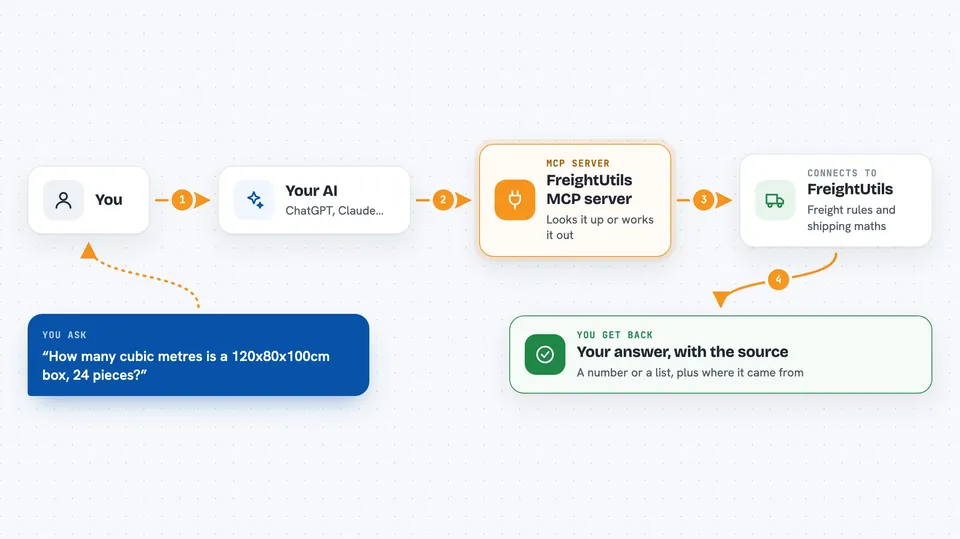
You ask your AI something like how many cubic metres a box takes, or what UN 1203 means. The AI sends that question to this FreightUtils helper. The helper looks it up in its freight data, such as ADR 2025, HS 2022 or UN/LOCODE, or runs the calculation. Then it sends the answer back, with the source noted, and your AI shows it to you in the chat.
 Click to zoom
What you can do with it
- Calculate CBM, LDM, chargeable weight and pallet fitting
- Look up ADR dangerous goods entries and small load exemptions
- Find HS codes, Incoterms and UK import duty and VAT
- Resolve freight identifiers like UN numbers, port codes and airline prefixes
- Check container, AWB and IMO numbers in a block of text
- Estimate freight CO2e using DEFRA, EPA and ADEME factors
- Get a combined shipment summary in one call
Try asking your AI
- “Calculate CBM for a box 120cm x 80cm x 100cm, 24 pieces”
- “Look up UN 1203 in the ADR database”
- “Find the HS code for lithium batteries”
- “What's the UK import duty on laptops from China?”
What it gives back to you
You get a clear answer in the chat, like a number, a list of matching entries, or a short summary. Each answer comes with a source block naming the authority and edition, so you can check where it came from. Some tools also add warnings or a note when a human should review the result. Calculations come back as figures, and lookups come back as ranked, cited candidates.
Before you start
What you need
- An MCP client like Claude Desktop, Claude Code, Cursor or Cline
- Node.js 18 or newer if you run it with npx
- Nothing else to start: anonymous use works, capped at 25 requests a day per IP
- Optional: a free or Pro FreightUtils API key for higher limits
Good to know
It is a reference only: it never files, books or gives legal advice, and some results note that a human should review them.
Install it with your AI
Add FreightUtils MCP server to your AI, no technical skills needed
You don't install anything by hand. You copy one prompt, paste it into an AI that can work on your computer, and it checks, installs and connects the server for you, asking you when it needs something.
Sign in to get the install prompt
Members get a ready-made prompt that lets the Claude desktop app check FreightUtils MCP server, install it and connect it for them, step by step. You don't need any technical skills: you copy, paste and answer a few questions. Your connected AI can also find and install any of the 4,361 MCP servers here for you.
Who it's for
Freight forwarders, transport planners, customs and shipping admins, and anyone who checks ADR, HS codes or freight calculations at work.