
MCP server · Research
SPARKIT MCP server
Ask your AI a science question and get back a cited research report from SPARKIT.
SPARKIT is a scientific research helper. This small add-on lets your AI assistant send your science questions to SPARKIT, which searches the literature, reads the papers, and writes a report with citations. It is handy if you need quick, sourced answers to research questions without digging through papers yourself.
What is an MCP server? The 30-second version
On its own, your AI can only chat with you using what it already knows. An MCP server is a small helper program that gives your AI a new skill or a connection to another service. This one connects your AI to SPARKIT, a scientific research agent. When you ask a question, your AI passes it to SPARKIT through this helper, and SPARKIT does the literature search and paper reading for you.
What this MCP server does
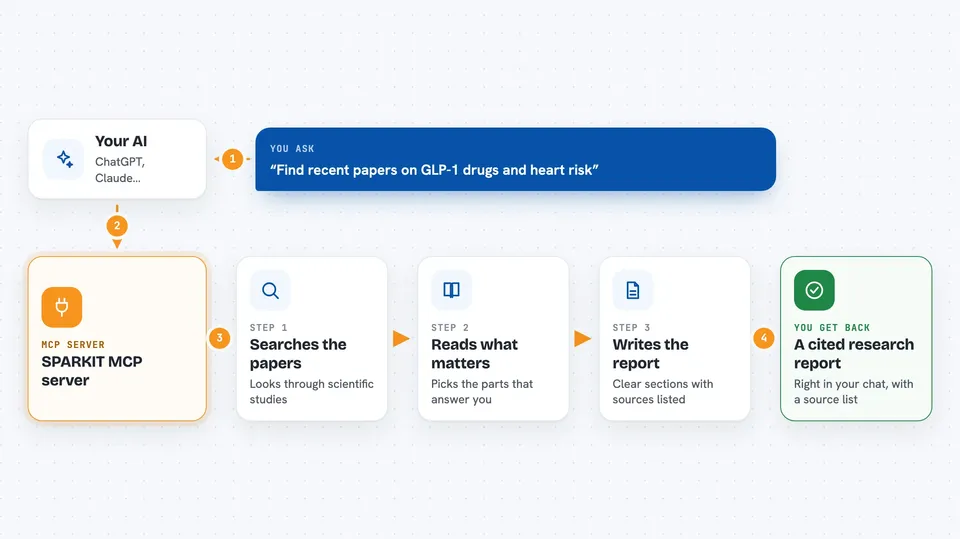
You ask your AI a science question in normal words. Your AI sends that question to SPARKIT using this helper. SPARKIT searches the scientific literature, reads the relevant papers, and writes a Markdown report with citations. If the report is not ready within a few minutes, your AI can check back later using a job id. You end up with a sourced answer right in your chat.
 Click to zoom
What you can do with it
- Ask a scientific question and get a cited report
- Get a short brief or a full-length report
- Check on a research job that is still running
- Revisit a past report by its job id
- Keep or drop the citation list in the report
Try asking your AI
- “Use SPARKIT to look up the most recent literature on the role of WRNIP1 as a synthetic-lethal target in cancer.”
- “Ask SPARKIT for a brief report on the current evidence for GLP-1 drugs and cardiovascular risk.”
- “Use SPARKIT to find papers on CRISPR base editing in plants and summarize them with citations.”
- “Ask SPARKIT for a full report on the link between gut microbiome and Parkinson's disease.”
What it gives back to you
You get a Markdown report written in clear sections, with inline citations and a numbered Sources list at the end. If you chose the brief format, the report is shorter. If the job is still running, you get a status line with a job id so you can ask again later. If something went wrong, you get an error message.
Before you start
What you need
- A SPARKIT account (sign up at app.sparkit.science; the Try-it costs $10 for 5 queries, subscriptions start at $50/mo)
- A SPARKIT API key from app.sparkit.science/keys (shown only once)
- An MCP-compatible app like Claude Desktop, Cursor, or Claude Code
- Python with pip or uv to install the sparkit-mcp package
Good to know
Each research query uses your SPARKIT credits or subscription quota, so keep an eye on how many you run.
Install it with your AI
Add SPARKIT MCP server to your AI, no technical skills needed
You don't install anything by hand. You copy one prompt, paste it into an AI that can work on your computer, and it checks, installs and connects the server for you, asking you when it needs something.
Sign in to get the install prompt
Members get a ready-made prompt that lets the Claude desktop app check SPARKIT MCP server, install it and connect it for them, step by step. You don't need any technical skills: you copy, paste and answer a few questions. Your connected AI can also find and install any of the 4,609 MCP servers here for you.
Who it's for
Researchers, students, analysts, and anyone who needs quick, sourced answers to scientific questions.




