MCP server · API
SpecShield MCP server
by specshield26
Lets your AI check whether an API change is safe to ship before it breaks anyone.
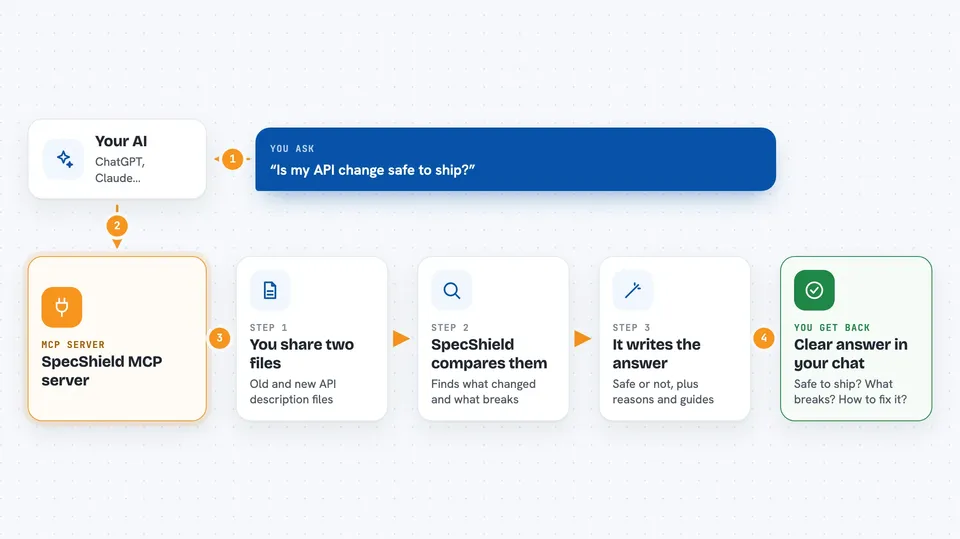
SpecShield is a helper that answers one big question for you: is this API change safe to send out? You give your AI two versions of an API description file, and SpecShield tells you if the change will break the people using it. It is handy if you work with APIs and want a quick second opinion before deploying.
What is an MCP server? The 30-second version
On its own, your AI can only chat with you. An MCP server is a small helper program that gives your AI a new skill or a connection to another service. This one connects your AI to SpecShield, a service that checks API changes. So when you ask your AI whether a change is safe, it quietly asks SpecShield and brings the answer back to you.
What this MCP server does
You paste or point to two versions of an API description file, the old one and the new one. Your AI sends them to SpecShield through this helper. SpecShield compares them and works out what would break for the people using your API. It decides whether the change is safe to deploy, explains any breaking changes, and can even write a migration guide or release notes. You get the answer right in your chat.
 Click to zoom
What you can do with it
- Check whether an API change is safe to deploy
- Explain what breaks and who it affects
- Generate a migration guide for your users
- Write release notes for developers or customers
- Compare two API description files and see the differences
- Run a governance review on a single API description (paid plan)
Try asking your AI
- “Here are my old and new openapi.yaml files. Is it safe to ship this API change to my consumers?”
- “Compare v1.yaml and v2.yaml and tell me if I can deploy, and why not.”
- “Explain the breaking changes between these two specs and how consumers should migrate.”
- “Generate customer-facing release notes for this API change.”
What it gives back to you
You get back a clear answer in the chat: whether the change is safe, a risk level, and the reasons if it is not. It can also give you a list of breaking changes with explanations, a migration guide in markdown, or ready-to-use release notes. Everything is written out for you to read and copy.
Before you start
What you need
- A SpecShield API key (a kind of password; you get one from specshield.io/account)
- Node.js version 20 or newer installed on your computer
- An MCP client like Claude Desktop, Claude Code, or Cursor
Good to know
It only reads and analyzes; it never changes your code, but it does send your API description files to the SpecShield service for analysis.
Install it with your AI
Add SpecShield MCP server to your AI, no technical skills needed
You don't install anything by hand. You copy one prompt, paste it into an AI that can work on your computer, and it checks, installs and connects the server for you, asking you when it needs something.
Sign in to get the install prompt
Members get a ready-made prompt that lets the Claude desktop app check SpecShield MCP server, install it and connect it for them, step by step. You don't need any technical skills: you copy, paste and answer a few questions. Your connected AI can also find and install any of the 4,609 MCP servers here for you.
Who it's for
Developers and teams who manage APIs and want a quick safety check before deploying changes.