
MCP server · Coding
Claude Concilium MCP server
by spyrae
Ask other AI helpers like OpenAI, Gemini or Qwen for a second opinion on your code, right inside Claude.
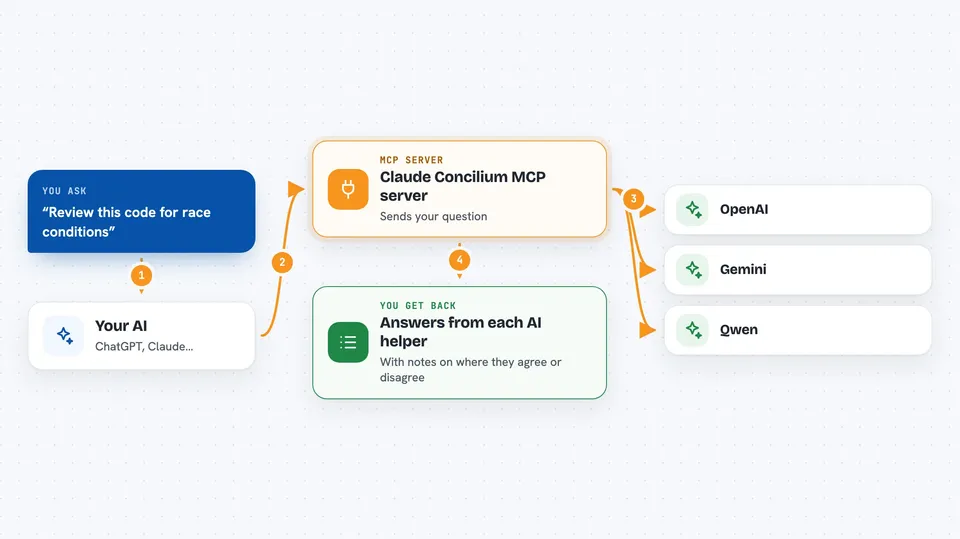
Claude Concilium is a set of small helper programs that let Claude Code ask other AI assistants for their opinion. You use it when you want a second or third view on a tricky piece of code, a design choice, or a bug that Claude alone keeps missing. It is handy for developers and anyone who works with Claude Code on real projects.
What is an MCP server? The 30-second version
On its own, your AI can only chat with you using what it already knows. An MCP server is a small helper program that gives your AI a new skill or a connection to something outside the chat. Here, the helper connects your AI to other AI services, like OpenAI, Google Gemini and Qwen, so your AI can send them a question and bring their answers back to you. You do not need to install anything fancy for the main ones, because they log in through your existing accounts.
What this MCP server does
You ask Claude Code something like review this code for race conditions. Claude then uses these helper programs to send the same question to other AI assistants at the same time. Each helper talks to its own service, like OpenAI or Gemini, through a small tool that is already on your computer. If one service is busy or out of credits, the helper automatically tries another one so you still get an answer. Claude then compares the replies and shows you where they agree or disagree.
 Click to zoom
What you can do with it
- Get a second opinion on a piece of code from OpenAI, Gemini or Qwen
- Run a parallel code review so two AI helpers look at the same file at once
- Break through a stuck bug by asking several AI helpers the same question
- Compare answers from different AI services to spot disagreements
- Fall back to another AI service automatically when one is out of credits
- Use any single helper on its own if you only want one extra opinion
Try asking your AI
- “Review this function for race conditions and edge cases, and ask OpenAI and Gemini for their take.”
- “I have been stuck on this bug for three attempts. Ask all available AI helpers what they think is wrong.”
- “Compare what OpenAI and Gemini say about this database schema and tell me where they disagree.”
- “Ask Gemini to look at this performance problem and suggest improvements.”
What it gives back to you
You get the other AI helpers' answers written out in your Claude chat, usually as short blocks of text you can read and compare. Claude often adds a summary of where the helpers agree and where they do not. If a helper could not answer, you see a short note about what went wrong, like the service being out of credits. You stay in the same chat the whole time.
Before you start
What you need
- Claude Code installed on your computer
- Node.js installed (the free program that runs these helpers)
- At least one account with OpenAI, Google Gemini or Qwen, set up through their own command line tools
- A copy of the Claude Concilium project from GitHub
Good to know
These helpers send your code and questions to other AI services like OpenAI and Google, so do not use them on private or sensitive code unless you are allowed to share it with those services.
Install it with your AI
Add Claude Concilium MCP server to your AI, no technical skills needed
You don't install anything by hand. You copy one prompt, paste it into an AI that can work on your computer, and it checks, installs and connects the server for you, asking you when it needs something.
Sign in to get the install prompt
Members get a ready-made prompt that lets the Claude desktop app check Claude Concilium MCP server, install it and connect it for them, step by step. You don't need any technical skills: you copy, paste and answer a few questions. Your connected AI can also find and install any of the 4,609 MCP servers here for you.
Who it's for
Developers and technical teams who already use Claude Code and want a second opinion from other AI assistants on code, bugs or design choices.



