
MCP server · Research
Documentation Scraper MCP server
by Sriram-PR
Lets your AI download documentation sites into clean local files and search them offline.
This is a small helper program that copies documentation websites onto your own computer as clean text files. It is handy if you often ask your AI about a tool or a library and want it to answer from the real docs instead of guessing. It runs on your machine, so the files stay with you.
What is an MCP server? The 30-second version
On its own, your AI can only chat with you using what it already learned. An MCP server is a small helper program that gives your AI a new skill or a connection to something outside the chat. This one connects your AI to documentation sites that have been saved on your computer. Once it is connected, your AI can look things up in those saved docs and read pages for you when you ask.
What this MCP server does
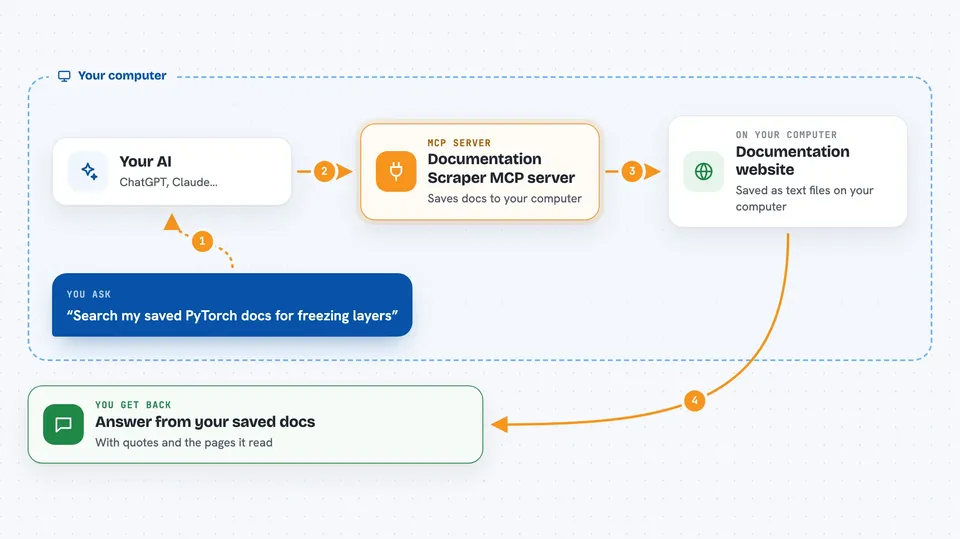
You point the tool at a documentation website and it walks through the pages, one by one, and saves each one as a clean text file on your computer. It keeps the same folder structure as the original site, so things stay easy to find. When you ask your AI a question, the AI uses this helper to search those saved files and pull out the parts that match. You then get an answer based on the real documentation, plus the pages it read. It can also tell you when the saved copy was last refreshed and what changed since the previous crawl.
 Click to zoom
What you can do with it
- Save a whole documentation site to your computer as readable text files
- Search your saved docs offline and get ranked results
- Read a specific documentation page and get its content back
- Check how fresh your saved copy is
- Compare two crawls and see what pages were added, changed, or removed
- Re-crawl a site on a schedule so your copy stays up to date
- Resume a crawl that was interrupted instead of starting over
Try asking your AI
- “Search my saved PyTorch docs for how to freeze layers in a model”
- “Read the page about installation from the docs I crawled yesterday”
- “Is my copy of the Rust CLI book still fresh, or should I re-crawl it?”
- “What changed in the TensorFlow docs since the last crawl?”
What it gives back to you
You get answers in the chat, usually with short quotes or snippets from the pages that matched. For a page read, you get the cleaned text of that page. For a freshness check, you get a simple status and dates. For a diff, you get a list of pages that were added, changed, or removed.
Before you start
What you need
- The doc-scraper program installed on your computer
- Go version 1.26 or newer, if you install it yourself
- A config.yaml file that says which site to crawl
- Your AI app pointed at the doc-scraper MCP server
Good to know
It downloads pages from websites onto your computer, so only crawl sites you are allowed to copy, and be careful with the setting that lets it reach private network addresses.
Install it with your AI
Add Documentation Scraper MCP server to your AI, no technical skills needed
You don't install anything by hand. You copy one prompt, paste it into an AI that can work on your computer, and it checks, installs and connects the server for you, asking you when it needs something.
Sign in to get the install prompt
Members get a ready-made prompt that lets the Claude desktop app check Documentation Scraper MCP server, install it and connect it for them, step by step. You don't need any technical skills: you copy, paste and answer a few questions. Your connected AI can also find and install any of the 4,609 MCP servers here for you.
Who it's for
People who work with technical documentation a lot, like developers, technical writers, support engineers, and anyone who wants their AI to answer from real docs instead of memory.


