MCP server · Research
SEC Filings MCP server
by stagproject
Let your AI search public company filings from SEC EDGAR and preview them for you.
This is a helper that connects your AI to SEC EDGAR, the public database where US companies file their official reports. It lets your AI search those filings and show you a sample of what is inside. It is handy if you look up company reports for work, study, or your own research.
What is an MCP server? The 30-second version
On its own, your AI can only chat with you using what it already learned. An MCP server is a small helper program that gives your AI a new skill or a connection to an app or service. This one connects your AI to SEC EDGAR filings, so when you ask about a company report, the AI can go look it up for you. You do not need to understand how it works under the hood. You just ask, and the AI uses this helper behind the scenes.
What this MCP server does
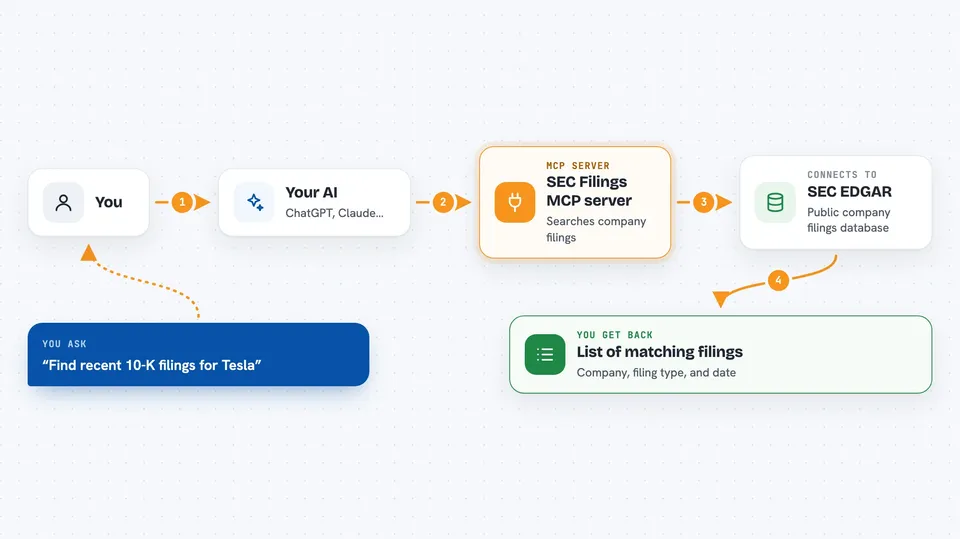
You ask your AI something like "find recent 10-K filings for this company." The AI passes your request to this helper. The helper searches a database of SEC EDGAR filings, which includes 10-K yearly reports and 10-Q quarterly reports. It can also show you a short sample of a filing so you can see what is inside before going further. If you want the full filing, there is a paid step that uses a crypto payment on the Polygon network.
 Click to zoom
What you can do with it
- Search SEC EDGAR 10-K and 10-Q filings
- Preview a short sample of a filing before you commit
- Look up filings for a specific company
- See which filings are available in the catalog
- Buy the full filing as structured data when you need it
Try asking your AI
- “Find recent 10-K filings for Tesla”
- “Show me a sample of the latest 10-Q for Apple”
- “What 10-K filings are available for Microsoft”
- “Search SEC filings for companies in the semiconductor industry”
What it gives back to you
You get back a list of matching filings, usually with the company name, the filing type, and the date. If you ask for a sample, the AI shows you a short preview of the filing content right in the chat. When you buy a full filing, you get the complete structured filing data. Everything appears as text you can read and copy.
Before you start
What you need
- An AI app that supports MCP servers, like Claude Desktop
- For searching and previews: nothing extra, you can try the free sandbox
- For full filings: an xpay account and key, plus USDC on the Polygon network to pay
Good to know
The full filing purchase costs real money in USDC on the Polygon network, so only use it when you actually need the complete filing.
Install it with your AI
Add SEC Filings MCP server to your AI, no technical skills needed
You don't install anything by hand. You copy one prompt, paste it into an AI that can work on your computer, and it checks, installs and connects the server for you, asking you when it needs something.
Sign in to get the install prompt
Members get a ready-made prompt that lets the Claude desktop app check SEC Filings MCP server, install it and connect it for them, step by step. You don't need any technical skills: you copy, paste and answer a few questions. Your connected AI can also find and install any of the 4,361 MCP servers here for you.
Who it's for
Anyone who needs to look up public company reports, like analysts, students, journalists, or small business owners doing research.