MCP server · Developer tools · official
Stacktree MCP server
by stevysmith · official
Publish HTML pages your AI makes to private, unguessable links with passcodes, expiry and feedback.
Stacktree is a service for putting a web page online at a link that is hard to guess. This MCP server lets your AI publish those pages for you, straight from your chat. It is handy if you or your AI make small HTML pages and you want a private link to send to a client or a colleague.
What is an MCP server? The 30-second version
On its own, your AI can only chat. An MCP server is a small helper program that gives your AI a new skill or a connection to an app. This one connects your AI to Stacktree, so when you ask it to publish a page, the AI sends the page to Stacktree and gets a link back. You do not have to touch any code yourself.
What this MCP server does
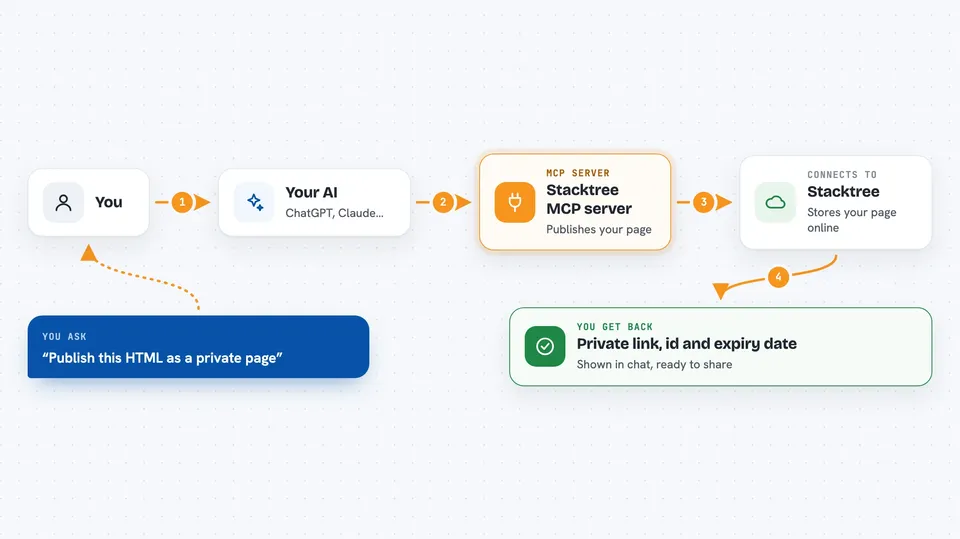
You ask your AI to publish some HTML. The AI uses this helper, which talks to Stacktree over the internet using your Stacktree key. Stacktree stores the page and gives back a private link, plus an id and an expiry date. Later you can ask your AI to update the page in place, so the same link keeps working. You can also ask it to add a passcode, set an expiry, or read comments people left on the page.
 Click to zoom
What you can do with it
- Publish an HTML page and get a private link
- Update an existing page without changing its link
- Add or remove a passcode on a page
- Set the page to expire after a number of hours, or never
- Restrict viewers to one email domain
- Read and resolve comments people left on the page
- Delete a page, or restore it within 30 days
Try asking your AI
- “Publish this HTML as a private page and give me the link”
- “Add a passcode to that page and tell me what it is”
- “Set the page to expire in 48 hours”
- “Show me the comments people left on that page”
What it gives back to you
You get back a link, an id, and an expiry date, shown right in the chat. When you list your pages, you get a list with their links and details. When you read comments, you get each one with a short note about what it is on and whether it is still on the page. When you update a page, the reply tells you which open comments no longer match the new version.
Before you start
What you need
- A Stacktree account (free plan available)
- A Stacktree API key, generated at app.stacktr.ee
- An MCP client such as Claude Desktop, Claude Code, Cursor or Continue
Good to know
Deleting a page kills its link at once, and the free plan only allows 3 pages in total, so check before you publish or delete.
Install it with your AI
Add Stacktree MCP server to your AI, no technical skills needed
You don't install anything by hand. You copy one prompt, paste it into an AI that can work on your computer, and it checks, installs and connects the server for you, asking you when it needs something.
Sign in to get the install prompt
Members get a ready-made prompt that lets the Claude desktop app check Stacktree MCP server, install it and connect it for them, step by step. You don't need any technical skills: you copy, paste and answer a few questions. Your connected AI can also find and install any of the 4,066 MCP servers here for you.
Who it's for
People who make small HTML pages with an AI and want a private link to share, such as freelancers, designers and consultants sending work to clients.