
MCP server · Developer tools
memex MCP server
by STiFLeR7
Lets your AI remember your codebase's structure, decisions and open problems across sessions.
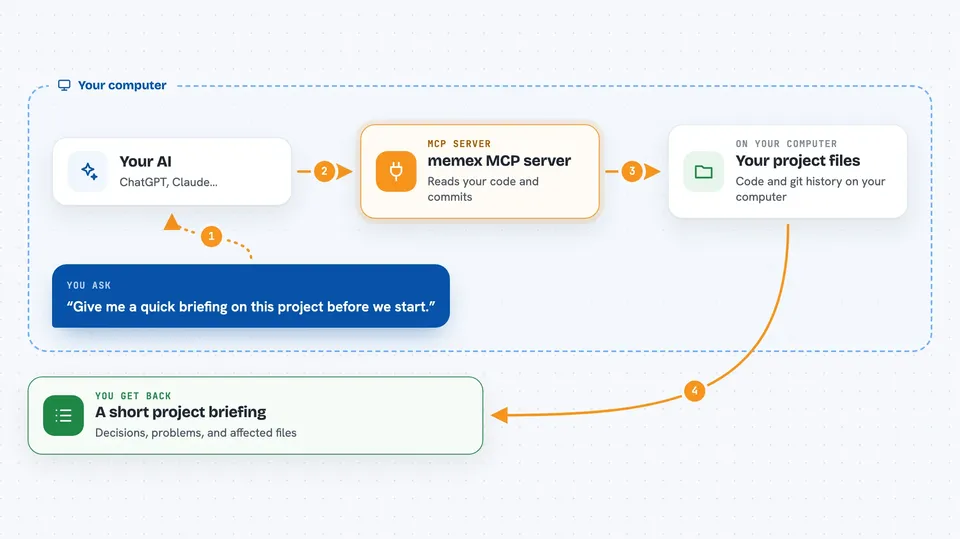
memex is a helper that watches your code repository and quietly builds a memory of it: which files and functions exist, what decisions were made, and what problems are still open. It then hands that memory to your AI coding assistant when you ask it something. It is handy if you work on a project for weeks or months and use AI assistants like Claude Code, Cursor, Codex or Gemini CLI.
What is an MCP server? The 30-second version
On its own, your AI can only chat with what is in front of it right now. An MCP server is a small helper program that gives your AI a new skill or a connection to something outside the chat. This one connects your AI to a memory of your repository, built from your files and your git history. So when you ask about a function or a past decision, the AI can look it up in that memory instead of guessing.
What this MCP server does
You run memex once on your project, and it reads your files and your git history to build a map of your code. From then on, it keeps watching: every time you commit, it updates that map with new symbols, new decisions and new problems. When you ask your AI something, the AI asks memex for the relevant slice of that map. memex answers with a short, ranked summary, and your AI uses it to reply to you. Everything stays on your machine, except the commit summaries, which are sent to Google's Gemini service.
 Click to zoom
What you can do with it
- Get a short briefing about your project at the start of a session
- Look up who calls a function and what decisions are linked to it
- See the architectural decisions made in the last few days
- List open bugs and tech debt, sorted by severity
- Search your project memory by meaning or keyword
- Ask what a specific commit changed and why
- Record a new decision or problem so your AI remembers it later
Try asking your AI
- “Give me a quick briefing on this project before we start.”
- “What decisions did we make about the payment module last month?”
- “Which files are likely affected if I change this file?”
- “Are there any open problems in the auth module?”
- “Explain what commit a1b2c3d changed and why.”
What it gives back to you
You get short, ranked summaries in your chat: lists of modules, functions, decisions or problems, each with a note about how fresh and how trustworthy it is. Some answers come with a plain explanation of a change or a ranked list of files that might be affected. It also keeps a small local record of how many tokens it saved you, which you can check with a command.
Before you start
What you need
- Docker installed and running (for the Neo4j database that stores the memory)
- A Gemini API key from Google (a kind of password for apps; Google gives you one for free)
- Node.js 18 or newer, if you use the npx install route
- An AI coding assistant that supports MCP, such as Claude Code, Cursor, Codex or Gemini CLI
Good to know
Your AI can add and change entries in the memory, and commit summaries are sent to Google's Gemini service, so keep private code and secrets out of what you commit if that matters to you.
Install it with your AI
Add memex MCP server to your AI, no technical skills needed
You don't install anything by hand. You copy one prompt, paste it into an AI that can work on your computer, and it checks, installs and connects the server for you, asking you when it needs something.
Sign in to get the install prompt
Members get a ready-made prompt that lets the Claude desktop app check memex MCP server, install it and connect it for them, step by step. You don't need any technical skills: you copy, paste and answer a few questions. Your connected AI can also find and install any of the 4,361 MCP servers here for you.
Who it's for
Developers and technical teams who work on the same codebase for weeks or months and use AI coding assistants across many sessions.


