
MCP server · Analytics
Gizmo Analytics MCP server
by sudomichael
Ask your AI about your website traffic and let it set up tracking for new sites.
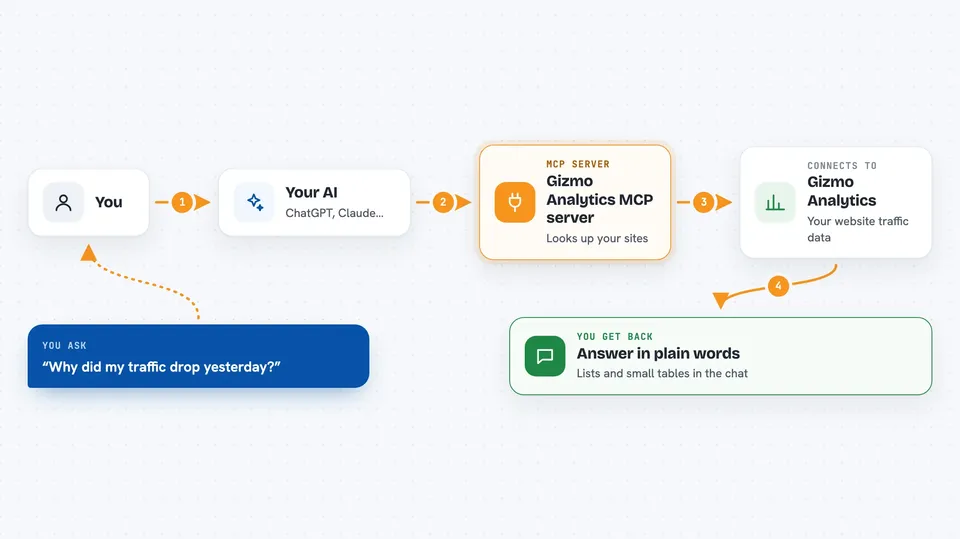
This is a helper for Gizmo Analytics, a website traffic tool that does not use cookies. Once you connect it, you can ask your AI plain questions about your sites and it will look up the numbers for you. It is handy if you run one or more websites and want quick answers without clicking around a dashboard.
What is an MCP server? The 30-second version
On its own, your AI can only chat with you. An MCP server is a small helper that gives your AI a new skill or a connection to an app. This one connects your AI to Gizmo Analytics, so when you ask about your traffic, the AI can go and fetch the real numbers. You do not install anything on your computer; you just point your AI tool at a web address.
What this MCP server does
You ask your AI a question about your websites, like why traffic dropped. The AI sends that question to this helper at Gizmo Analytics. The helper looks up your sites, pages, visitors and events, and works out the answer. Then the AI writes it back to you in the chat in normal words. For new sites, it can also create the site and give you the tracking code to paste in.
 Click to zoom
What you can do with it
- Ask why your traffic changed on a certain day
- See which of your sites is growing fastest
- Add a new site and get the tracking code to install
- Check whether the tracking script is actually loading
- List your top pages from a chosen country or time range
- Break visitors down by device, browser or channel
- Spot unusual spikes or drops in your traffic
Try asking your AI
- “Why did traffic drop yesterday?”
- “Which of my sites is growing fastest?”
- “Add foo.com to Gizmo and install the tracker”
- “Top pages from Germany last quarter”
What it gives back to you
You get answers in plain sentences, plus lists and small tables in the chat. For example, a ranked list of your sites by growth, or a breakdown of visitors by country. When it sets up a new site, it hands you the tracking code and tells you which file to paste it into. It can also confirm whether the script is loading on your homepage.
Before you start
What you need
- A Gizmo Analytics account
- An admin key from your Gizmo dashboard (a kind of password for apps; the site gives you one)
- An AI tool that can connect to MCP servers, such as Cursor, Claude Desktop or Windsurf
Good to know
It can create new sites and change settings in your Gizmo account, so check what it did before moving on.
Install it with your AI
Add Gizmo Analytics MCP server to your AI, no technical skills needed
You don't install anything by hand. You copy one prompt, paste it into an AI that can work on your computer, and it checks, installs and connects the server for you, asking you when it needs something.
Sign in to get the install prompt
Members get a ready-made prompt that lets the Claude desktop app check Gizmo Analytics MCP server, install it and connect it for them, step by step. You don't need any technical skills: you copy, paste and answer a few questions. Your connected AI can also find and install any of the 4,609 MCP servers here for you.
Who it's for
Website owners, marketers and small teams who want quick answers about their traffic without digging through a dashboard.



