
MCP server · Coding
Covate learning sidecar MCP server
Your AI quizzes you on the code it wrote and remembers past bugs so it stops repeating them.
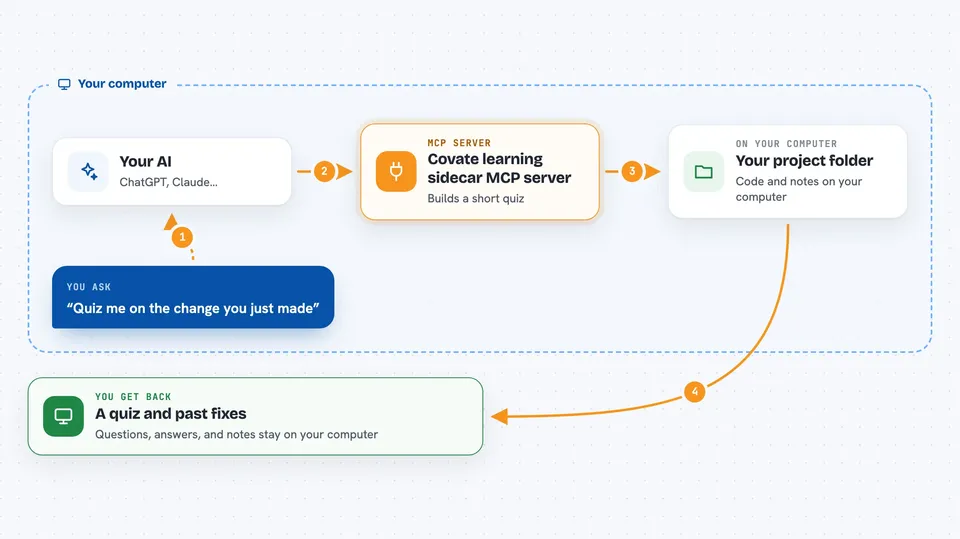
Covate is a small helper that sits next to your AI coding assistant and does two jobs. It can pop up a short quiz about the changes the AI just made, so you actually understand the code instead of just accepting it. It also quietly remembers how bugs were fixed in your project, so the AI can look those up later.
What is an MCP server? The 30-second version
On its own, your AI can only chat with you. An MCP server is a small helper program that gives your AI a new skill or a connection to something. This one connects your AI to a learning and memory layer for your project, stored in a hidden folder called .mcp-sidecar inside your project. When you ask for a quiz, or when the AI hits an error, this helper steps in and does the extra work.
What this MCP server does
You ask your AI to quiz you on a change it made, and the AI calls this helper. The helper looks at the recent code changes, builds a short quiz with a few questions, and opens a small quiz window for you to answer. It waits until you finish, then tells the AI it can continue. Separately, when the AI runs into an error, the helper searches your project's past debugging notes for something similar. After the AI fixes the bug, the helper saves a short note about what went wrong and how it was fixed.
 Click to zoom
What you can do with it
- Get quizzed on the code your AI just wrote
- Focus quizzes on logic, security, performance, architecture, or syntax
- Let your AI look up how similar bugs were fixed before
- Save a short note each time a bug gets fixed
- Ask for short explanations of programming terms
- Keep all of this inside your project folder, with nothing sent out
Try asking your AI
- “Quiz me on the change you just made”
- “Test my understanding of this function”
- “Help me learn what you did and why”
- “Give me a few programming terms about databases”
What it gives back to you
For a quiz, you get a small window with a few multiple-choice questions and short explanations after you answer. Your score is saved on your computer for your own tracking, but it is not sent back to the AI. For debugging, the AI gets a short list of past fixes that look related, not the full notes. For terms, you get a short list of words with plain explanations.
Before you start
What you need
- Python 3.11 or newer, or the uv tool
- An MCP-compatible AI coding tool like Claude Code, Cursor, or Windsurf
- About five minutes to run the installer and restart your editor
Good to know
It writes small files inside a hidden .mcp-sidecar folder in your project, so if you do not want that, delete the folder or skip this server.
Install it with your AI
Add Covate learning sidecar MCP server to your AI, no technical skills needed
You don't install anything by hand. You copy one prompt, paste it into an AI that can work on your computer, and it checks, installs and connects the server for you, asking you when it needs something.
Sign in to get the install prompt
Members get a ready-made prompt that lets the Claude desktop app check Covate learning sidecar MCP server, install it and connect it for them, step by step. You don't need any technical skills: you copy, paste and answer a few questions. Your connected AI can also find and install any of the 4,609 MCP servers here for you.
Who it's for
Developers and anyone using an AI coding assistant who wants to actually learn from the code the AI writes and stop fixing the same bug twice.



