MCP server · Analytics
SigRank MCP server
Lets your AI rank your token usage on a public leaderboard and check how you compare.
SigRank is a small helper that reads your local AI session logs, works out how efficiently you use tokens, and can publish those numbers to a public leaderboard at signalaf.com. It is handy if you are curious about your own AI usage habits or want to see how you stack up against other people. Only four token counts ever leave your machine, never your prompts or code.
What is an MCP server? The 30-second version
On its own, your AI can only chat with you. An MCP server is a small helper program that gives your AI a new skill or a connection to an app or service. This one connects your AI to SigRank, a leaderboard for AI operators, so it can read your local token logs, score them, and show or submit your ranking. You just ask in plain words, and the helper does the work behind the scenes.
What this MCP server does
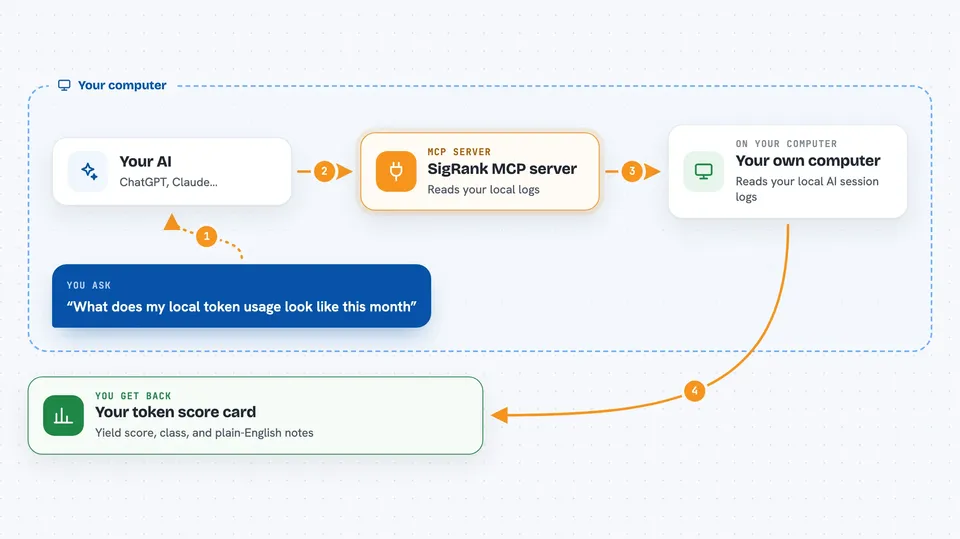
You ask your AI something like how your token usage looks or where you rank. The AI calls this helper, which reads your local AI session logs on your own computer. It counts four things: input tokens, output tokens, cache creation tokens, and cache read tokens. From those it works out a score called Yield and a few related numbers. If you want, it can send just those four counts to the leaderboard at signalaf.com so you get a public profile.
 Click to zoom
What you can do with it
- Score a set of token numbers you paste in
- Read your local logs and build a token summary
- Show the live leaderboard sorted by Yield
- Look up one operator's public profile
- Preview what would be sent before submitting
- Submit your token counts to the board
- Compare token counts from different local sources
Try asking your AI
- “Rank these token numbers for me: 1000000 500000 50000 800000”
- “Show me the current SigRank leaderboard”
- “What does my local token usage look like this month”
- “Look up the operator profile for codename abc123”
What it gives back to you
You get back a short card with your Yield score, a signal-to-noise ratio, leverage, velocity, a 10xDEV number, and a class label. It also writes a plain-English narration of what those numbers mean. For leaderboard requests you get a ranked list of operators with their scores. For a profile lookup you get that one operator's public numbers.
Before you start
What you need
- Node.js installed on your computer
- A free account at signalaf.com if you want to submit
- A connect code from signalaf.com Settings if you want to submit
Good to know
Submitting sends your token counts and a signature to a public leaderboard, so check the dry run first if you want to see exactly what leaves your machine.
Install it with your AI
Add SigRank MCP server to your AI, no technical skills needed
You don't install anything by hand. You copy one prompt, paste it into an AI that can work on your computer, and it checks, installs and connects the server for you, asking you when it needs something.
Sign in to get the install prompt
Members get a ready-made prompt that lets the Claude desktop app check SigRank MCP server, install it and connect it for them, step by step. You don't need any technical skills: you copy, paste and answer a few questions. Your connected AI can also find and install any of the 4,066 MCP servers here for you.
Who it's for
People who use AI coding tools daily and are curious about their own token efficiency or want to compare with others.