MCP server · Analytics
claudeusage MCP server
by syk8015
Ask your AI whether your Claude subscription is worth it, and what is really eating your rate limit.
claudeusage is a small helper that reads the logs Claude Code already keeps on your own computer and turns them into answers about your subscription. It tells you how much Claude-written code actually survived, where money and limit got wasted, and how much of your limit the chat app ate. It is handy if you pay for Claude and quietly wonder whether you are getting your money's worth.
What is an MCP server? The 30-second version
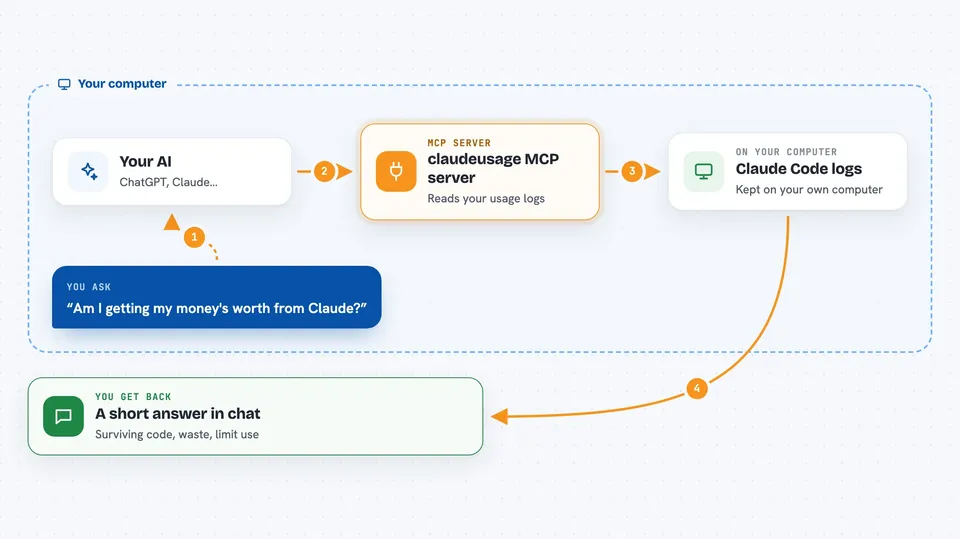
On its own, your AI can only chat with you. An MCP server is a small helper program that gives your AI one new skill, here the skill of reading your local Claude Code logs and doing the math on them. Once it is connected, you can ask a plain question like "am I getting my money's worth?" and the AI calls this helper, which looks at your logs and hands back the numbers. You never have to open a terminal or read a log file yourself.
What this MCP server does
You ask your AI a plain question about your Claude usage. The AI picks the right tool from this server, for example the one about subscription value or the one about your rate limit. The helper then reads the Claude Code logs stored on your machine, folds every edit in time order, and works out what survived, what was wasted and what drove the limit. It hands a short answer back to the AI, and the AI explains it to you in the chat. Nothing is uploaded anywhere and it does not touch Git.
 Click to zoom
What you can do with it
- See how many lines of Claude-written code actually survived in a session
- Find out how much money went to rework, failures and rejections
- Check what is really draining your 5-hour and weekly limits
- Estimate how much of your limit the Claude chat and mobile app used
- Look at your current limits and the per-product breakdown
- Compare value across all your projects at once
Try asking your AI
- “Am I getting my money's worth from my Claude subscription?”
- “Why is my limit draining so fast this week?”
- “How much of my limit did the chat app eat?”
- “Show me the waste in my last project, in money”
What it gives back to you
You get short answers in the chat, not raw files. Expect numbers and small tables: surviving lines, waste as a percentage or a dollar figure, cost grouped by activity, and a breakdown of what drove your limit. The limit tools also show your current gauge and how much each product (Claude Code, chat, Cowork) used. If a number is still rough, the answer says so.
Before you start
What you need
- Claude Code installed and used on your machine, so there are logs to read
- Python 3.9 or newer
- macOS if you want the live limit tools (they read the keychain)
- A few days of status line samples before the limit analysis gets useful
Good to know
The live limit tool reads your Claude Code login credentials from the macOS keychain and sends them only to api.anthropic.com, and it never prints or stores them.
Install it with your AI
Add claudeusage MCP server to your AI, no technical skills needed
You don't install anything by hand. You copy one prompt, paste it into an AI that can work on your computer, and it checks, installs and connects the server for you, asking you when it needs something.
Sign in to get the install prompt
Members get a ready-made prompt that lets the Claude desktop app check claudeusage MCP server, install it and connect it for them, step by step. You don't need any technical skills: you copy, paste and answer a few questions. Your connected AI can also find and install any of the 4,361 MCP servers here for you.
Who it's for
Individual Claude subscribers who code with Claude Code and want to know if the subscription is paying off, without team tools or Git setup.