
MCP server · Notes
Zaxy MCP server
by syndicalt
Give your AI a long-term memory that keeps a receipt for every fact it remembers.
Zaxy is a memory helper for AI assistants. It lets your AI remember what happened in a project, where each fact came from, and when it stopped being true. It is handy for people running long projects with an AI, or teams where several AI helpers work together and you need to keep track of what they found.
What is an MCP server? The 30-second version
On its own, your AI can only chat. It forgets everything the moment you close the window. An MCP server is a small helper program that gives your AI a new skill or a connection to a service. Zaxy is that helper, and its skill is memory: it keeps a careful, dated record of what your AI learned, so your AI can look things up later and tell you where each fact came from.
What this MCP server does
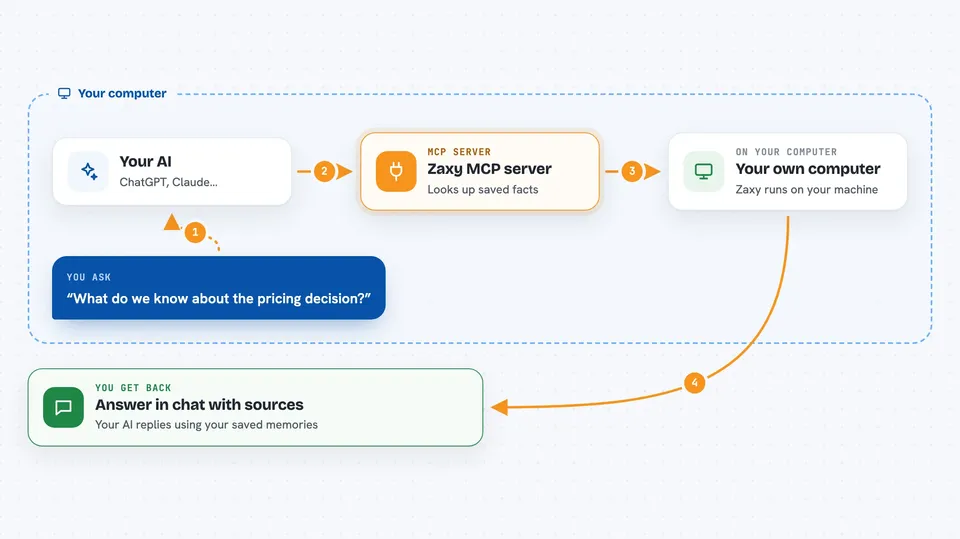
You ask your AI something about your project. The AI passes your question to Zaxy. Zaxy looks through its saved history of past events and facts, finds the parts that match, and hands them back. Your AI then answers you using those memories. When your AI learns something new, Zaxy writes it down in a log that cannot be quietly changed, so there is always a trail back to the source.
 Click to zoom
What you can do with it
- Save a fact or finding to your project memory
- Ask your AI what it already knows about a topic
- See where a remembered fact came from
- Mark an old fact as no longer true
- Replay the history of a session to see what happened
- Give feedback on whether a memory was useful
- Keep separate memory logs for different AI helpers
Try asking your AI
- “Remember that the client prefers weekly Friday updates.”
- “What do we know about the pricing decision from last month?”
- “Show me where the note about the vendor contract came from.”
- “That old address is wrong now, mark it as no longer valid.”
What it gives back to you
You get answers in the chat, written in normal language by your AI. Behind the scenes Zaxy returns matching facts, short summaries, and the source events they came from. When you ask it to save or change something, it confirms what it wrote down. You can also ask it to replay a session and it will list the events in order.
Before you start
What you need
- Python installed on your computer
- The zaxy-memory package installed (the setup guide shows the one-line command)
- A folder where Zaxy can keep its memory log
Good to know
Zaxy keeps a permanent record of what your AI saves, and the invalidate action can mark facts as no longer true, so be careful about what you ask it to remember or change.
Install it with your AI
Add Zaxy MCP server to your AI, no technical skills needed
You don't install anything by hand. You copy one prompt, paste it into an AI that can work on your computer, and it checks, installs and connects the server for you, asking you when it needs something.
Sign in to get the install prompt
Members get a ready-made prompt that lets the Claude desktop app check Zaxy MCP server, install it and connect it for them, step by step. You don't need any technical skills: you copy, paste and answer a few questions. Your connected AI can also find and install any of the 4,066 MCP servers here for you.
Who it's for
People running long projects with an AI assistant, and small teams where several AI helpers need to share what they have learned.




