MCP server · Developer tools
sudo-proxy MCP server
by tarides
Let your AI run admin commands on your computer or a remote server, with you approving each one by pressing a key.
sudo-proxy is a helper that lets your AI run commands that need administrator rights, like installing software or changing system files. Every single command is shown to you first, and nothing runs until you press a key to say yes. It is handy if you want your AI to do real system work but you still want to stay in control.
What is an MCP server? The 30-second version
On its own, your AI can only chat. An MCP server is a small helper program that gives your AI a new skill or a connection to something else. This one connects your AI to the admin side of your computer (and to other computers you can reach over SSH), so it can run commands there when you ask. The difference here is that the helper always stops and asks you first.
What this MCP server does
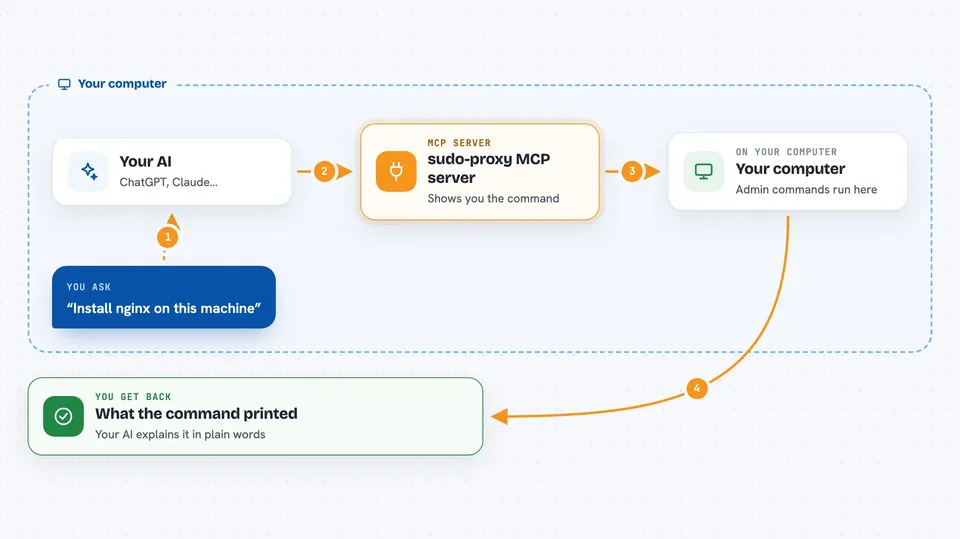
You ask your AI to do something that needs admin rights, like installing a program. The AI sends the exact command to this helper instead of running it itself. The helper opens a small approval screen in a terminal and shows you the command. You press y to approve or N to deny, and only then does it run the command using sudo. If you approve, the result comes back to your AI and then to you in the chat.
 Click to zoom
What you can do with it
- Install software packages on your machine or a remote server
- Edit system files that normally need administrator rights
- Start, stop, or restart system services
- Run the same kind of admin command on a remote host over SSH
- See the exact command before it runs, every single time
- Keep a log of every request the server handled
Try asking your AI
- “Install nginx on this machine”
- “Restart the docker service”
- “On my server called web01, update the package list and upgrade everything”
- “Check the status of the sudo-proxy server”
What it gives back to you
You get back whatever the command printed, like a list of installed packages, a success or error message, or the output of a status check. The approval screen is separate: it appears in a terminal window, not in your chat. Your AI then reads that output and explains it to you in plain words.
Before you start
What you need
- A Rust toolchain to install it, or the prebuilt binaries from the Releases page
- An MCP client such as Claude Code or the Claude desktop app
- A terminal where you can press keys to approve commands
- For remote use, SSH access to the other machine
Good to know
This tool really does grant administrator rights, so a command you approve can change or delete important things on your machine or a remote server; read each command before you press y.
Install it with your AI
Add sudo-proxy MCP server to your AI, no technical skills needed
You don't install anything by hand. You copy one prompt, paste it into an AI that can work on your computer, and it checks, installs and connects the server for you, asking you when it needs something.
Sign in to get the install prompt
Members get a ready-made prompt that lets the Claude desktop app check sudo-proxy MCP server, install it and connect it for them, step by step. You don't need any technical skills: you copy, paste and answer a few questions. Your connected AI can also find and install any of the 4,361 MCP servers here for you.
Who it's for
People who want their AI to handle real system administration tasks but insist on approving every command themselves.