
MCP server · Finance and crypto
Tatum Blockchain MCP server
by tatumio
Lets your AI look up blockchain data like balances, transactions, and crypto prices across many networks.
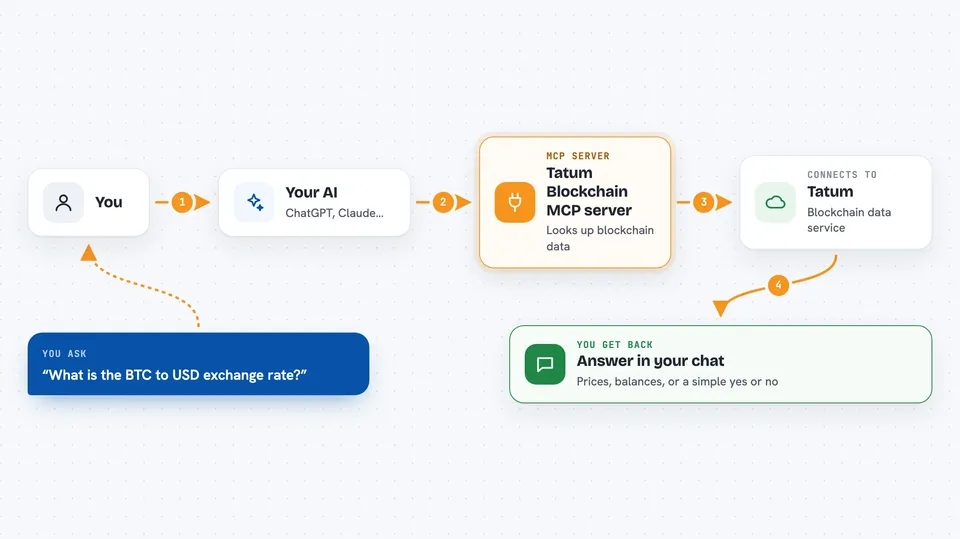
This is a helper for your AI that connects it to Tatum, a service that reads data from many blockchains. Once it is set up, you can just ask your AI questions about crypto wallets, blocks, and prices, and it will go look up the real numbers for you. It is handy for anyone who works with crypto data but does not want to click around block explorer websites all day.
What is an MCP server? The 30-second version
On its own, your AI can only chat with you using what it already knows. An MCP server is a small helper program that gives your AI a new skill or a connection to an outside service. This one connects your AI to Tatum, which is a service that reads data from over 130 blockchains. So when you ask about a wallet or a coin, your AI can reach out through this helper and bring back real, current information.
What this MCP server does
You ask your AI a question in normal words, like what a wallet holds or what a coin is worth. Your AI passes that request to this helper program running on your computer. The helper talks to Tatum's servers, which read the blockchain for you. Tatum sends the answer back, and your AI shows it to you in the chat as a list, a number, or a short summary. You never have to visit a blockchain website or copy long addresses around.
 Click to zoom
What you can do with it
- Check a wallet's balance and full portfolio
- Look up transaction history for one or more addresses
- Get the current exchange rate between a crypto coin and a regular currency
- Find out who owns an NFT or token contract
- See which block was created at a certain time
- Run a security check on a wallet or contract address
- Ask for the latest block number on a network like Ethereum
Try asking your AI
- “What is the BTC to USD exchange rate right now?”
- “Show me the portfolio for this Ethereum address: 0x1234...”
- “What is the latest Ethereum block number?”
- “Is this wallet address known to be malicious?”
What it gives back to you
You get answers in your chat window, in plain language. Depending on what you asked, that could be a number like a price or a block height, a list of transactions, a wallet portfolio broken into coins and NFTs, or a short yes or no on a security check. Your AI usually adds a sentence or two explaining what it found.
Before you start
What you need
- A free Tatum account and API key from dashboard.tatum.io (an API key is like a password your apps use to talk to a service)
- Node.js 18 or newer installed on your computer
- An MCP client like Claude Desktop, Cursor, or VS Code
Good to know
It only reads blockchain data, so it will not move or spend your crypto, but it does need your Tatum API key, so keep that key private.
Install it with your AI
Add Tatum Blockchain MCP server to your AI, no technical skills needed
You don't install anything by hand. You copy one prompt, paste it into an AI that can work on your computer, and it checks, installs and connects the server for you, asking you when it needs something.
Sign in to get the install prompt
Members get a ready-made prompt that lets the Claude desktop app check Tatum Blockchain MCP server, install it and connect it for them, step by step. You don't need any technical skills: you copy, paste and answer a few questions. Your connected AI can also find and install any of the 4,609 MCP servers here for you.
Who it's for
People who work with crypto data, like analysts, finance folks, and developers who want quick blockchain answers without leaving their chat window.



