
MCP server · Productivity
ntfy MCP server
by teddyzxcv
Lets your AI send a phone notification through ntfy when a task is finished.
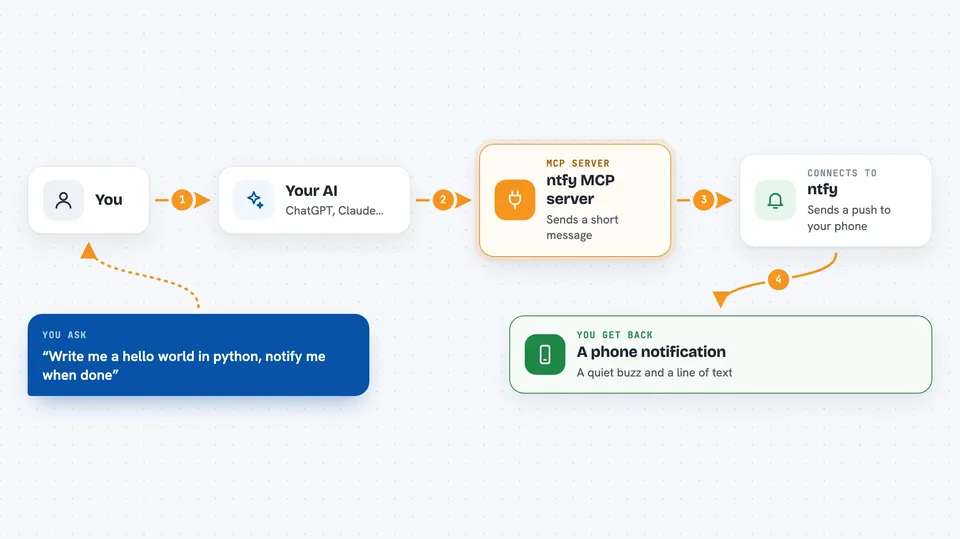
This is a small helper that connects your AI assistant to ntfy, a free service that sends push notifications to your phone. When you ask your AI to do something and add "notify me when the task is done", you get a buzz on your phone the moment it finishes. It is handy if you step away from your desk while your AI works.
What is an MCP server? The 30-second version
On its own, your AI can only chat with you in the window on your screen. An MCP server is a small helper program that gives your AI one extra skill or a connection to another service. This helper connects your AI to ntfy, a notification service, so your AI can send a message to your phone. You ask in plain words, and the helper does the sending for you.
What this MCP server does
You tell your AI something like "write me a hello world in python, notify me when the task is done". Your AI works on the task, and when it finishes, it uses this helper. The helper sends a short message to ntfy using a topic name you chose. The ntfy app on your phone, which is subscribed to that same topic, shows the notification. You get a quiet buzz and a line of text saying the work is done.
 Click to zoom
What you can do with it
- Get a phone notification when your AI finishes a task
- Ask for the notification in the same sentence as your request
- Choose your own topic name so only you get the messages
- Step away from your desk while your AI keeps working
- Use it with any task your AI can do, big or small
Try asking your AI
- “Write me a hello world in python, notify me when the task is done”
- “Summarise this long text and send me a notification when you finish”
- “Rename these files for me and notify me when it is done”
- “Draft a short email reply and ping me when it is ready”
What it gives back to you
You get a short push notification on your phone through the ntfy app. It tells you the task is complete, usually with a brief line of text. In the chat window, your AI also shows you the result it produced, like the code or the summary. There is nothing to read on a website; the message arrives on your phone.
Before you start
What you need
- The ntfy app on your phone (free, from ntfy.sh)
- A topic name you pick, for example your-name-tasks
- Node.js installed on your computer to run the helper
- The Claude desktop app or another AI app that supports MCP servers
Good to know
Anyone who knows your topic name can read the messages on that topic, so pick a name that is hard to guess and do not put private details in the notification.
Install it with your AI
Add ntfy MCP server to your AI, no technical skills needed
You don't install anything by hand. You copy one prompt, paste it into an AI that can work on your computer, and it checks, installs and connects the server for you, asking you when it needs something.
Sign in to get the install prompt
Members get a ready-made prompt that lets the Claude desktop app check ntfy MCP server, install it and connect it for them, step by step. You don't need any technical skills: you copy, paste and answer a few questions. Your connected AI can also find and install any of the 4,609 MCP servers here for you.
Who it's for
Anyone who asks their AI to do longer tasks and wants a nudge on their phone when the work is done.





