MCP server · Email · official
SendRaven MCP server
by CommonNinja · official
Let your AI send emails, read replies as threads, and run campaigns through your SendRaven account.
SendRaven is an email service built for AI agents. This MCP server connects your AI assistant to your SendRaven account so it can send real emails, read the replies, and manage campaigns for you. It is handy if you run email outreach or customer messages and want your AI to handle the back and forth.
What is an MCP server? The 30-second version
On its own, your AI can only chat with you. An MCP server is a small helper that gives your AI a new skill or a connection to another app. This one connects your AI to SendRaven, an email service. Once it is set up, your AI can send emails, check replies, and run campaigns in your SendRaven account when you ask it to.
What this MCP server does
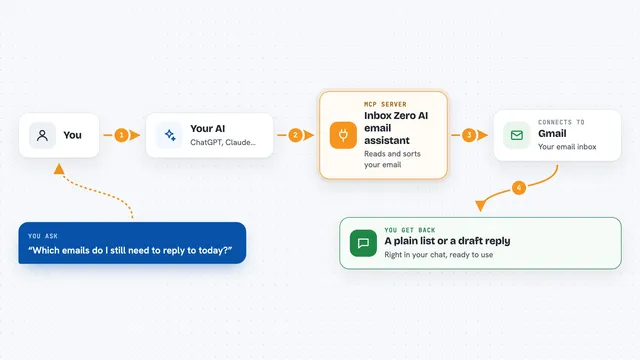
You ask your AI to send an email or check your inbox. The AI passes that request to this helper program. The helper talks to SendRaven, which actually sends the email or fetches the replies. Then you get the result back in your chat, like a confirmation, a list of messages, or a summary of who replied. If your account has limits or approval rules set, the helper follows those too.
What you can do with it
- Send an email to one or more people, now or scheduled for later
- Read replies grouped as conversation threads
- List recent emails with their delivery status
- Create and send email campaigns to a group of contacts
- Preview how many people a campaign would reach before sending it
- Check your sending domains and their verification status
- Manage the list of addresses you do not want to email
Try asking your AI
- “Send an email to sarah@example.com with the subject Project update and a short note about the launch date”
- “Show me the last ten emails I sent and whether they were delivered”
- “Draft a campaign for my newsletter list and tell me how many people it would reach”
- “Schedule a reminder email to go out in three days”
What it gives back to you
You get answers in your chat: a confirmation with the email id and status when you send, a list of messages with their delivery status when you ask for them, and thread views when you read replies. For campaigns, you get a count of how many contacts would be reached before anything goes out. If a send needs approval, you get a note that it is waiting for a person.
Before you start
What you need
- A SendRaven account
- An API key from your SendRaven dashboard (a kind of password for apps, found under Developers)
- A verified sending domain in SendRaven before you can send email
Good to know
It can send real emails to real people and start campaigns that cannot be undone, so check the preview and your account limits before letting it send in bulk.
Install it with your AI
Add SendRaven MCP server to your AI, no technical skills needed
You don't install anything by hand. You copy one prompt, paste it into an AI that can work on your computer, and it checks, installs and connects the server for you, asking you when it needs something.
Sign in to get the install prompt
Members get a ready-made prompt that lets the Claude desktop app check SendRaven MCP server, install it and connect it for them, step by step. You don't need any technical skills: you copy, paste and answer a few questions. Your connected AI can also find and install any of the 4,361 MCP servers here for you.
Who it's for
People who run email outreach, newsletters, or customer messages and want their AI assistant to handle the sending and reading for them.