
MCP server · Developer tools
EdgeOne Pages MCP server
Let your AI publish a web page or small site online and hand you back a public link.
This is a helper that lets your AI put a web page on the internet for you. You describe or paste the page, and the helper uploads it to EdgeOne Pages and gives you a link you can open or share. It is handy if you build simple pages and want them online without learning a whole publishing setup.
What is an MCP server? The 30-second version
On its own, your AI can only chat with you. An MCP server is a small helper program that gives your AI one new skill or one new connection. This helper connects your AI to EdgeOne Pages, a service that hosts websites. So when you ask your AI to put a page online, it can actually do it through this helper and give you the address.
What this MCP server does
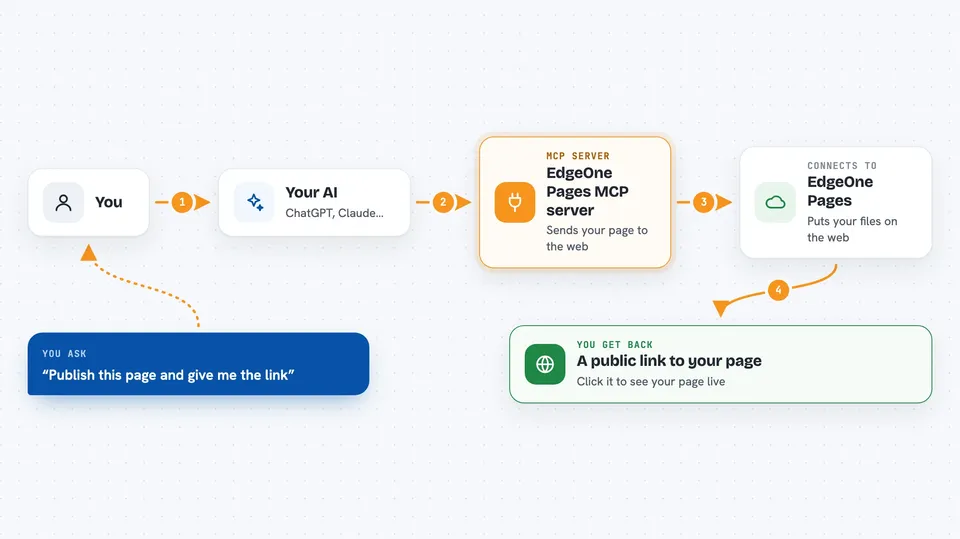
You ask your AI to publish a page, and you can paste the HTML or point it at your project files. Your AI passes that to this helper, which talks to EdgeOne Pages. EdgeOne Pages stores the files and puts them on the web. The helper then hands the public link back to your AI, and your AI shows it to you in the chat.
 Click to zoom
What you can do with it
- Publish a single HTML page and get a shareable link
- Deploy a small full-stack project to EdgeOne Pages
- Get the public URL of what you just published
- Skip the browser login by using an API token
- Pick a project ahead of time so you are not asked each time
Try asking your AI
- “Here is my HTML page. Please publish it and give me the link.”
- “Deploy this folder to EdgeOne Pages and tell me the public URL.”
- “Put this landing page online so I can send the link to my team.”
- “Publish my project and show me the address when it is done.”
What it gives back to you
You get back a public web address for what you published, shown as a link in the chat. If something goes wrong, you get a short message explaining what failed. You can click the link to check the page yourself.
Before you start
What you need
- Node.js 18 or higher on your computer (for the local version)
- An EdgeOne Pages account
- Optional: an EdgeOne Pages API token, which is a kind of password the site gives you, so you skip the browser login
- Optional: your EdgeOne Pages project name, so you skip the project picker
Good to know
It publishes files to the public web, so make sure you are happy for anyone with the link to see what you upload.
Install it with your AI
Add EdgeOne Pages MCP server to your AI, no technical skills needed
You don't install anything by hand. You copy one prompt, paste it into an AI that can work on your computer, and it checks, installs and connects the server for you, asking you when it needs something.
Sign in to get the install prompt
Members get a ready-made prompt that lets the Claude desktop app check EdgeOne Pages MCP server, install it and connect it for them, step by step. You don't need any technical skills: you copy, paste and answer a few questions. Your connected AI can also find and install any of the 4,609 MCP servers here for you.
Who it's for
People who make simple web pages or small sites and want an easy way to put them online and share a link.



