
MCP server · Notes
Librarian MCP server
by Terobyte
Turn your ebooks into clean Markdown chapters your AI can browse, search, and quote-check.
Librarian is a small tool that takes your ebook files and turns them into tidy Markdown chapters. Then it lets your AI assistant read those chapters, search them, and check whether a quote really comes from your book. It is handy if you keep a personal library and want your AI to work with it without sending anything over the internet.
What is an MCP server? The 30-second version
On its own, your AI can only chat with you. An MCP server is a small helper program that gives your AI a new skill or a connection to something. This one connects your AI to your own ebook library on your computer. Once it is running, your AI can look through your books and answer questions about them when you ask.
What this MCP server does
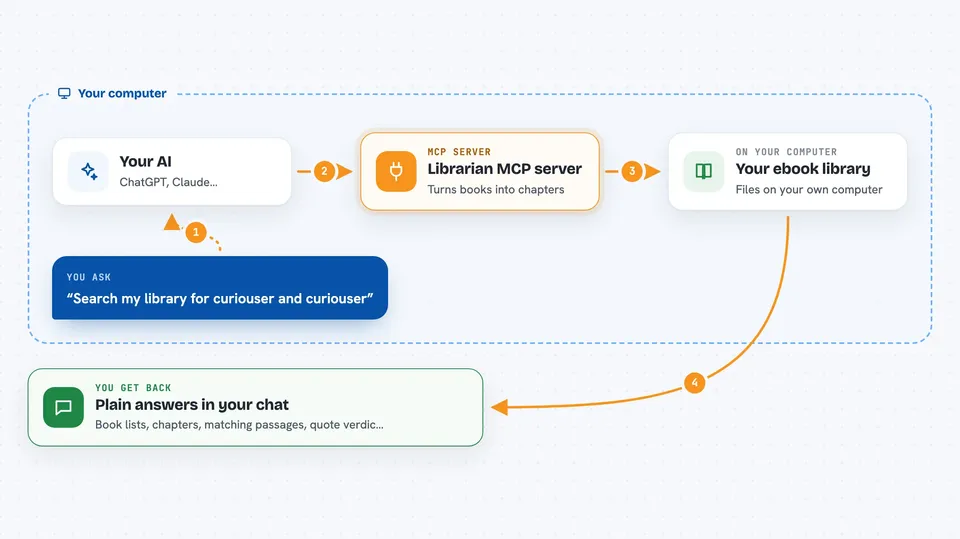
First, you point Librarian at your ebook files, and it converts them into a folder of clean Markdown chapters with token counts. Then you start its built-in helper, which your AI can talk to. When you ask your AI something about your books, the AI sends the request to Librarian, Librarian looks through your library, and sends back the matching chapters, a list of books, or a quote check. Everything stays on your computer. No internet, no accounts, no API keys.
 Click to zoom
What you can do with it
- List all the books in your library
- Show the chapters of a specific book
- Search your whole library for a word or phrase
- Pull chapters under a token budget so your AI does not get overloaded
- Get details about a book, like its title, author, and quality score
- Check whether a quote really appears in one of your books
Try asking your AI
- “What books do I have in my library?”
- “Show me the chapters of the book with id bulgakov-master-i-margarita”
- “Search my library for the phrase curiouser and curiouser”
- “Did this book actually say 'Рукописи не горят'?”
What it gives back to you
You get back plain answers in the chat: a list of books, a list of chapters with token counts, matching passages with snippets, or a verdict on a quote. The verdict tells you if the quote is exact, close, distorted, or not found. Everything is shown as text you can read right away.
Before you start
What you need
- Python installed on your computer (the install command uses uv or pipx)
- Your ebook files in a folder on your computer
- The Claude desktop app or Claude Code, if you want to use the MCP server
Good to know
The tools are read-only, so they will not change or delete your books, but the quote checker can be slow on very long books and the search index needs to be built first.
Install it with your AI
Add Librarian MCP server to your AI, no technical skills needed
You don't install anything by hand. You copy one prompt, paste it into an AI that can work on your computer, and it checks, installs and connects the server for you, asking you when it needs something.
Sign in to get the install prompt
Members get a ready-made prompt that lets the Claude desktop app check Librarian MCP server, install it and connect it for them, step by step. You don't need any technical skills: you copy, paste and answer a few questions. Your connected AI can also find and install any of the 4,066 MCP servers here for you.
Who it's for
People who keep a personal ebook collection and want their AI assistant to read, search, and quote-check those books without sending them anywhere.




