
MCP server · Developer tools
Nutanix MCP server
Lets your AI look up your Nutanix virtual machines, clusters, hosts, images and subnets for you.
This is a small helper program that connects your AI assistant to Nutanix Prism Central, the dashboard where your company's Nutanix systems are managed. Once it is set up, you can ask your AI plain questions about your Nutanix setup instead of clicking around the web console. It is handy for anyone who works with Nutanix infrastructure but does not want to memorize where every menu lives.
What is an MCP server? The 30-second version
On its own, your AI can only chat with you. An MCP server is a small helper program that gives your AI a new skill or a connection to another app. This one connects your AI to Nutanix Prism Central, so the AI can look things up there for you when you ask. You stay in the chat, and the helper does the talking to Nutanix behind the scenes.
What this MCP server does
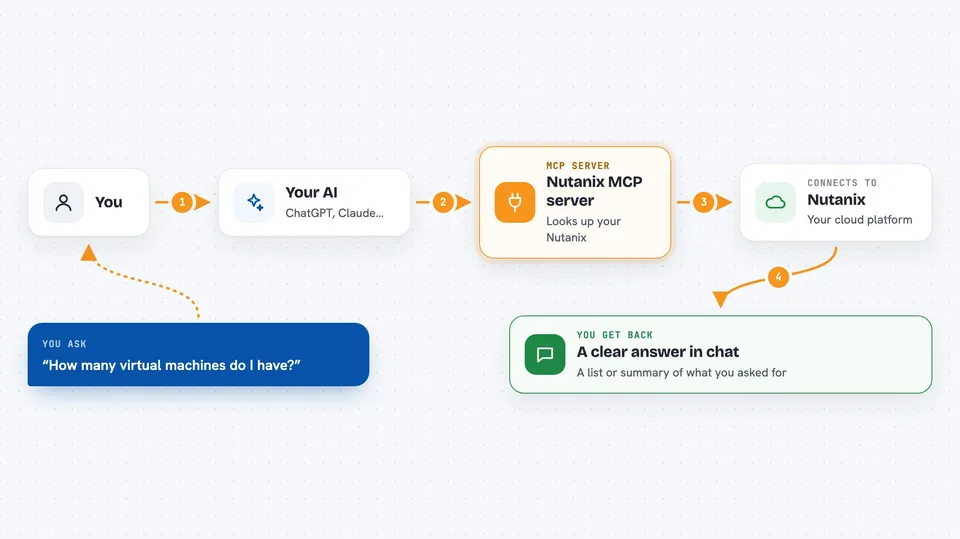
You ask your AI something about your Nutanix environment, like how many virtual machines you have or what a specific one looks like. The AI passes your question to this helper program. The helper logs in to your Prism Central instance with the credentials you gave it and asks for the list or the details you wanted. Nutanix sends the answer back, and the helper hands it to your AI. Your AI then explains it to you in the chat, usually as a list or a short summary.
 Click to zoom
What you can do with it
- List all virtual machines in your Nutanix environment
- List clusters, hosts, images and subnets
- Look up the details of one specific virtual machine by its ID
- Look up the details of one specific cluster or host
- Ask follow-up questions about what the AI found, like which VMs are powered on
- Get a quick overview of your Nutanix setup without opening the web console
Try asking your AI
- “List all the virtual machines in my Nutanix environment”
- “How many hosts do we have and what are their names”
- “Show me the details of the cluster with this ID”
- “What images and subnets are available right now”
What it gives back to you
You get answers in the chat, not files to download. For a list request, your AI shows a list of items with their names and IDs, and often a short summary on top. For a single item, it shows the detailed information Nutanix keeps about that virtual machine, cluster or host. If something goes wrong, like a wrong password or a resource that is too big to send, you get an error message instead.
Before you start
What you need
- A Nutanix Prism Central instance you can reach, with its address (IP or hostname)
- A username and password that can log in to Prism Central
- Go 1.23 or newer if you want to build the program yourself
- An MCP client like Claude Desktop or Cursor
Good to know
This is an experimental personal project, not an official Nutanix tool, and it is read-only, so it will not change or delete anything, but you are handing your Prism Central username and password to a program that is not supported by Nutanix, so treat it as a test tool rather than something for production.
Install it with your AI
Add Nutanix MCP server to your AI, no technical skills needed
You don't install anything by hand. You copy one prompt, paste it into an AI that can work on your computer, and it checks, installs and connects the server for you, asking you when it needs something.
Sign in to get the install prompt
Members get a ready-made prompt that lets the Claude desktop app check Nutanix MCP server, install it and connect it for them, step by step. You don't need any technical skills: you copy, paste and answer a few questions. Your connected AI can also find and install any of the 4,609 MCP servers here for you.
Who it's for
IT and infrastructure people who already use Nutanix at work and want to ask quick questions about their virtual machines, clusters and hosts without opening the Prism Central console.



