
MCP server · Developer tools
Tokenectomy Razor MCP server
Your AI can clean up messy error logs, hide passwords, and check code fixes before applying them.
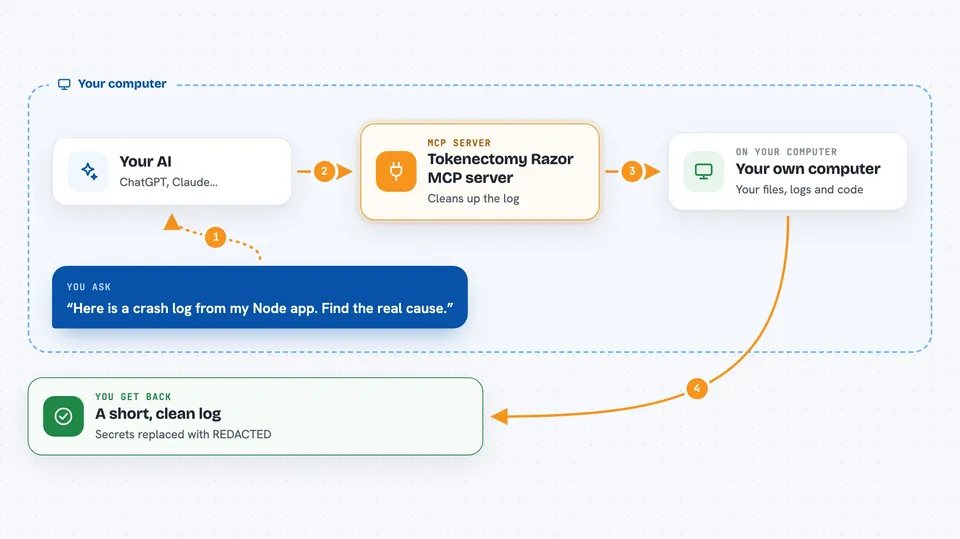
Tokenectomy Razor is a helper that sits between your coding tools and your AI. It strips out the noisy, repetitive parts of error messages and hides secret passwords before they get sent anywhere. It is handy if you use Claude Code, Cursor, or similar tools and keep hitting rate limits or seeing your AI get confused by library code.
What is an MCP server? The 30-second version
On its own, your AI can only chat with you. An MCP server is a small helper program that gives your AI a new skill or a connection to something useful. This one connects your AI to Tokenectomy Razor, which cleans up logs and checks code changes. So when you ask your AI to look at an error, it can use this helper to get a tidy version and work on the right file.
What this MCP server does
You ask your AI to look at a crash or a bug. The AI uses this helper to grab the error log. The helper removes all the lines from third-party libraries and hides any passwords or keys it finds. Then it hands back a short, clean version that points to the exact line in your own code. The AI can then suggest a fix or even apply a patch, and the helper checks that the patch is safe before it goes in.
 Click to zoom
What you can do with it
- Clean up long error logs so your AI sees only the important lines
- Hide passwords, API keys, and database connection strings before they leave your computer
- Find the exact file and line where an error happened in your own code
- Check a suggested code fix for mistakes before it is applied
- Roll back a code change if something goes wrong
- Cache repeated prompts so you do not waste your AI usage limit
Try asking your AI
- “Here is a crash log from my Node app. Can you find the real cause and suggest a fix?”
- “This error mentions a database password. Please clean it up before showing me the important part.”
- “Apply this patch to my checkout file, but check it first and roll back if it breaks anything.”
- “Why does my AI keep editing files in node_modules? Can you strip those out of the log?”
What it gives back to you
You get back a short, cleaned-up version of the log or error message. It shows only the lines from your own code and replaces any secrets with a note like REDACTED. If you asked for a code fix, it tells you whether the patch was applied or rolled back. In the chat, it looks like a few lines of text with the key problem highlighted.
Before you start
What you need
- Node.js installed on your computer (the free program that runs JavaScript tools)
- A coding tool that supports MCP, like Claude Code, Cursor, or Claude Desktop
- Your own API key for the AI service you use (this helper does not provide one)
Good to know
This tool can change your code files and roll back changes, so make sure you have a backup or use version control before letting it apply patches.
Install it with your AI
Add Tokenectomy Razor MCP server to your AI, no technical skills needed
You don't install anything by hand. You copy one prompt, paste it into an AI that can work on your computer, and it checks, installs and connects the server for you, asking you when it needs something.
Sign in to get the install prompt
Members get a ready-made prompt that lets the Claude desktop app check Tokenectomy Razor MCP server, install it and connect it for them, step by step. You don't need any technical skills: you copy, paste and answer a few questions. Your connected AI can also find and install any of the 4,609 MCP servers here for you.
Who it's for
Developers and technical teams who use AI coding assistants and want to save tokens, avoid rate limits, and keep secrets out of their logs.




