MCP server · Research
Tomba Email Finder MCP server
by tomba-io
Let your AI find, check and enrich email addresses, phone numbers and company details for you.
This is a helper that connects your AI assistant to Tomba, a service that finds and checks email addresses, phone numbers and company information. It is handy for sales, recruiting, marketing and research work where you need contact details for people and companies. Instead of jumping between websites, you just ask your AI in plain words.
What is an MCP server? The 30-second version
On its own, your AI can only chat with you. An MCP server is a small helper program that gives your AI a new skill or a connection to another service. This one connects your AI to Tomba, so when you ask for an email address or a company's details, the AI can go and look it up for you. You never touch the technical parts; you just ask and read the answer.
What this MCP server does
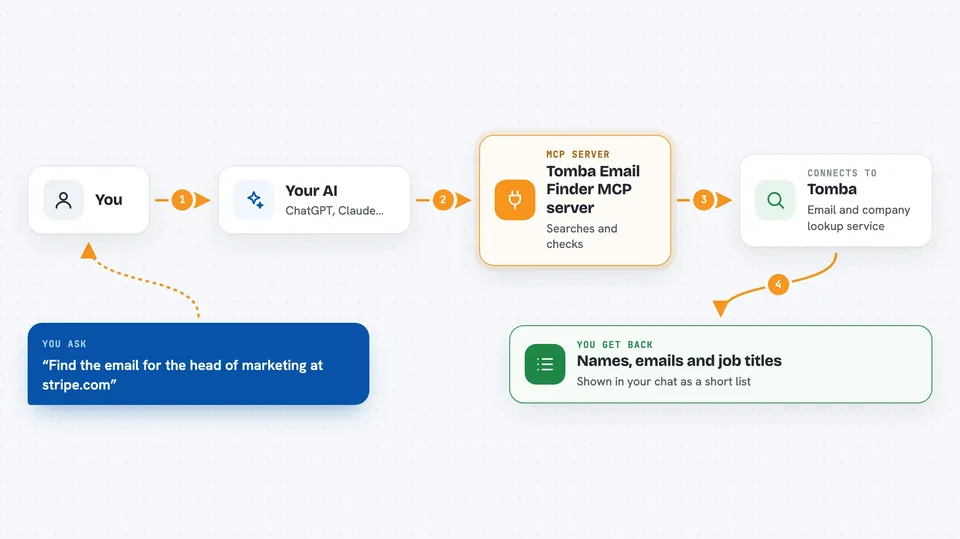
You ask your AI something like find the email address for the head of marketing at a company. The AI sends that request to this helper, and the helper talks to Tomba's service. Tomba searches its data and live checks, then sends back what it found. Your AI shows you the result in the chat, often as a list or a short summary. Some requests also let you check whether an email is real, or add extra details like a person's job title or a company's size.
 Click to zoom
What you can do with it
- Find email addresses linked to a company's website
- Guess a person's likely email from their name and company
- Check whether an email address is real and can receive mail
- Look up a person's job title and social profiles from their email
- Find phone numbers and check which carrier they belong to
- See what technology a website uses
- Search for companies by size, industry or revenue
Try asking your AI
- “Find the email address for the head of partnerships at stripe.com and check if it is valid”
- “What is the job title and company for jane@acme.com”
- “Find similar companies to shopify.com and tell me what technology they use”
- “Search for fintech companies in Germany with 51 to 250 employees and list a few”
What it gives back to you
You get answers in the chat, usually as a short list or a small table. For an email search you might see names, email addresses, job titles and how confident the match is. For a verification you get a simple yes or no plus a short reason. For company research you get details like industry, size, location and technology used.
Before you start
What you need
- A Tomba account (you can sign up for free at tomba.io)
- Your Tomba API key and secret key from your Tomba dashboard
- Node.js 18 or newer installed on your computer
- The Claude desktop app or another AI tool that supports MCP servers
Good to know
Each search uses credits from your Tomba plan, so keep an eye on your usage, and only look up contact details you have a fair reason to use.
Install it with your AI
Add Tomba Email Finder MCP server to your AI, no technical skills needed
You don't install anything by hand. You copy one prompt, paste it into an AI that can work on your computer, and it checks, installs and connects the server for you, asking you when it needs something.
Sign in to get the install prompt
Members get a ready-made prompt that lets the Claude desktop app check Tomba Email Finder MCP server, install it and connect it for them, step by step. You don't need any technical skills: you copy, paste and answer a few questions. Your connected AI can also find and install any of the 4,609 MCP servers here for you.
Who it's for
Sales, recruiting, marketing and research people who need to find and check contact details for people and companies.