
MCP server · Notes
Cognee MCP server
by topoteretes
Give your AI a long-term memory so it can remember what you told it and recall it later.
Cognee is a memory helper for your AI. Normally your AI forgets everything once the chat ends. With this connected, you can tell it things, and it will store them and bring them back when you ask.
What is an MCP server? The 30-second version
On its own, your AI can only chat with you in the moment. An MCP server is a small helper program that gives your AI a new skill or a connection to something outside the chat. This one connects your AI to Cognee, a memory system that runs on your own computer. So instead of forgetting, your AI can save notes, documents and facts into Cognee and look them up again later when you ask.
What this MCP server does
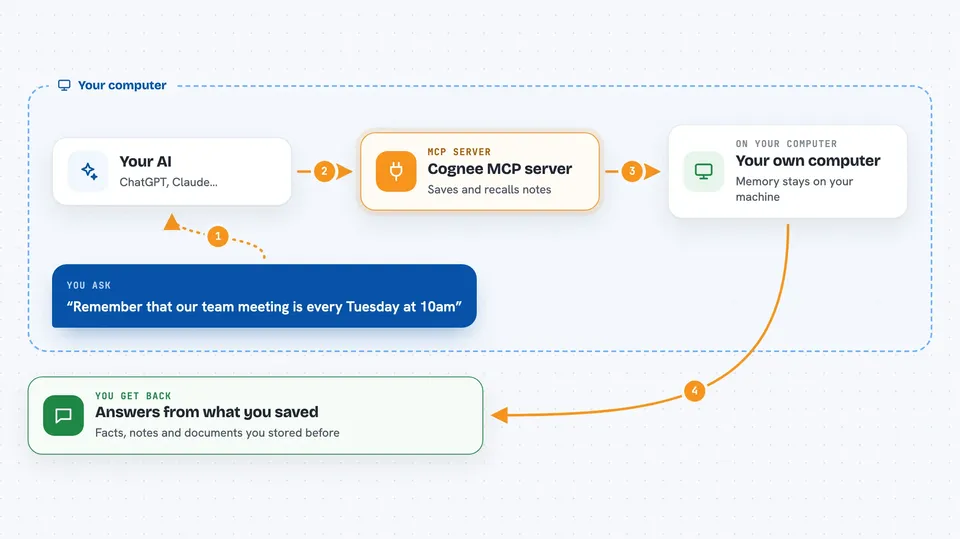
You ask your AI to remember something, like a note, a document or a fact. The AI passes that to this helper program, which sends it to Cognee running on your machine. Cognee stores it in a memory store that uses graphs and vectors (two ways of organising information so it can be searched by meaning, not just by exact words). Later, when you ask a question, the AI asks Cognee to recall what it knows, and you get an answer based on what you saved. You can also ask it to forget things you no longer want stored.
 Click to zoom
What you can do with it
- Save notes, facts or documents into a memory your AI can reuse later
- Ask your AI to recall something you told it in an earlier chat
- Keep a short-term session memory for a single conversation
- Search an indexed code project to see symbols, dependencies and how a change might affect things
- Delete a dataset or all your stored memory when you no longer need it
- Run the memory helper locally so your data stays on your own machine
Try asking your AI
- “Remember that our team meeting is every Tuesday at 10am and the project lead is Maria”
- “What did I tell you about the Q3 budget last week?”
- “Recall everything I saved about the Johnson account”
- “Forget the dataset called old-notes”
What it gives back to you
You get answers in plain chat text, built from what you previously saved. When you ask it to remember something, it confirms that the item was stored. When you ask it to recall, it gives you the matching facts, notes or documents. When you ask it to forget, it tells you what was removed.
Before you start
What you need
- A computer where you can run Python programs (the README uses uv, a tool that installs Python packages)
- An OpenAI API key, or another model provider key, set in a .env file (an API key is a kind of password for apps; the provider gives you one when you sign up)
- A supported MCP client such as Claude Desktop, Claude Code or Cursor
Good to know
The forget tool can delete a dataset or all of your stored memory, so be careful when you ask it to remove things.
Install it with your AI
Add Cognee MCP server to your AI, no technical skills needed
You don't install anything by hand. You copy one prompt, paste it into an AI that can work on your computer, and it checks, installs and connects the server for you, asking you when it needs something.
Sign in to get the install prompt
Members get a ready-made prompt that lets the Claude desktop app check Cognee MCP server, install it and connect it for them, step by step. You don't need any technical skills: you copy, paste and answer a few questions. Your connected AI can also find and install any of the 4,609 MCP servers here for you.
Who it's for
People who want their AI to remember things across chats, and developers who want a searchable memory or code index for their projects.





