
MCP server · Finance and crypto · official
true402 MCP server
by true402 · official
Lets your AI run paid crypto safety checks, web audits and web lookups, paying small amounts from a wallet you control.
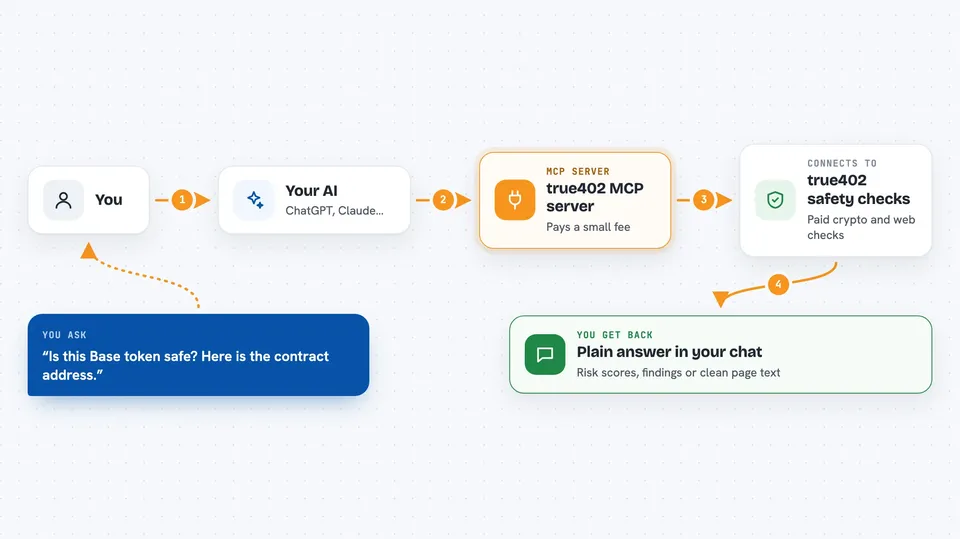
This is a helper that connects your AI assistant to the true402 marketplace, a place where tools are paid for one call at a time. Each call costs a tiny amount of a digital currency called USDC, taken from a wallet you set up. It is handy if you already work with crypto tokens or websites and want your AI to check things for you without opening lots of browser tabs.
What is an MCP server? The 30-second version
On its own, your AI can only chat with you. An MCP server is a small helper program that gives your AI a new skill or a connection to an outside service. This one connects your AI to true402, a marketplace of paid tools. When you ask for something, your AI sends the request through this helper, the helper pays the small fee from your wallet, and the answer comes back into your chat.
What this MCP server does
You ask your AI something like checking whether a crypto token looks safe or auditing a web page. Your AI passes that request to this helper. The helper calls the true402 service, which asks for a small payment in USDC. The helper signs that payment with your wallet and sends it, and the service returns the result. Your AI then shows you the answer in the chat, and your wallet has paid only that one small amount.
 Click to zoom
What you can do with it
- Check a crypto token for rug-pull or honeypot risk
- See newly created trading pairs on the Base network
- Watch for large swaps by big holders
- Audit a web page for search and AI-crawler friendliness
- Pull clean text, links and metadata from any URL
- Check a site's rules for AI crawlers and its security headers
- Preview how a link will look when shared
Try asking your AI
- “Is this Base token safe? Here is the contract address.”
- “Show me the newest trading pairs on Base from the last hour.”
- “Audit this page for SEO and tell me what to fix.”
- “Pull the main text and links from this article URL.”
What it gives back to you
You get back plain answers in your chat: risk scores, lists of tokens or swaps, audit findings, or cleaned-up page text. Some tools return short structured reports with numbers and flags. Everything appears as normal chat text you can read and copy. The changes are only to your wallet balance, not to any website or account.
Before you start
What you need
- Node.js version 20 or newer on your computer
- An MCP client such as Claude Desktop, Claude Code, Cursor or Cline
- A Base wallet with a small amount of USDC in it (the wallet key goes in a setting; gas fees are covered for you)
Good to know
Every paid call spends real USDC from the wallet you connect, so use a separate wallet with only a small balance and keep the spending ceiling low.
Install it with your AI
Add true402 MCP server to your AI, no technical skills needed
You don't install anything by hand. You copy one prompt, paste it into an AI that can work on your computer, and it checks, installs and connects the server for you, asking you when it needs something.
Sign in to get the install prompt
Members get a ready-made prompt that lets the Claude desktop app check true402 MCP server, install it and connect it for them, step by step. You don't need any technical skills: you copy, paste and answer a few questions. Your connected AI can also find and install any of the 4,609 MCP servers here for you.
Who it's for
People who already dabble in crypto tokens or run websites and want quick checks without leaving their AI chat.



