
MCP server · Developer tools
Lachesis MCP server
Lets your AI read your code and answer questions about how data moves through it.
Lachesis is a helper that reads your code and builds a map of it. Once the map is built, you can ask questions like who calls this function, or can outside input reach a database call with no login check. It works on C, Python, and TypeScript/JavaScript, and it is handy for anyone who has to understand code they did not write.
What is an MCP server? The 30-second version
On its own, your AI can only chat. An MCP server is a small helper program that gives your AI a new skill or a connection to another tool. This one connects your AI to Lachesis, which reads your codebase and builds a map of it. So when you ask your AI a question about your code, it can actually look things up in that map instead of guessing.
What this MCP server does
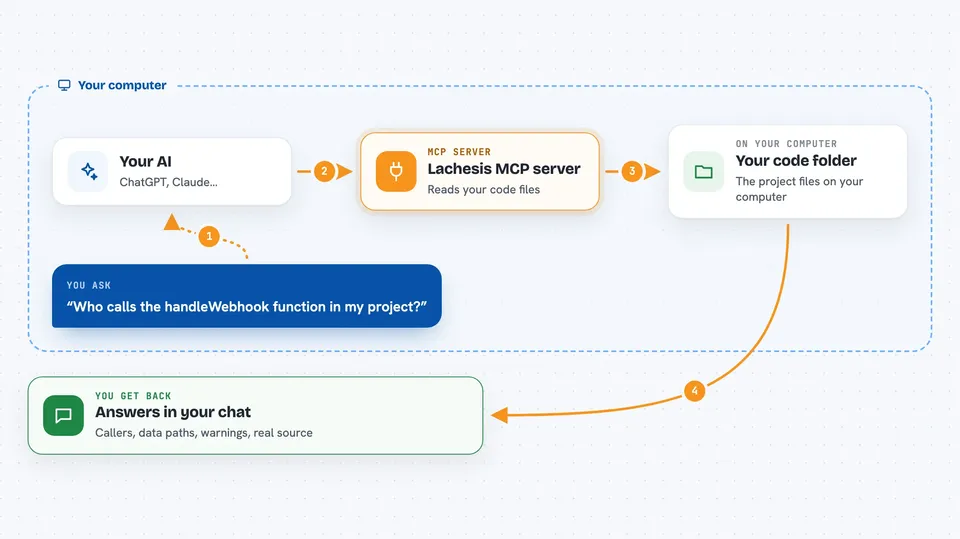
You point Lachesis at a folder of code, and it reads the files the way a compiler does, not by searching for words. It builds a map of functions, calls, and how values move from place to place. Then your AI can ask that map questions through this server. You get back answers like a list of callers, a path showing how a value travels, or a warning that outside input can reach something sensitive with no check in the way.
 Click to zoom
What you can do with it
- Find who calls a function and what it calls
- Trace where a value comes from and where it goes
- Check whether outside input can reach a dangerous spot
- Show the real source code of a function
- List what a file or folder contains
- Find where a name appears in the code
- See what a pointer points at in C code
Try asking your AI
- “Who calls the handleWebhook function in my project?”
- “Can user input from the web route reach the database call in webhook.ts?”
- “Show me the source of the findById function”
- “What functions are called from the main entry point?”
What it gives back to you
You get answers in the chat, like a list of function names, a path showing how data moves from one place to another, or a short summary of spots worth looking at. Each answer comes with how sure Lachesis is, so you know when it is guessing. For some questions it shows the actual source code of a function. It does not change your code; it only reads it and reports back.
Before you start
What you need
- Python 3.10 to 3.12 installed
- Node.js on your PATH if you want to scan TypeScript or JavaScript
- Clang installed if you want to scan C code
Good to know
Lachesis reads your code and builds a map, so it can see private source files; the answers are evidence to check, not final verdicts, and some links are safe guesses rather than exact facts.
Install it with your AI
Add Lachesis MCP server to your AI, no technical skills needed
You don't install anything by hand. You copy one prompt, paste it into an AI that can work on your computer, and it checks, installs and connects the server for you, asking you when it needs something.
Sign in to get the install prompt
Members get a ready-made prompt that lets the Claude desktop app check Lachesis MCP server, install it and connect it for them, step by step. You don't need any technical skills: you copy, paste and answer a few questions. Your connected AI can also find and install any of the 4,361 MCP servers here for you.
Who it's for
Developers, security reviewers, and anyone who needs to understand a codebase they did not write.




