MCP server · Research
VesselAPI MCP server
by vessel-api
Ask your AI to look up ships, their live positions, ETAs, port arrivals and emissions data.
This is a helper that connects your AI assistant to VesselAPI, a service that tracks ships around the world. Once it is set up, you can just ask your AI things like where a certain ship is right now, or which vessels are heading into a port. It is handy for people who work with shipping, logistics, ports, or anyone curious about what is happening at sea.
What is an MCP server? The 30-second version
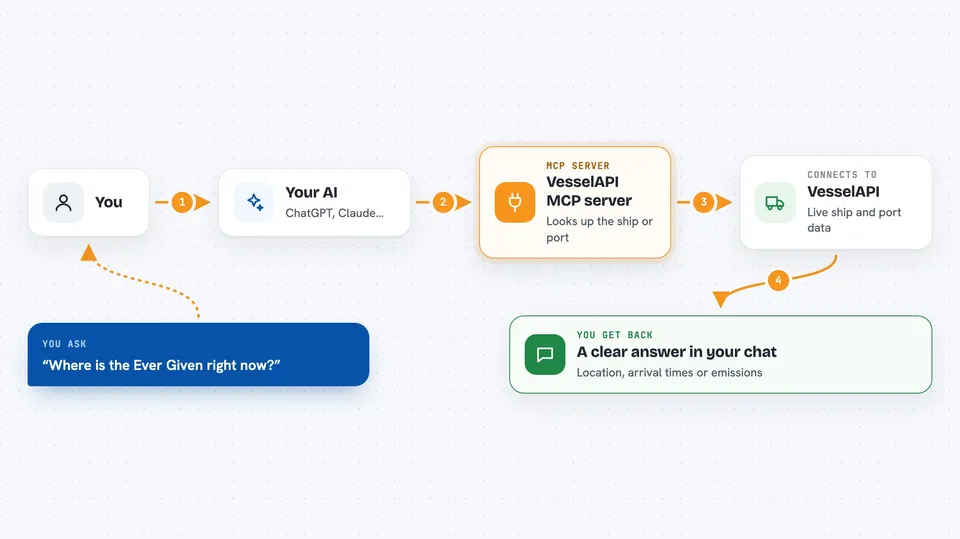
On its own, your AI can only chat with you using what it already knows. An MCP server is a small helper program that gives your AI a new skill or a connection to an outside service. This one connects your AI to VesselAPI, a maritime data service. So when you ask about a ship or a port, your AI can actually look it up there and bring the answer back to you.
What this MCP server does
You ask your AI a question about a ship or a port in normal words. Your AI passes that request to this helper, which talks to VesselAPI behind the scenes. VesselAPI sends back the details, like a ship's current location, its speed, or when it is expected to arrive somewhere. Your AI then turns that into a clear answer in your chat. You never have to touch the technical parts yourself.
 Click to zoom
What you can do with it
- Find a ship by name, IMO number, MMSI, flag, type, or callsign
- Get a ship's current position, speed, and heading
- Check a ship's estimated time of arrival
- See which vessels are arriving at or leaving a port
- Look up port details by its UN/LOCODE
- Find all ships inside a certain area or within a certain distance of a point
- Check a ship's emissions data like CO2 and fuel use
Try asking your AI
- “Where is the vessel Ever Given right now?”
- “Which ships are arriving at the port of Rotterdam in the next 24 hours?”
- “Show me all vessels within 50 km of these coordinates”
- “What is the estimated arrival time for this ship at its destination?”
What it gives back to you
You get answers in your chat, in plain language. That could be a ship's location with coordinates, speed, and heading, a list of vessels with their names and details, or a summary of port arrivals and departures. Sometimes it is a table of emissions numbers or a list of casualty records. Your AI writes it up so it reads like a normal reply.
Before you start
What you need
- A VesselAPI account (sign up at dashboard.vesselapi.com)
- An API token from your VesselAPI dashboard (a kind of password for apps)
- An AI client that supports MCP, like Claude Desktop, Cursor, Windsurf, or Claude Code
Good to know
Each lookup uses your VesselAPI account quota, so heavy use may use up your plan's allowance.
Install it with your AI
Add VesselAPI MCP server to your AI, no technical skills needed
You don't install anything by hand. You copy one prompt, paste it into an AI that can work on your computer, and it checks, installs and connects the server for you, asking you when it needs something.
Sign in to get the install prompt
Members get a ready-made prompt that lets the Claude desktop app check VesselAPI MCP server, install it and connect it for them, step by step. You don't need any technical skills: you copy, paste and answer a few questions. Your connected AI can also find and install any of the 4,361 MCP servers here for you.
Who it's for
People in shipping, logistics, port operations, maritime research, or anyone who needs to track vessels and port activity.