
MCP server · Developer tools
Veris MCP server
by vighriday
Lets your AI check what behavior changed in your TypeScript or JavaScript code and what was actually tested.
Veris is a helper for teams whose AI assistant writes or edits code in a TypeScript or JavaScript project. It looks at what your code does before and after a change, and tells you which behaviors shifted and whether any of them were checked. It is handy if you review AI-written changes and want a plain answer instead of a wall of line differences.
What is an MCP server? The 30-second version
On its own, your AI can only chat with you. An MCP server is a small helper program that gives your AI a new skill or a connection to something useful. This one connects your AI to Veris, a tool that reads your code project and builds a map of how it behaves. Once it is connected, you can ask your AI questions about your code, and it will quietly ask Veris behind the scenes and bring the answer back to you.
What this MCP server does
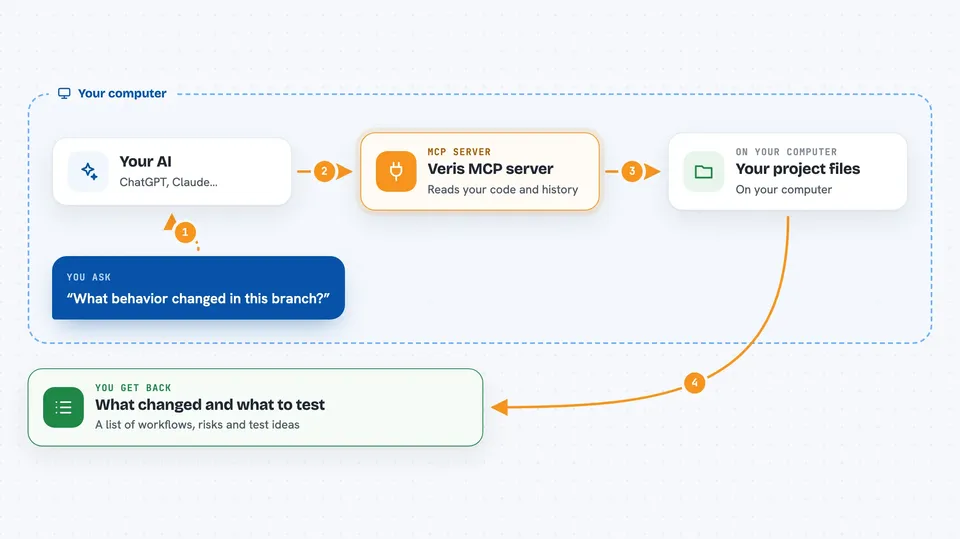
You ask your AI something like what changed in this branch or what should I test first. Your AI passes that question to Veris through this helper. Veris reads your project files, compares the current state with an earlier version from your git history, and builds a picture of which behaviors were added, removed or rewritten. It also checks whether any evidence exists that those behaviors were tested. Then your AI shows you the result in the chat, often as a list of workflows, risk scores and suggested checks.
 Click to zoom
What you can do with it
- See which behaviors changed between your branch and a base branch
- List the main workflows in your project and which ones the change touched
- Get a ranked list of what is riskiest to look at first
- Generate concrete test ideas for the riskiest areas
- Get a time-boxed plan for what to actually run if you only have 15 minutes
- Detect silent rewrites that keep the same name but change behavior
- Ask what would recover if you reverted a specific piece of code
Try asking your AI
- “What behavior changed in this branch compared to origin/main?”
- “List the workflows in this project and tell me which ones my change affected.”
- “Give me a 15 minute plan for what to test first.”
- “Did anyone actually check the payment code that changed?”
What it gives back to you
You get back plain answers in the chat: lists of workflows, short explanations of what changed, risk scores with reasons, and suggested checks written as short scenarios. It can also produce a markdown summary you could hand to a new teammate. When you or your AI report back that something was run, Veris records it and updates the picture of what has evidence behind it.
Before you start
What you need
- Node.js installed on your computer
- A git repository with real commit history (Veris compares against an earlier version)
- An MCP-compatible AI client such as Claude Code or Cursor
Good to know
Veris reads your project files and runs locally, so point it only at code you are allowed to analyze, and be aware that plugins from a repository can run code unless you leave them off.
Install it with your AI
Add Veris MCP server to your AI, no technical skills needed
You don't install anything by hand. You copy one prompt, paste it into an AI that can work on your computer, and it checks, installs and connects the server for you, asking you when it needs something.
Sign in to get the install prompt
Members get a ready-made prompt that lets the Claude desktop app check Veris MCP server, install it and connect it for them, step by step. You don't need any technical skills: you copy, paste and answer a few questions. Your connected AI can also find and install any of the 4,609 MCP servers here for you.
Who it's for
Developers and reviewers on TypeScript or JavaScript teams who let AI assistants write or edit code and want a quick, honest read on what changed and what was tested.




