MCP server · Chat
Ollama MCP server
by VrtxOmega
Lets your AI chat with the AI models running on your own computer through Ollama.
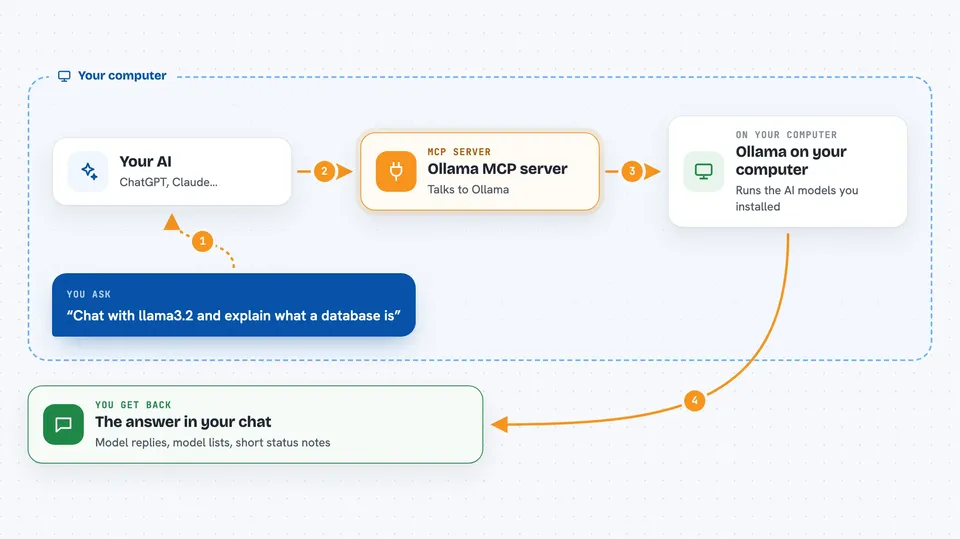
This is a small helper that connects your AI assistant to Ollama, the free program that runs AI models on your own machine. Once it is set up, you can ask your assistant to chat with a local model, list which models you have, or download a new one. It is handy for anyone who wants to use AI models without sending anything to the cloud.
What is an MCP server? The 30-second version
On its own, your AI assistant can only chat with you. An MCP server is a small helper program that gives your assistant a new skill or a connection to another app. This one connects your assistant to Ollama, the program that runs AI models on your computer. So when you ask your assistant to talk to a local model, it quietly passes the request to Ollama and brings the answer back to you.
What this MCP server does
You type a request in your AI assistant, like asking it to chat with a model or list your models. The assistant passes that request to this helper program. The helper then talks to Ollama running on your computer over a local connection. Ollama runs the model or looks up the information, and the helper sends the result back to your assistant. You see the answer right in your chat window.
 Click to zoom
What you can do with it
- Chat with any AI model you have installed in Ollama
- List all the models available on your computer
- Download a new model by name
- Check whether Ollama is running and reachable
- Ask for details about a specific model
- Generate text from a prompt using a chosen model
Try asking your AI
- “List all the Ollama models I have installed”
- “Chat with llama3.2 and ask it to explain what a database is”
- “Pull the model llama3.2:3b for me”
- “Show me the details of the model I used last time”
What it gives back to you
You get answers, lists, and short status messages right in your chat. For example, asking for your models gives you a list of names. Asking for a chat gives you the model's reply. Pulling a model gives you a short confirmation that it finished.
Before you start
What you need
- Python 3.11 or newer on your computer
- The Ollama program installed and running
- The mcp and httpx Python packages installed
- Your AI assistant set up to use MCP servers
Good to know
Pulling models downloads large files and can take a while, and chatting with big models can be slow on older computers.
Install it with your AI
Add Ollama MCP server to your AI, no technical skills needed
You don't install anything by hand. You copy one prompt, paste it into an AI that can work on your computer, and it checks, installs and connects the server for you, asking you when it needs something.
Sign in to get the install prompt
Members get a ready-made prompt that lets the Claude desktop app check Ollama MCP server, install it and connect it for them, step by step. You don't need any technical skills: you copy, paste and answer a few questions. Your connected AI can also find and install any of the 4,609 MCP servers here for you.
Who it's for
People who like to run AI models on their own computer and want their AI assistant to be able to use them.