MCP server · Chat
Multi-Model Advisor MCP server
by YuChenSSR
Ask one question and get answers from several small AI models running on your own computer, combined into one reply.
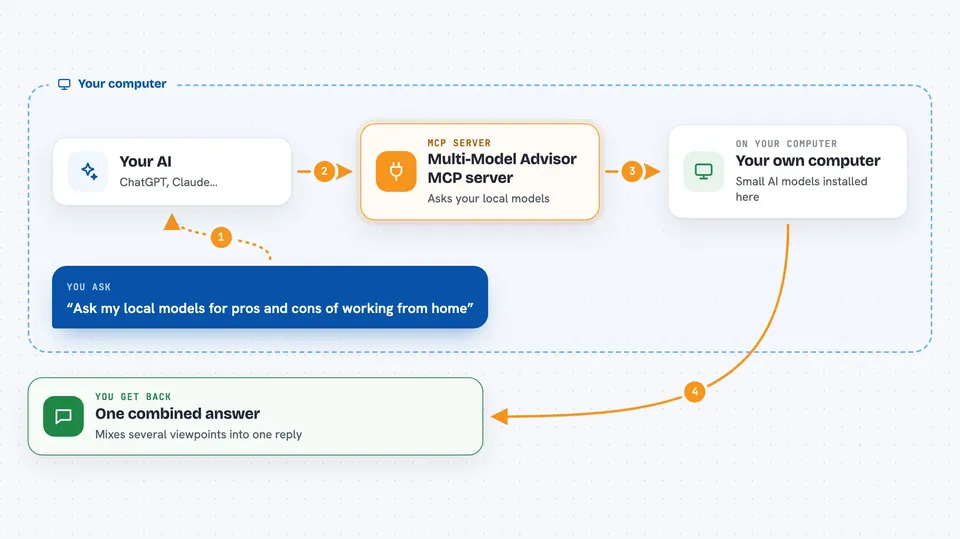
This is a helper that lets your AI assistant ask the same question to several small AI models that run on your own computer, then pull their answers together into one reply. It is handy if you like hearing more than one opinion before you decide something. It is made for people who already run Ollama, a free tool that runs AI models locally.
What is an MCP server? The 30-second version
On its own, your AI can only chat with you using what it already knows. An MCP server is a small helper program that gives your AI a new skill or a connection to something else. This one connects your AI to Ollama, the free program that runs AI models on your own machine. So when you ask a question, your AI can quietly ask those local models too, then blend their answers with its own.
What this MCP server does
You ask your AI a question and mention that it can use the multi-model advisor. Your AI then uses this helper, which sends your question to several Ollama models you have installed. Each model answers in its own style, because you can give each one a different role, like a creative thinker or a careful analyst. Your AI collects all those answers and writes one combined reply for you. You can also ask which models are installed on your computer.
 Click to zoom
What you can do with it
- Ask several local AI models the same question at once
- Give each model a different role or personality
- See which Ollama models are installed on your computer
- Get one combined answer that mixes several viewpoints
- Change the instructions each model follows
- Choose which models to use for a question
Try asking your AI
- “What are the most important skills for success in today's job market? You can use gemma3:1b, llama3.2:1b and deepseek-r1:1.5b to help you.”
- “Show me which Ollama models are available on my system.”
- “Ask my local models for pros and cons of working from home, then summarize what they said.”
- “Use the multi-model advisor to compare three ideas for a small business name.”
What it gives back to you
You get one written answer in the chat, built from what each local model said plus your AI's own view. Sometimes it shows the separate answers so you can see where the opinions differ. If you ask about models, you get a simple list of what is installed. Nothing is changed on your computer and no files are touched.
Before you start
What you need
- Node.js 16 or newer installed on your computer
- Ollama installed and running (a free program that runs AI models locally)
- At least one Ollama model downloaded, for example gemma3:1b
- The Claude desktop app if you want the full experience
Good to know
It runs AI models on your own computer, so it can be slow and needs enough memory, and it only works while Ollama is running.
Install it with your AI
Add Multi-Model Advisor MCP server to your AI, no technical skills needed
You don't install anything by hand. You copy one prompt, paste it into an AI that can work on your computer, and it checks, installs and connects the server for you, asking you when it needs something.
Sign in to get the install prompt
Members get a ready-made prompt that lets the Claude desktop app check Multi-Model Advisor MCP server, install it and connect it for them, step by step. You don't need any technical skills: you copy, paste and answer a few questions. Your connected AI can also find and install any of the 4,609 MCP servers here for you.
Who it's for
People who already run Ollama on their own computer and like comparing several AI opinions before making a decision.