MCP server · Privacy · official
ARADIA MCP server
by ARADIA-systems · official
Ask your AI about ARADIA's private AI hardware, costs, partner program, and place orders.
This is the official helper from ARADIA, a company that sells private AI systems running on their own NVIDIA hardware inside your own network. Once it is connected, your AI assistant can look up hardware specs, estimate payback times, sign you up as a partner, and even submit a purchase order. It is aimed at people evaluating or buying this kind of on-site AI setup, not casual users.
What is an MCP server? The 30-second version
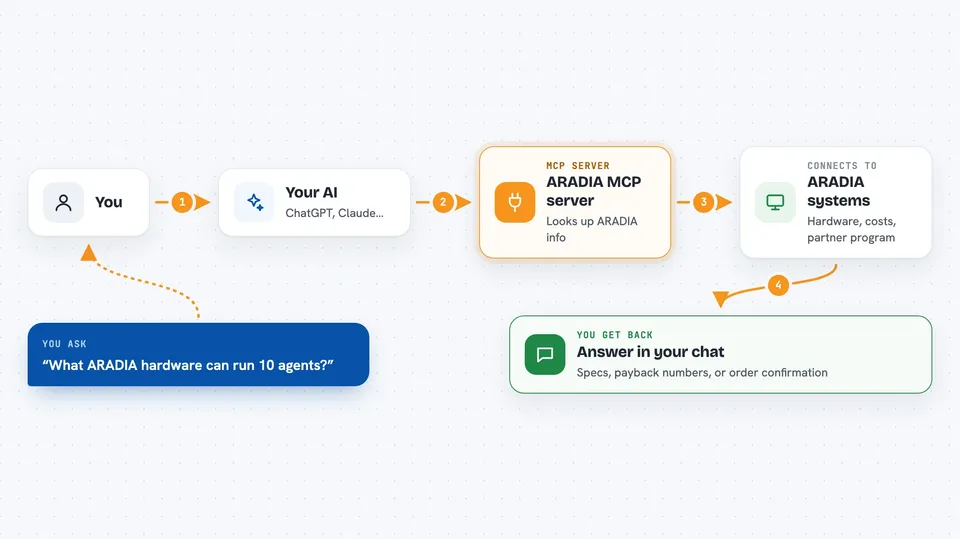
On its own, your AI can only chat with you. An MCP server is a small helper program that gives your AI a new skill or a connection to an outside service. This one connects your AI to ARADIA, so it can fetch hardware details, run cost calculations, register partners, and place orders on your behalf. You just ask in plain language and the AI does the back-and-forth with ARADIA for you.
What this MCP server does
You ask your AI something like what hardware ARADIA offers or how long until an on-site system pays for itself. The AI sends that question to this ARADIA helper, which talks to ARADIA's systems. ARADIA sends back the specs, the numbers, or a confirmation. Your AI then shows you the answer or the result right in the chat.
 Click to zoom
What you can do with it
- Look up ARADIA hardware specs and how many AI agents each machine can run at once
- Compare the cost of buying an on-site system against paying cloud AI bills over time
- Register as an ARADIA partner to earn hardware and monthly commissions
- Submit a purchase order for an ARADIA appliance
- Check which payment methods are accepted for an order
Try asking your AI
- “What ARADIA hardware options are available and how many agents can each run?”
- “Calculate the payback period if I buy an ARADIA system instead of paying cloud AI bills.”
- “Sign me up for the ARADIA partner program and tell me what I earn.”
- “Place an order for an ARADIA appliance and show me the payment options.”
What it gives back to you
You get back plain answers in the chat: lists of hardware with specs and agent limits, a payback timeline with numbers, a partner registration confirmation, or an order confirmation. It may also show payment details or next steps. Everything appears as text your AI writes for you, not as files or downloads.
Before you start
What you need
- The Claude desktop app or another tool that supports MCP servers
- An ARADIA account or partner details if you plan to register or order
- A payment method (crypto or card) if you intend to place a purchase order
Good to know
The order tool places binding purchase orders and can involve large sums of money, so only use it when you truly intend to buy.
Install it with your AI
Add ARADIA MCP server to your AI, no technical skills needed
You don't install anything by hand. You copy one prompt, paste it into an AI that can work on your computer, and it checks, installs and connects the server for you, asking you when it needs something.
Sign in to get the install prompt
Members get a ready-made prompt that lets the Claude desktop app check ARADIA MCP server, install it and connect it for them, step by step. You don't need any technical skills: you copy, paste and answer a few questions. Your connected AI can also find and install any of the 4,361 MCP servers here for you.
Who it's for
People evaluating or buying private on-site AI hardware, such as technical operators, IT managers, and partners reselling ARADIA systems.