MCP server · Developer tools
Cortex MCP server
by gzoonet
Turn your project files into a searchable knowledge graph so your AI can answer questions about your past decisions and code.
Cortex is a local tool that reads your project files and builds a knowledge graph of decisions, patterns, and components. It connects to your AI through an MCP server, so you can ask questions about your projects in plain English. It is handy if you work on several projects and often forget what you decided months ago.
What is an MCP server? The 30-second version
On its own, your AI can only chat based on what it already knows or what you paste in. An MCP server is a small helper program that gives your AI a new skill or a connection to an app or service. Here, the helper connects your AI to Cortex, which watches your project files and stores what it learns in a local knowledge graph. When you ask a question, your AI can look things up in Cortex and use that information to answer you.
What this MCP server does
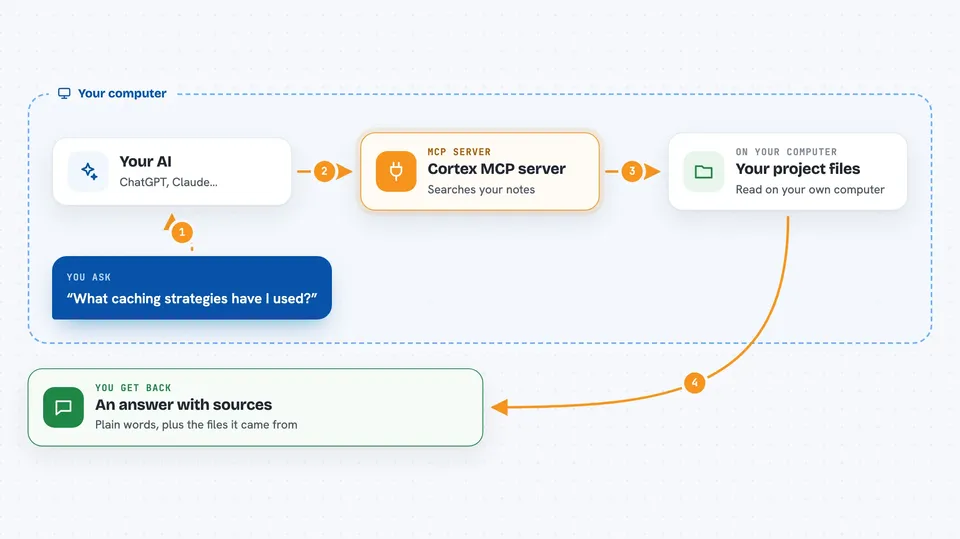
You ask your AI a question about your projects, like what caching strategies you have used. The AI sends that question to the Cortex MCP server running on your computer. Cortex searches its local knowledge graph, which it built by reading your project files and extracting entities like decisions and patterns. It finds relevant pieces and sends them back to your AI, which then writes an answer for you, often with citations to the source files.
 Click to zoom
What you can do with it
- Ask natural language questions about your projects and get answers with source citations
- Look up specific entities like decisions, components, or patterns by name
- List all registered projects and see their status
- Find contradictions between decisions across projects
- Resolve a contradiction when you decide which decision is correct
- Register a new project or remove an old one
- Trigger ingestion of a file to update the knowledge graph
- Get a summary of your current session context
Try asking your AI
- “What decisions have I made about authentication across my projects?”
- “Find all entities related to PostgreSQL.”
- “Are there any contradictions in my project decisions?”
- “Give me a brief summary of my current session context.”
What it gives back to you
You get answers in plain language, often with citations to the files where the information was found. For example, if you ask about caching strategies, the AI might list the strategies and mention which project and file each came from. You can also get lists of projects, entities, or contradictions, and status information about the system.
Before you start
What you need
- Node.js 20 or newer installed on your computer
- An API key for a cloud LLM provider like Anthropic, Google Gemini, DeepSeek, Groq, or any OpenAI-compatible service (or Ollama for local-only mode)
- Cortex installed and set up with at least one project registered
- Claude Code or another MCP-compatible AI tool
Good to know
Cortex can read your project files and send some information to cloud LLMs for processing, so be careful with sensitive data and use the restricted privacy setting for confidential projects.
Install it with your AI
Add Cortex MCP server to your AI, no technical skills needed
You don't install anything by hand. You copy one prompt, paste it into an AI that can work on your computer, and it checks, installs and connects the server for you, asking you when it needs something.
Sign in to get the install prompt
Members get a ready-made prompt that lets the Claude desktop app check Cortex MCP server, install it and connect it for them, step by step. You don't need any technical skills: you copy, paste and answer a few questions. Your connected AI can also find and install any of the 4,361 MCP servers here for you.
Who it's for
Developers and technical team members who work on multiple projects and want to query their own project knowledge easily.