MCP server · Developer tools
WhenLabs When MCP server
by WhenLabs-org
Lets your AI check your project for port clashes, messy .env files, stale docs, license issues and task timing.

WhenLabs When is a small toolkit that plugs six developer checks into your AI assistant. Once it is connected, you can ask your AI to look over your project and it will run the checks for you. It is handy for developers and anyone who keeps a coding project tidy but does not want to run each tool by hand.
What is an MCP server? The 30-second version
On its own, your AI can only chat with you. An MCP server is a small helper program that gives your AI a new skill or a connection to a tool. This one connects your AI to the WhenLabs tools, so it can look at your project files and report back. You ask a question, the AI calls the right tool, and you get an answer in the chat.
What this MCP server does
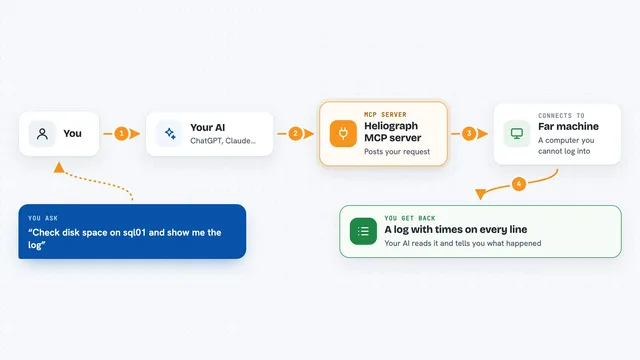
You ask your AI something like whether your project has any port conflicts. The AI passes that request to this helper, which runs the matching WhenLabs check on your files. The check looks at your project, finds issues, and sends the result back. The AI then explains what it found in plain words. You can also ask for a single summary that rolls up all five scanners at once.
 Click to zoom
What you can do with it
- Detect your project stack and refresh AI context files
- Check for port conflicts before starting a dev server
- Validate your .env file against a schema
- Spot documentation that has drifted away from the code
- Scan dependency licenses and compare them to a policy
- Time a coding task and record how long it took
- Get one combined report across all five scanners
Try asking your AI
- “Check my project for port conflicts before I start the dev server”
- “Validate my .env file and tell me what is missing”
- “Scan my dependencies for license problems”
- “Give me a full health report on this project”
What it gives back to you
You get answers in the chat, usually as a short list or a summary. For example, a port check may list which ports are already in use, and a license scan may name the packages that break your policy. The .env check tells you which variables are missing or wrong. The timing tools record how long a task took so you can see it later.
Before you start
What you need
- Node.js 20 or newer
- Claude Code (the desktop or CLI app that supports MCP servers)
- A project folder you want to check
Good to know
Some tools can rewrite your AI context files, so check the changes before you accept them.
Install it with your AI
Add WhenLabs When MCP server to your AI, no technical skills needed
You don't install anything by hand. You copy one prompt, paste it into an AI that can work on your computer, and it checks, installs and connects the server for you, asking you when it needs something.
Sign in to get the install prompt
Members get a ready-made prompt that lets the Claude desktop app check WhenLabs When MCP server, install it and connect it for them, step by step. You don't need any technical skills: you copy, paste and answer a few questions. Your connected AI can also find and install any of the 4,066 MCP servers here for you.
Who it's for
Developers and technical teams who want quick project checks without leaving their AI chat.