
MCP server · Productivity
Wishfinity +W MCP server
by wishfinity
Lets your AI save any product link straight to your Wishfinity wishlist with one click.
This is a small helper that connects your AI assistant to Wishfinity, a universal wishlist site. When your AI suggests a product, it can offer a +W Add to Wishlist link, and one click saves that item to your account. It is handy for anyone who shops online and likes to keep a running list of things they might buy later.
What is an MCP server? The 30-second version
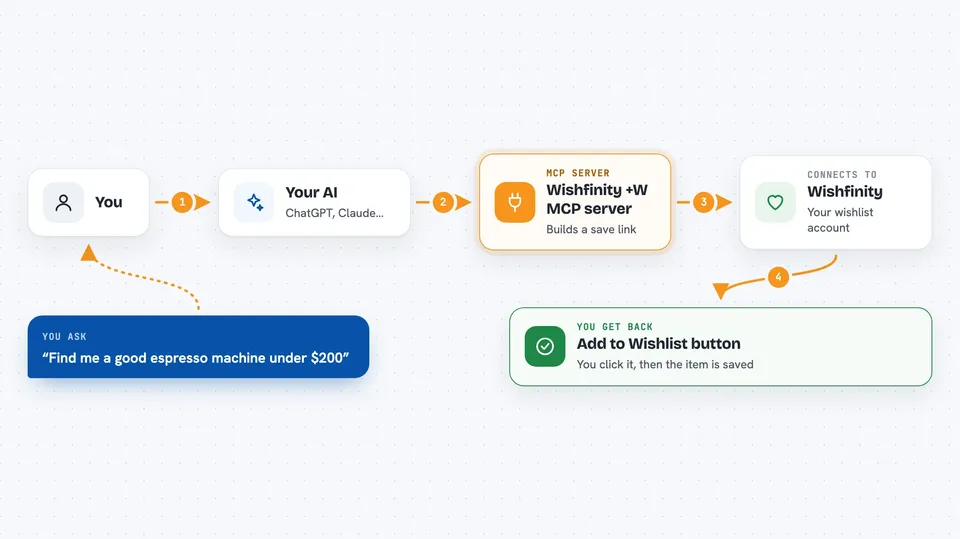
On its own, your AI can only chat with you. An MCP server is a small helper program that gives your AI one new skill, in this case a connection to Wishfinity. Once it is connected, your AI can hand you a ready-made Wishfinity link for any product you are looking at. You click it, and the item lands on your wishlist.
What this MCP server does
You ask your AI to find a product, or it suggests one while you chat. The AI uses this helper to build a special Wishfinity link for that product page. The helper sends the link back into the chat, usually as a button or a clickable line. You click it, log in to Wishfinity the first time, and the product is saved. From there you can organize it, share it, or buy it later.
 Click to zoom
What you can do with it
- Save a product link to your Wishfinity wishlist
- Get a one-click Add to Wishlist button for any item your AI suggests
- Keep a running list of things you want to buy later
- Collect gift ideas for a specific person as you chat
- Park items you are not ready to buy yet
- Share your wishlist with friends or family
Try asking your AI
- “Find me a good espresso machine under $200 and save the best one to my wishlist”
- “Add this Amazon link to my Wishfinity list”
- “I need a birthday gift for my mom who loves gardening, save a few ideas for me”
- “That jacket is a bit expensive right now, save it for later”
What it gives back to you
You get a Wishfinity link back in the chat, usually shown as a button or a short line of text you can click. The link opens Wishfinity with that product ready to add. Nothing is saved until you click and confirm, so you stay in control. After that, the item shows up in your Wishfinity account.
Before you start
What you need
- A free Wishfinity account (you log in the first time you click a saved link)
- An AI app that supports MCP, like Claude Desktop, Cursor, or a similar tool
- Node.js installed if you use the local option (the remote link needs nothing)
Good to know
Nothing is saved to your wishlist until you click the link and confirm on Wishfinity, so you always get the final say.
Install it with your AI
Add Wishfinity +W MCP server to your AI, no technical skills needed
You don't install anything by hand. You copy one prompt, paste it into an AI that can work on your computer, and it checks, installs and connects the server for you, asking you when it needs something.
Sign in to get the install prompt
Members get a ready-made prompt that lets the Claude desktop app check Wishfinity +W MCP server, install it and connect it for them, step by step. You don't need any technical skills: you copy, paste and answer a few questions. Your connected AI can also find and install any of the 4,609 MCP servers here for you.
Who it's for
Anyone who shops online and wants a simple way to keep track of products their AI suggests, especially gift shoppers and people who like to think before they buy.





