MCP server · API
Swagger MCP server
by zaizaizhao
Turns an OpenAPI or Swagger API description into tools your AI can call for you.
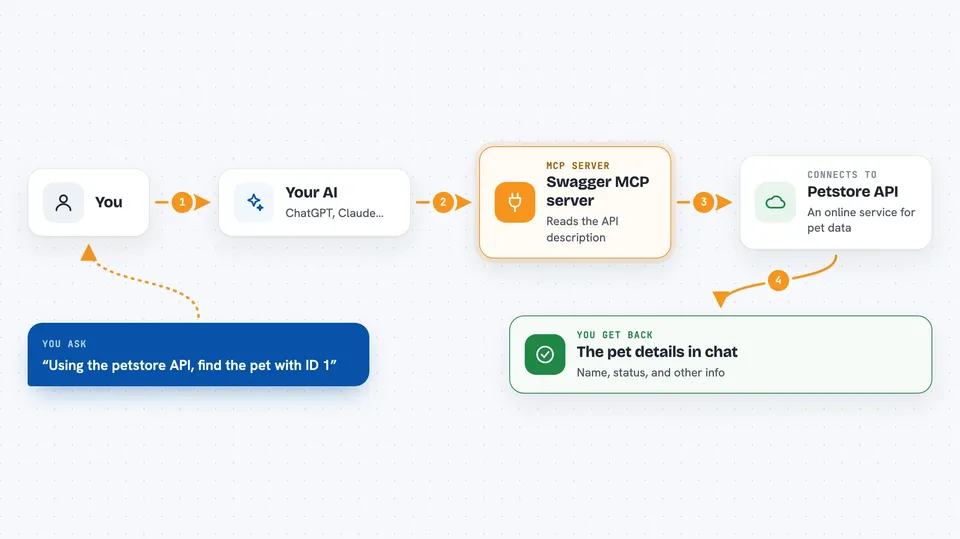
This is a small helper program that reads an API description file (called OpenAPI or Swagger) and turns it into something your AI assistant can use. Instead of you reading API docs and copying requests by hand, you point this at the description and your AI gets a set of tools it can call. It is handy if your team has an internal or public API and you want your AI to fetch or send data through it.
What is an MCP server? The 30-second version
On its own, your AI can only chat. An MCP server is a small helper program that gives your AI a new skill or a connection to an app or service. This one connects your AI to a REST API, which is a way one program talks to another over the internet. Once it is running, your AI can look things up or send things to that API when you ask, without you writing any code.
What this MCP server does
You give it the web address or file path of an OpenAPI or Swagger description. It reads that description and figures out every action the API offers, like getting a user or listing orders. It then presents each of those actions to your AI as a tool it can call. When you ask your AI something, the AI picks the right tool, this helper sends the request to the real API, and the answer comes back to you in the chat. You can also filter which actions are exposed, so only the ones you want are available.
 Click to zoom
What you can do with it
- Point it at any OpenAPI or Swagger description and get AI-callable tools
- Filter which API actions are exposed by method, path, or operation ID
- Protect requests with a Bearer token or custom headers
- Run it locally over stdio, or as a small server over SSE or Streamable
- Load settings from a config file or a .env file
- Watch the description file and reload when it changes
Try asking your AI
- “Using the petstore API, find the pet with ID 1”
- “List the first 10 orders from our internal API”
- “Create a new user named Alex in the test API”
- “What endpoints does the orders API expose for GET requests”
What it gives back to you
You get answers in plain chat, built from whatever the API sent back. That might be a list of items, a single record, a status message, or a confirmation that something was created or updated. If the API returns an error, you will usually see that error explained in the chat too.
Before you start
What you need
- Node.js version 20 or newer installed on your computer
- The web address or file path of an OpenAPI or Swagger description
- A Bearer token or API key if the API needs one (a kind of password the API provider gives you)
Good to know
It can send real requests to the API it is pointed at, so if the API can create, change, or delete data, your AI could do that too when you ask.
Install it with your AI
Add Swagger MCP server to your AI, no technical skills needed
You don't install anything by hand. You copy one prompt, paste it into an AI that can work on your computer, and it checks, installs and connects the server for you, asking you when it needs something.
Sign in to get the install prompt
Members get a ready-made prompt that lets the Claude desktop app check Swagger MCP server, install it and connect it for them, step by step. You don't need any technical skills: you copy, paste and answer a few questions. Your connected AI can also find and install any of the 4,361 MCP servers here for you.
Who it's for
Developers and technical folks who work with APIs and want their AI assistant to call those APIs for them.