
MCP server · Productivity
Date and Time MCP server
by ZeparHyfar
Lets your AI tell you the current date and time in many formats, including Japanese and filename styles.
This is a small helper that gives your AI assistant the current date and time. It can hand back the date in lots of different styles, like 2024-12-10, 2024/12/10, or a Japanese style like 2024年12月10日. It is handy if you often need today's date for file names, logs, or notes and do not want to type it yourself.
What is an MCP server? The 30-second version
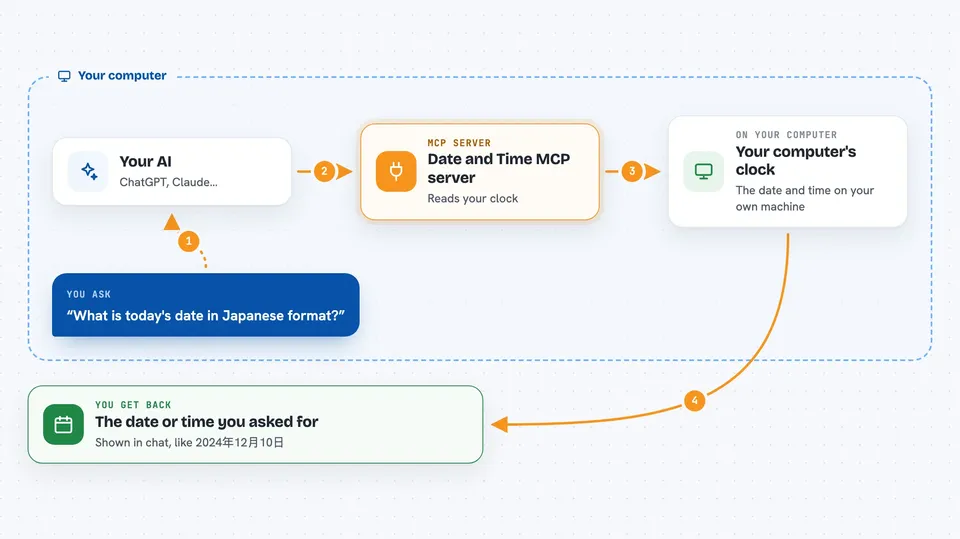
On its own, your AI can only chat with you using what it already learned. An MCP server is a small helper program that gives your AI one new skill or a connection to something outside the chat. This one connects your AI to your computer's clock, so it can look up the real current date and time for you. When you ask for the date, your AI quietly asks this helper and then tells you the answer.
What this MCP server does
You ask your AI something like what is today's date or give me the time in Japanese format. Your AI passes that request to this helper program running on your computer. The helper reads your computer's clock, picks the format you asked for, and sends the result back. Your AI then shows you the formatted date or time right in the chat. It is a simple one-step lookup, nothing more.
 Click to zoom
What you can do with it
- Get today's date in a standard format like 2024-12-10
- Get the current time with hours, minutes, and seconds
- Get the date in Japanese style like 2024年12月10日
- Get a compact timestamp for file names, like 20241210005401.md
- Get an ISO format date and time for technical use
- Get a log-style timestamp with microseconds
Try asking your AI
- “What is today's date in the date_slash format?”
- “Please give me the current time in Japanese format.”
- “I need a filename timestamp for a markdown file.”
- “What is the current date and time in ISO format?”
What it gives back to you
You get back a short piece of text with the date, the time, or both, in the format you asked for. For example, you might see 2024/12/12 or 2024年12月10日 00時54分01秒 in the chat. It does not change anything on your computer, it just tells you the answer.
Before you start
What you need
- The Claude desktop app
- Python 3.12 or later installed on your computer
- The uv and uvx tools installed (they help run small Python programs)
Good to know
It only reads your computer's clock and does not change anything, so there is nothing risky to watch out for.
Install it with your AI
Add Date and Time MCP server to your AI, no technical skills needed
You don't install anything by hand. You copy one prompt, paste it into an AI that can work on your computer, and it checks, installs and connects the server for you, asking you when it needs something.
Sign in to get the install prompt
Members get a ready-made prompt that lets the Claude desktop app check Date and Time MCP server, install it and connect it for them, step by step. You don't need any technical skills: you copy, paste and answer a few questions. Your connected AI can also find and install any of the 4,609 MCP servers here for you.
Who it's for
Anyone who often needs the current date or time in a specific format, like writers naming files, people keeping logs, or anyone working with Japanese dates.





