MCP server · Analytics
LLM Usage & Cost Tracker MCP server
by zhaoyue722
Ask your AI how much you spent on Claude, GPT, Qwen or DeepSeek, and which model is cheapest.
This is a small helper that keeps a record of what your AI calls cost. It watches the calls you make to Anthropic, OpenAI, Qwen and DeepSeek, saves the numbers in a file on your own computer, and lets you ask your AI questions about your spending in plain English. It is handy if you use more than one AI provider and want to stop guessing what the monthly bill will be.
What is an MCP server? The 30-second version
On its own, your AI can only chat. It cannot see your bills or your spending history. An MCP server is a small helper program that gives your AI a new skill, and this one gives it a connection to your own usage records. Once it is connected, your AI can look up what you spent, compare providers, and suggest cheaper models when you ask.
What this MCP server does
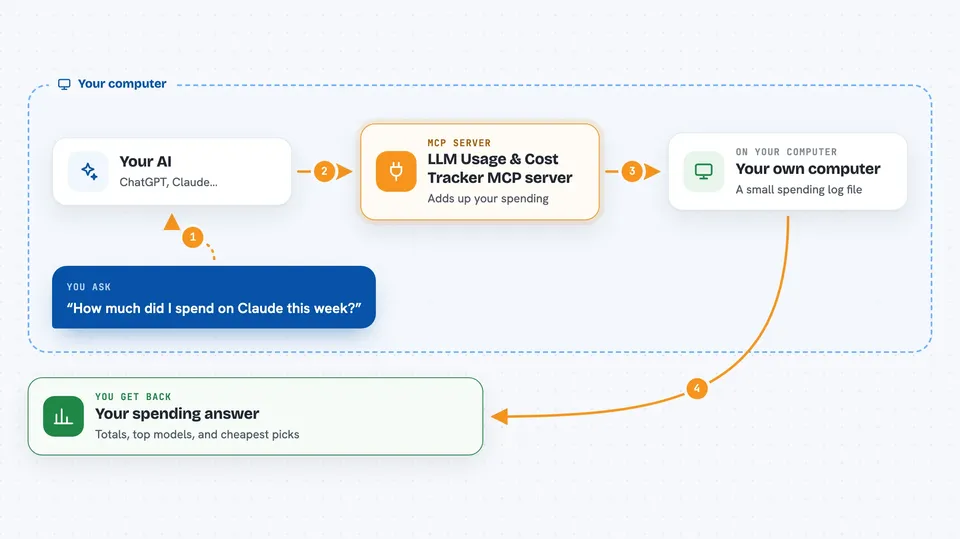
You ask your AI something like how much you spent on Claude this week. Your AI uses this helper to look inside a small database file on your computer where every call has been recorded. The helper adds up the tokens and the cost for the time window you asked about, using the current prices for each provider. Then your AI reads the answer back to you in the chat, in plain words and numbers.
 Click to zoom
What you can do with it
- See your total spend for today, this week, this month or this year
- Break your spending down by provider, model, project or day
- Compare what the same call would cost across every priced model
- Find the cheapest model that fits a budget you set
- Look up the current price per million tokens for any model
- List which providers are set up on your machine
- Log a call by hand when it was not captured automatically
Try asking your AI
- “How much did I spend on Anthropic today?”
- “Show me my spend this month grouped by model.”
- “Which provider is cheapest for a 10k input and 2k output call?”
- “I have 4 cents left, which model should I use for a 1k by 1k call?”
What it gives back to you
You get back plain answers in the chat: totals in dollars, lists of your top providers and models, and the largest single call. When you ask for a comparison, you get a ranked list of models with their projected cost and how much more expensive each one is than the cheapest. When you ask for a recommendation, you get one model plus two backups and a short note explaining why.
Before you start
What you need
- Python 3.10 or newer
- The uv tool (or pipx) to install the package
- At least one API key for the provider you use, like ANTHROPIC_API_KEY or OPENAI_API_KEY
- The capture proxy running so your calls get recorded
Good to know
It only reads and records numbers, it does not send or change your AI calls, but the database file sits on your computer, so keep it private if your usage details are sensitive.
Install it with your AI
Add LLM Usage & Cost Tracker MCP server to your AI, no technical skills needed
You don't install anything by hand. You copy one prompt, paste it into an AI that can work on your computer, and it checks, installs and connects the server for you, asking you when it needs something.
Sign in to get the install prompt
Members get a ready-made prompt that lets the Claude desktop app check LLM Usage & Cost Tracker MCP server, install it and connect it for them, step by step. You don't need any technical skills: you copy, paste and answer a few questions. Your connected AI can also find and install any of the 4,609 MCP servers here for you.
Who it's for
Anyone who pays for more than one AI provider and wants a simple, private way to see what they are actually spending.