
MCP server · Developer tools
VMware VKS MCP server
by zw008
Lets your AI manage VMware vSphere Kubernetes Service clusters, namespaces, and kubeconfigs for you.
This is a helper that connects your AI assistant to VMware vSphere Kubernetes Service, often called VKS or Tanzu. It lets you ask your AI in plain words to look at your Supervisor cluster, create or change namespaces, and set up or scale Kubernetes clusters. It is handy for anyone who runs VMware and wants to do these chores without clicking through vCenter or typing long commands.
What is an MCP server? The 30-second version
On its own, your AI can only chat. An MCP server is a small helper program that gives your AI a new skill or a connection to another system. This one connects your AI to your VMware vSphere environment, so it can look up your Supervisor cluster, namespaces, and Kubernetes clusters, and make changes when you ask. You install it once, point it at your vCenter, and then just talk to your AI.
What this MCP server does
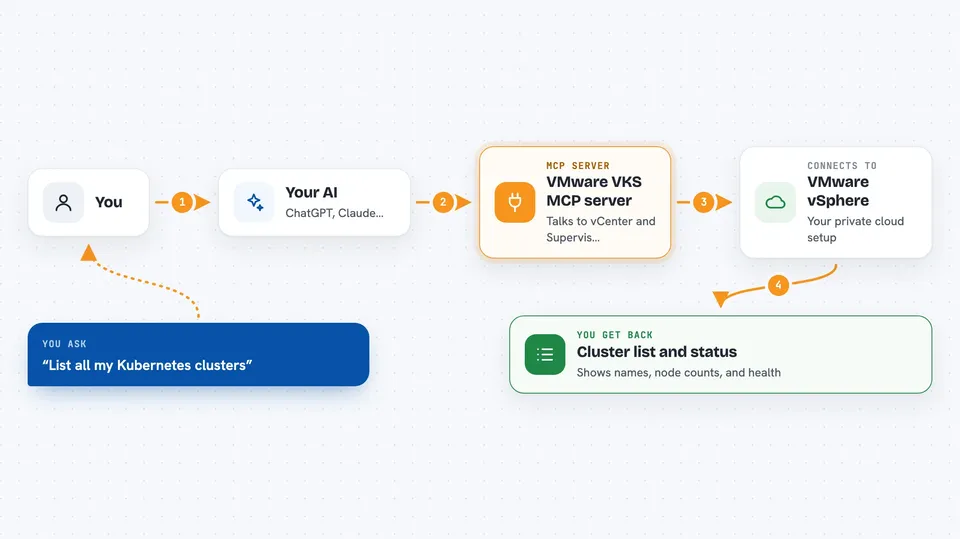
You ask your AI something like "list my Kubernetes clusters" or "create a namespace called dev". Your AI passes that request to this helper program. The helper talks to your vCenter and to the Supervisor Kubernetes API, using the credentials you set up. It brings the answer back into the chat, or, for changes, shows you a preview first and waits for your go-ahead before doing anything.
 Click to zoom
What you can do with it
- Check whether your vCenter and Supervisor are ready for VKS
- List your vSphere namespaces and their quotas
- Create, update, or delete a namespace
- List, create, scale, upgrade, or delete Kubernetes clusters
- List the Kubernetes versions and VM sizes you can use
- Get a kubeconfig file so you can connect to a cluster
- Check storage usage and the built-in Harbor registry
Try asking your AI
- “Check if my vCenter is ready for VKS”
- “List all my Kubernetes clusters”
- “Create a namespace called dev with 16 GHz CPU and 32 GB memory”
- “Scale the workers on dev-cluster to 6”
- “Get the kubeconfig for dev-cluster and save it to my home folder”
What it gives back to you
You get clear answers in the chat: lists of namespaces or clusters with their status, details like node counts and health, available Kubernetes versions, and storage numbers. When you ask for a change, it first shows you a preview of what would happen, including what would be created or destroyed. Once you confirm, it makes the change and tells you what it did. Kubeconfigs can be shown in the chat or saved to a file only you can read.
Before you start
What you need
- Python 3.10 or newer
- vSphere 8.0 or newer with Workload Management turned on
- A vSphere Kubernetes Service license (Enterprise Plus or VMware Cloud Foundation)
- Your vCenter host name, username, and password
Good to know
It can create, change, and delete namespaces and Kubernetes clusters, so always read the preview it shows before you confirm.
Install it with your AI
Add VMware VKS MCP server to your AI, no technical skills needed
You don't install anything by hand. You copy one prompt, paste it into an AI that can work on your computer, and it checks, installs and connects the server for you, asking you when it needs something.
Sign in to get the install prompt
Members get a ready-made prompt that lets the Claude desktop app check VMware VKS MCP server, install it and connect it for them, step by step. You don't need any technical skills: you copy, paste and answer a few questions. Your connected AI can also find and install any of the 4,609 MCP servers here for you.
Who it's for
VMware administrators and platform engineers who manage vSphere Kubernetes Service and want to do everyday tasks by chatting with an AI instead of clicking through vCenter.



