AI agent for electrical engineers
Engineering Design Document Agent
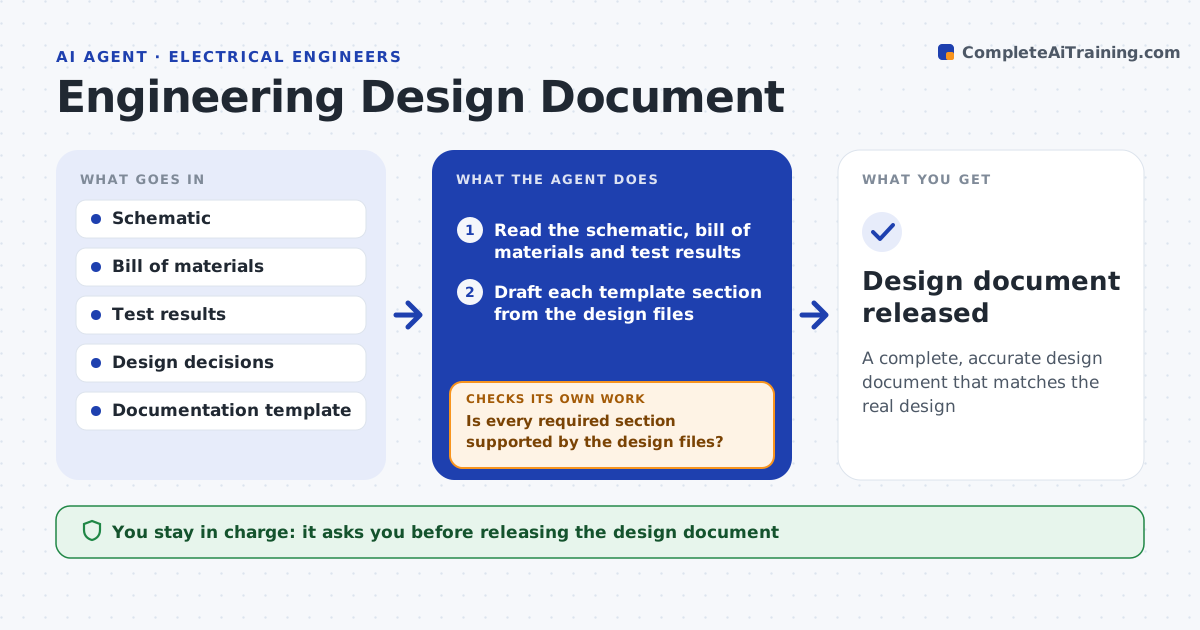
A complete, accurate design document that matches the real design
What it does
Design documentation is usually written last and rushed, so it misses details the next engineer needs. This agent drafts the design document from the actual design files: architecture, key decisions and why, interfaces, power and timing, and known limitations. It pulls values from the schematic, bill of materials and test results so the document matches reality. It checks the draft against your template for required sections. Where it cannot find something, such as the reason for a design choice, it asks the engineer a specific question and fills the gap after the answer. It then cross-checks every value against the latest schematic. You approve the document for release. Edge case: a value in an older note that conflicts with the latest schematic is flagged, because the design may have changed since.
How it works
Follow the arrows from top to bottom. The orange dashed arrow is the loop: when a check fails, the agent goes back and tries again.
Read the steps as a list
- Design reaches a documentation milestone
- Read the schematic, bill of materials and test results
- Draft each template section from the design files
- Is every required section supported by the design files?If not: flag the gap with a question to the engineer and fill it after the answer. Back to step 3.
- Cross-check every value against the latest schematic
- Do all values match the current design?If not: flag each conflict and use the schematic value. Back to step 5.
- Prepare the document and a list of open items for review
- Engineer approves the documentThe agent waits here for your OK.
- Design document released
How it decides
It fills the template from the design files and flags any required section it cannot support with a source rather than inventing content.
- Pull values from source files, not memory
- Flag missing rationale rather than inventing it
- Flag values that conflict with the latest design
Make it yours
Every agent is a starting point. You choose these settings for your own situation.
- Documentation template and sections
- Source files to pull from
- Detail level
- Review and release process
What keeps you in control
It always asks you first
- Releasing the design document
Hard limits
- Does not invent decisions or values
- Does not release without approval
It stops when
- Done: document complete and approved
- Stop: design files are not accessible
Set it up
We guide you through the set-up, step by step
Members get the full set-up guide for this agent. No technical skills needed: you copy, paste and upload.
- One set of instructions to paste into your AI, with the clicks for ChatGPT, Claude, Microsoft 365 Copilot, Gemini and Grok
- The agent then walks you through connecting your own data, one source at a time
- A downloadable copy with the flow chart, the rules and the full guide