AI agent for field service technicians
Maintenance Contract Visit Planner Agent
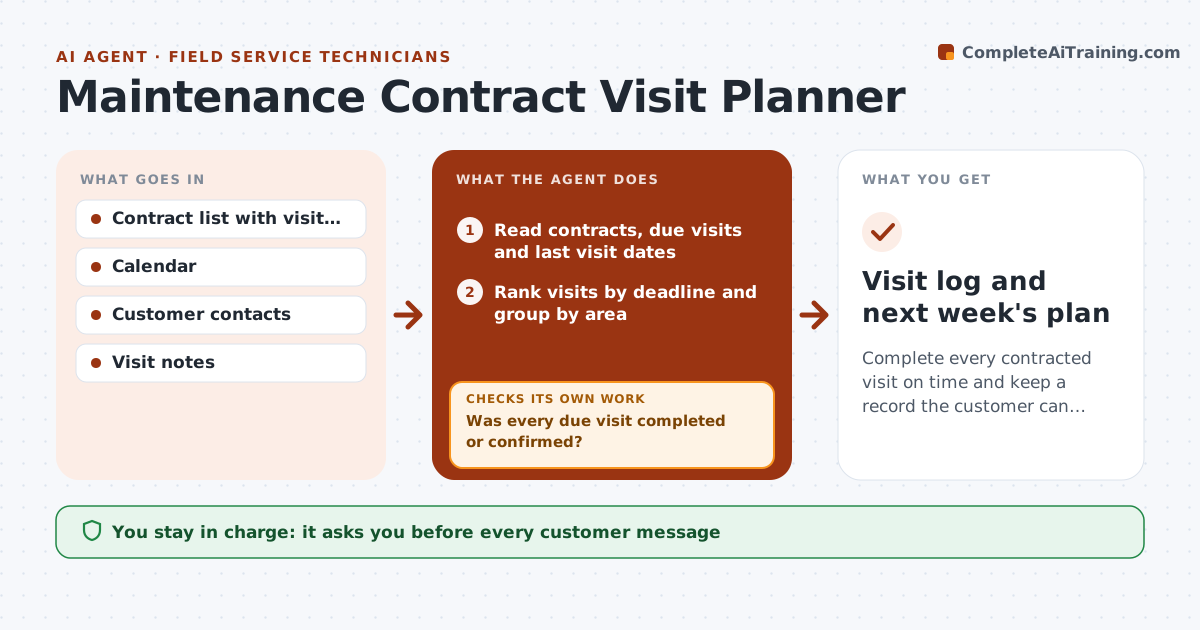
Complete every contracted visit on time and keep a record the customer can see.
What it does
Service agreements promise visits, and busy weeks push them aside until a customer calls to ask why they paid. This agent lists every contract with its due visits and last visit date. It groups the due jobs by area, builds a route plan around your calendar, and drafts a confirmation to each customer. After each visit, it logs what was done from your notes. If a visit is missed or the customer declines the slot, it reschedules and checks that the new date still falls inside the contract period. You approve every customer message. Edge case: an annual boiler service falls due in a month with two holidays, and the agent starts offering slots early.
How it works
Follow the arrows from top to bottom. The orange dashed arrow is the loop: when a check fails, the agent goes back and tries again.
Read the steps as a list
- Weekly planning starts
- Read contracts, due visits and last visit dates
- Rank visits by deadline and group by area
- Build a route plan around the calendar
- Draft a confirmation message for each customer
- Owner approves the customer messages before they are sentThe agent waits here for your OK.
- Log what was done after each visit from your notes
- Was every due visit completed or confirmed?If not: Reschedule missed or declined visits inside the contract period. Back to step 3.
- Check the new date against the contract end
- Does the new date meet the contract terms?If not: Offer an earlier slot and alert the owner. Back to step 4.
- Visit log and next week's plan
How it decides
It prioritizes visits by how close they are to the contract deadline, then groups them by area to cut travel time.
- Visits due within 30 days get booked first (default)
- Group visits within a 10 km area (default)
- Reschedule within 7 days after a miss
- Never schedule past the contract deadline without owner approval
Make it yours
Every agent is a starting point. You choose these settings for your own situation.
- Planning day (default Monday)
- Visit priority window (default 30 days)
- Area grouping distance
- Message tone
- Reschedule window (default 7 days)
What keeps you in control
It always asks you first
- Every customer message
- Any visit outside the contract period
Hard limits
- Never sends messages without approval
- Never changes contract terms
- Keeps the customer log private
It stops when
- Done: all due visits completed or confirmed
- Stop: customer unreachable after 3 tries; the owner calls
Set it up
We guide you through the set-up, step by step
Members get the full set-up guide for this agent. No technical skills needed: you copy, paste and upload.
- One set of instructions to paste into your AI, with the clicks for ChatGPT, Claude, Microsoft 365 Copilot, Gemini and Grok
- The agent then walks you through connecting your own data, one source at a time
- A downloadable copy with the flow chart, the rules and the full guide