AI agent for it consultants
Managed Service Handover Agent
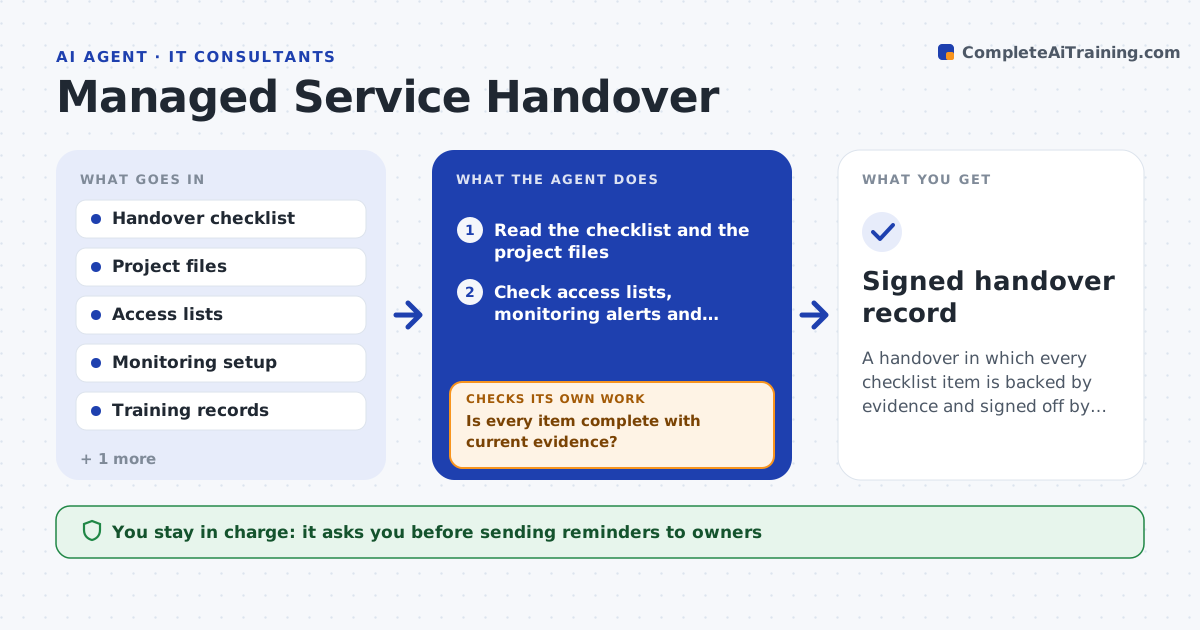
A handover in which every checklist item is backed by evidence and signed off by both sides
What it does
A project goes live on Friday and on Monday the support team finds it has no runbook, no admin access and no monitoring. This agent takes the handover checklist and checks each item against the real evidence: documents in the project files, access lists in the directory, alerts in the monitoring tool and training attendance. It builds a list of gaps, assigns each to an owner and chases them by email with the specific item missing. After each reply, it rechecks the evidence rather than trusting the answer, and loops until every item is complete or the owner explains why not. The consultant and the client sign off the handover. Edge case: a document that exists but is dated before a major change is flagged as outdated, not accepted.
How it works
Follow the arrows from top to bottom. The orange dashed arrow is the loop: when a check fails, the agent goes back and tries again.
Read the steps as a list
- Handover window opens before go-live
- Read the checklist and the project files
- Check access lists, monitoring alerts and training attendance
- List each item as complete, outdated or missing
- Assign each gap to an owner and draft a reminder
- Consultant approves sending remindersThe agent waits here for your OK.
- Send reminders and track replies
- Recheck the evidence after each reply
- Is every item complete with current evidence?If not: update the gap list and chase the open items again. Back to step 4.
- Consultant and client sign off the handoverThe agent waits here for your OK.
- Signed handover record
How it decides
An item is complete only when the evidence is found and current. A claim without evidence stays open.
- Accept only evidence dated after the last major change
- Escalate items open within 5 days of go-live
- Require access for at least 2 support staff per system
- Count a monitoring alert as done only if it has fired in a test
Make it yours
Every agent is a starting point. You choose these settings for your own situation.
- Checklist items for your projects
- Evidence age rule
- Reminder cadence (default daily in the last 2 weeks)
- Who signs off for the client
What keeps you in control
It always asks you first
- Sending reminders to owners
- Handover sign-off by consultant and client
Hard limits
- Never grants access itself
- Never marks an item complete without evidence
It stops when
- Done: all items complete and signed off
- Stop: the client refuses to provide access for support
Set it up
We guide you through the set-up, step by step
Members get the full set-up guide for this agent. No technical skills needed: you copy, paste and upload.
- One set of instructions to paste into your AI, with the clicks for ChatGPT, Claude, Microsoft 365 Copilot, Gemini and Grok
- The agent then walks you through connecting your own data, one source at a time
- A downloadable copy with the flow chart, the rules and the full guide