AI agent for industrial designers
Prototype Test Round Agent
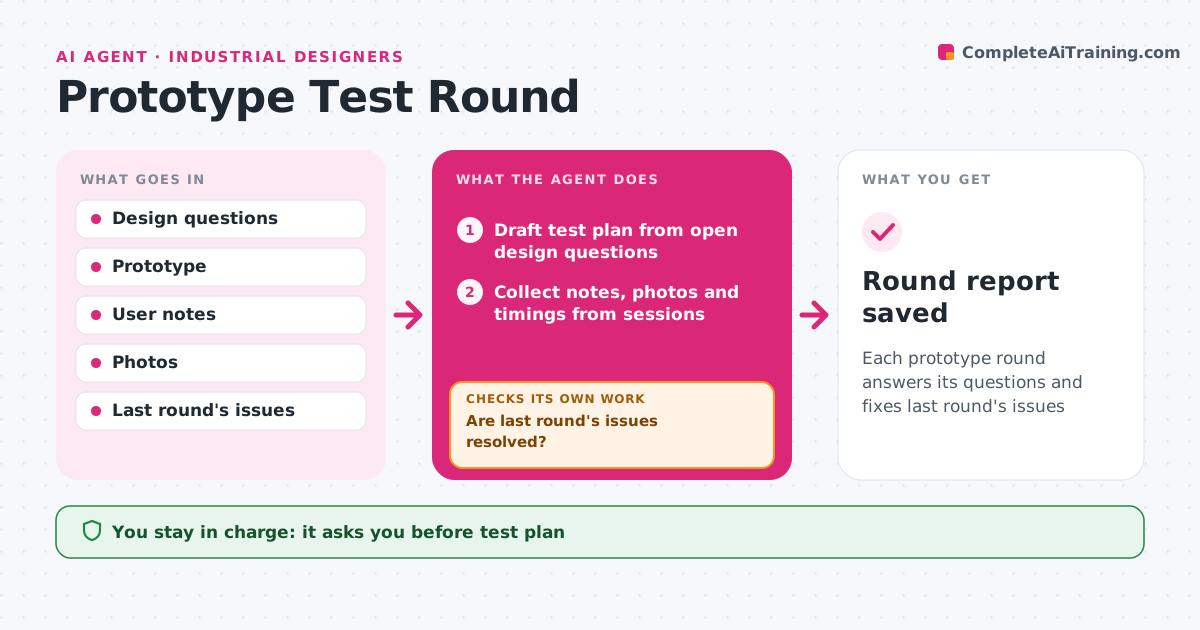
Each prototype round answers its questions and fixes last round's issues
What it does
Prototype rounds waste time when the same issues reappear and nobody notices. For each round, this agent drafts a test plan from open design questions: tasks for users, what to observe and what counts as success. During and after the sessions it collects notes, photos and timings. It summarizes issues by severity and links each to the design question. It then checks whether last round's issues are fixed in this prototype. Issues that reappear are escalated to the top of the list. It drafts the list of design changes for the next round. The designer decides what to change. Edge case: an issue seen in only one user who misused the product is kept as a note, not turned into a design change.
How it works
Follow the arrows from top to bottom. The orange dashed arrow is the loop: when a check fails, the agent goes back and tries again.
Read the steps as a list
- Prototype ready
- Draft test plan from open design questions
- Designer approves the planThe agent waits here for your OK.
- Collect notes, photos and timings from sessions
- Summarize issues by severity
- Are last round's issues resolved?If not: escalate repeat issues to the top of the change list. Back to step 5.
- Draft change list for the next round
- Round report saved
How it decides
It ranks issues by severity and how many users hit them, and tracks whether earlier issues are fixed.
- Severity from task failure, then frustration, then preference
- Repeat issues go to the top
- Single misuse cases stay as notes
Make it yours
Every agent is a starting point. You choose these settings for your own situation.
- Severity scale
- Users per round
- Report template
- Where findings are stored
What keeps you in control
It always asks you first
- Test plan
- Design changes
Hard limits
- Never shares user identities
- Never changes CAD
It stops when
- Done: round closed
- Stop: prototype not working well enough to test
Set it up
We guide you through the set-up, step by step
Members get the full set-up guide for this agent. No technical skills needed: you copy, paste and upload.
- One set of instructions to paste into your AI, with the clicks for ChatGPT, Claude, Microsoft 365 Copilot, Gemini and Grok
- The agent then walks you through connecting your own data, one source at a time
- A downloadable copy with the flow chart, the rules and the full guide