AI agent for salesforce administrators
Role and Permission Test Agent
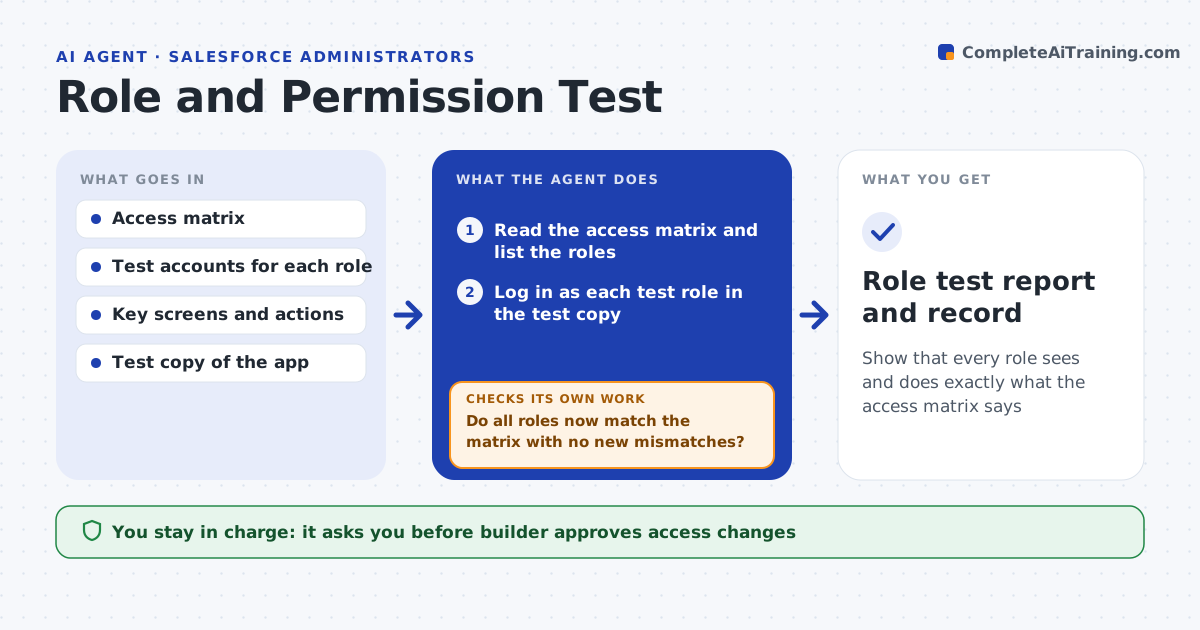
Show that every role sees and does exactly what the access matrix says
What it does
A new field is visible to every role, or a delete button appears for interns. This agent logs in as each test role in a test copy, walks the key screens and actions, and records what it can see, edit and delete. It compares the result with the access matrix that says what each role should be able to do, and lists every mismatch: too much access, too little access and hidden data that appears in a report or export. After the builder changes the access rules, it reruns the same tests and a sample of the others. It keeps a record of passing runs. The builder approves access changes. Edge case: a role can see a record through a shared report even if the object permission blocks it, so the agent tests reports and exports too.
How it works
Follow the arrows from top to bottom. The orange dashed arrow is the loop: when a check fails, the agent goes back and tries again.
Read the steps as a list
- Release or access change
- Read the access matrix and list the roles
- Log in as each test role in the test copy
- Walk screens, actions, reports and exports
- Compare observed access with the matrix
- List mismatches ranked by risk
- Builder approves access changesThe agent waits here for your OK.
- Builder applies the changes; agent reruns the failed tests and a sample
- Do all roles now match the matrix with no new mismatches?If not: list the remaining and new mismatches and test again. Back to step 3.
- Role test report and record
How it decides
It marks any difference between observed and expected access as a mismatch and ranks too much access above too little.
- Rank access to personal or financial data above all other mismatches
- Test reports, exports and search as well as screens
- Rerun 20% of the passing tests after any change
- Treat any extra delete rights as high risk
Make it yours
Every agent is a starting point. You choose these settings for your own situation.
- Roles and test accounts
- Key screens and actions
- Access matrix location
- Sample size for reruns (default 20%)
- Report format
What keeps you in control
It always asks you first
- Builder approves access changes
- Data owner approves any change to who can see sensitive data
Hard limits
- Use only test accounts and test data
- Never change access rules without approval
It stops when
- Done: every role matches the matrix
- Stop: the matrix itself is unclear and the owner must decide
Set it up
We guide you through the set-up, step by step
Members get the full set-up guide for this agent. No technical skills needed: you copy, paste and upload.
- One set of instructions to paste into your AI, with the clicks for ChatGPT, Claude, Microsoft 365 Copilot, Gemini and Grok
- The agent then walks you through connecting your own data, one source at a time
- A downloadable copy with the flow chart, the rules and the full guide