
MCP server · Research
Job Searchoor MCP server
by 0xDAEF0F
Lets your AI search job listings by date, keywords, and remote work, right inside the chat.
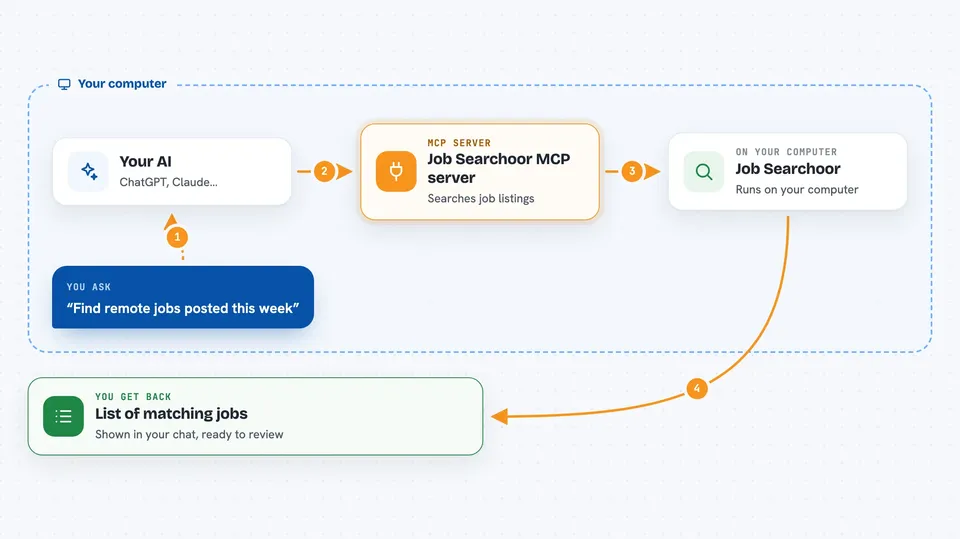
Job Searchoor is a small helper that connects your AI assistant to a job search service. Once it is set up, you can ask your AI for jobs and it will go and look them up for you. It is handy if you are job hunting and want to check what is new without opening a dozen websites.
What is an MCP server? The 30-second version
On its own, your AI can only chat with you using what it already knows. An MCP server is a small helper program that gives your AI a new skill or a connection to an app or service. This one connects your AI to a job search service, so it can look up job listings for you when you ask. You do not have to understand how it works inside. You just install it once and then talk to your AI like normal.
What this MCP server does
You ask your AI something like find me remote jobs posted this week. Your AI passes that request to this helper. The helper talks to the job search service and pulls back matching listings. Then your AI shows you the results in the chat, filtered the way you asked. You can ask again with different words or a different time window and get a fresh list.
 Click to zoom
What you can do with it
- Find jobs posted in the last day or the last week
- Filter jobs by keywords you care about
- Exclude jobs with words you do not want to see
- Show only remote jobs
- Combine filters, like remote jobs about writing posted this week
- Ask follow-up questions about the jobs it found
Try asking your AI
- “Find remote jobs posted in the last week”
- “Show me jobs from the last day with the keyword designer”
- “Look for jobs about marketing but exclude ones mentioning senior”
- “Any new remote jobs this week about customer support”
What it gives back to you
You get a list of job listings in the chat. Each one usually includes the title and some details about the job. Your AI can then summarize them, group them, or help you pick which ones to look at first. It does not apply to jobs for you. It just finds and shows them.
Before you start
What you need
- The Claude desktop app or another AI app that supports MCP servers
- Node.js installed on your computer (the free program that runs this helper)
Good to know
It only reads job listings, so it will not apply to jobs or change anything for you, but always check the listing on the original site before you trust the details.
Install it with your AI
Add Job Searchoor MCP server to your AI, no technical skills needed
You don't install anything by hand. You copy one prompt, paste it into an AI that can work on your computer, and it checks, installs and connects the server for you, asking you when it needs something.
Sign in to get the install prompt
Members get a ready-made prompt that lets the Claude desktop app check Job Searchoor MCP server, install it and connect it for them, step by step. You don't need any technical skills: you copy, paste and answer a few questions. Your connected AI can also find and install any of the 4,609 MCP servers here for you.
Who it's for
Job seekers and anyone who wants to keep an eye on new openings without checking job boards by hand.


