MCP server · Research
Bilibili MCP server
by 34892002
Let your AI search Bilibili videos, hot lists, video details, and uploader info for you.
This is a small helper that connects your AI assistant to Bilibili, the Chinese video site. Once it is set up, you can just ask your AI to find videos, check what is trending, or look up a creator, and it will go and fetch that for you. It is handy if you often dig around Bilibili for videos, anime schedules, or creator info.
What is an MCP server? The 30-second version
On its own, your AI can only chat with you using what it already knows. An MCP server is a small helper program that gives your AI a new skill or a connection to an app or service. This one connects your AI to Bilibili, so when you ask about videos or creators there, the AI can actually look things up instead of guessing. You stay in your normal chat window; the helper does the running around behind the scenes.
What this MCP server does
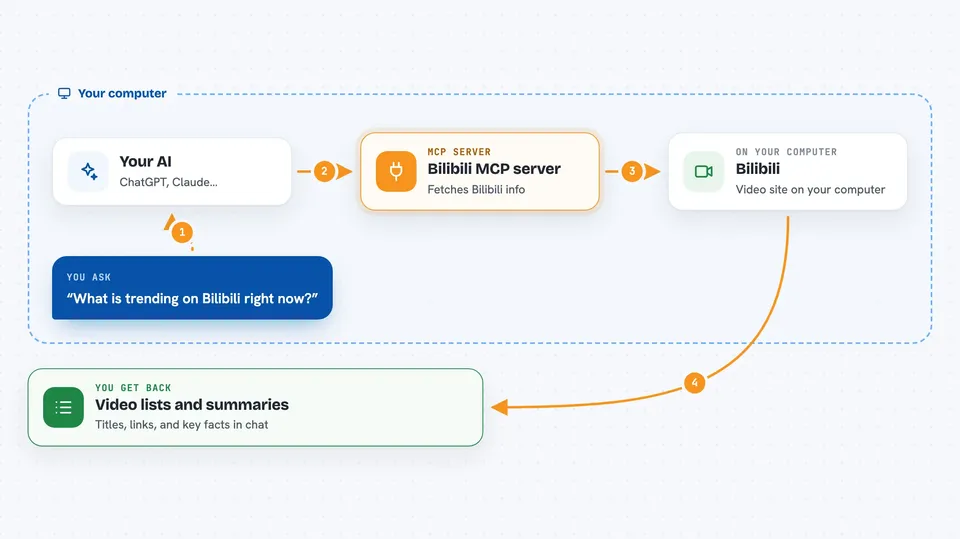
You type a request in plain words, like asking for videos about a topic or the current hot list. Your AI passes that request to this helper program running on your computer. The helper then talks to Bilibili and pulls back the matching results, such as a list of videos with titles and links, details for one video, or info about an uploader. Your AI then shows you that information in the chat in a readable way. You never have to open Bilibili yourself unless you want to watch something.
 Click to zoom
What you can do with it
- Search Bilibili for videos by keyword
- See what is currently trending on Bilibili
- Look up details for a specific video by its BV or AV number
- Get basic info about an uploader, like follower count
- Check the anime broadcast schedule for a date range
- Browse the all-site music chart
Try asking your AI
- “Find me some Bilibili videos about learning Japanese”
- “What is trending on Bilibili right now?”
- “Show me the details for this Bilibili video BV1xx411c7mD”
- “What anime is airing on Bilibili this week?”
What it gives back to you
You get back lists and short summaries right in the chat. For a search, that means video titles with links and maybe a short description. For a video or uploader lookup, you get the key facts like title, uploader, and follower count. For trending or schedules, you get a tidy list you can scan.
Before you start
What you need
- Node.js version 20.12.0 or newer installed on your computer
- An AI app that supports MCP servers, like Trae or Claude Desktop
Good to know
It only reads public Bilibili information, so it will not post, comment, or change anything on your account.
Install it with your AI
Add Bilibili MCP server to your AI, no technical skills needed
You don't install anything by hand. You copy one prompt, paste it into an AI that can work on your computer, and it checks, installs and connects the server for you, asking you when it needs something.
Sign in to get the install prompt
Members get a ready-made prompt that lets the Claude desktop app check Bilibili MCP server, install it and connect it for them, step by step. You don't need any technical skills: you copy, paste and answer a few questions. Your connected AI can also find and install any of the 4,609 MCP servers here for you.
Who it's for
Anyone who watches or searches Bilibili a lot and wants their AI to do the looking up for them.