
MCP server · Productivity
JobGPT MCP server
by 6figr-com
Let your AI search jobs, auto-apply, tailor resumes, and track applications for you.
This is a helper that connects your AI assistant to JobGPT, a job search platform. Once it is connected, you can ask your AI in plain words to find jobs, apply to them, or write a resume for a specific opening. It is handy if you are job hunting and already use a tool like Claude, ChatGPT, or Cursor.
What is an MCP server? The 30-second version
On its own, your AI can only chat with you. An MCP server is a small helper program that gives your AI a new skill or a connection to an app or service. This one connects your AI to JobGPT, so it can look up jobs, send applications, and manage your resumes for you. You just ask in normal words, and the AI uses this helper behind the scenes.
What this MCP server does
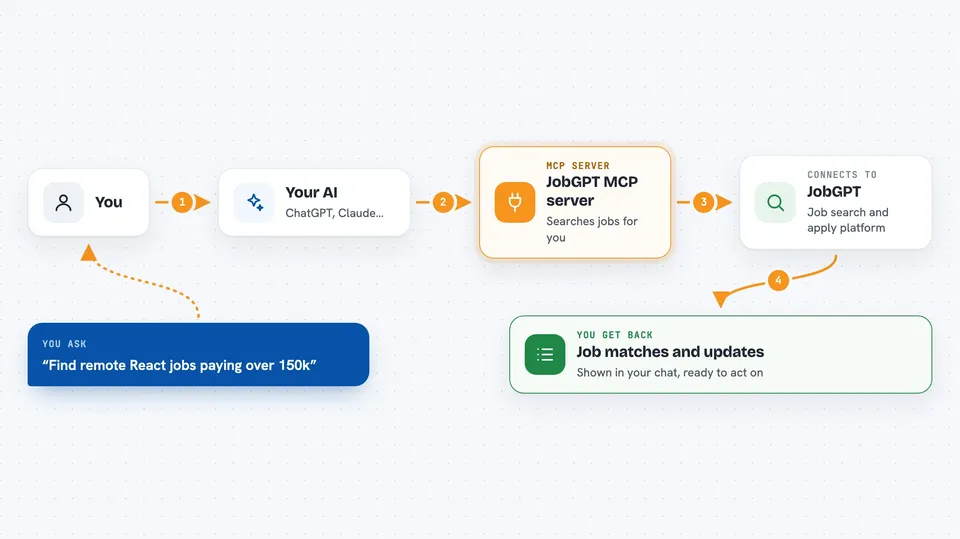
You ask your AI something like find remote React jobs paying over 150k. The AI passes that request to this JobGPT helper. The helper talks to the JobGPT platform, which searches its job listings and your saved job hunts. Then it sends the results back, and your AI shows them to you in the chat. For actions like applying or generating a resume, the helper carries out the task on JobGPT and tells you what it did.
 Click to zoom
What you can do with it
- Search jobs by title, location, company, skills, salary, remote, or visa sponsorship
- Auto-apply to jobs from a saved job hunt
- Generate a tailored resume for a specific application
- Import a job from a link on LinkedIn, Greenhouse, Lever, or Workday
- Track your applications and see stats by status
- Find recruiters or referrers for a job and send an outreach email
- Check your remaining credits balance
Try asking your AI
- “Find remote senior React jobs paying over $150k”
- “Auto-apply to the top 5 matches from my job hunt”
- “Generate a tailored resume for this Google application”
- “Show my application stats for the last 7 days”
What it gives back to you
You get back lists of jobs, application details, stats, resume download links, or recruiter names, depending on what you asked. The AI shows these as text in your chat, sometimes as a table or bullet list. When it applies to a job or sends an email, it tells you that the action was done. You can then ask follow-up questions or give new instructions.
Before you start
What you need
- A JobGPT account at 6figr.com
- An API key from your 6figr account page (a kind of password for apps; the site gives you one for free)
- For the browser login method: just the server URL, no key needed
- For running it on your own computer: Node.js 18 or newer
Good to know
Auto-apply and resume generation use credits from your JobGPT account, and sending outreach emails acts on your behalf, so check before you confirm.
Install it with your AI
Add JobGPT MCP server to your AI, no technical skills needed
You don't install anything by hand. You copy one prompt, paste it into an AI that can work on your computer, and it checks, installs and connects the server for you, asking you when it needs something.
Sign in to get the install prompt
Members get a ready-made prompt that lets the Claude desktop app check JobGPT MCP server, install it and connect it for them, step by step. You don't need any technical skills: you copy, paste and answer a few questions. Your connected AI can also find and install any of the 4,609 MCP servers here for you.
Who it's for
Job seekers, career changers, and anyone who wants their AI to help with searching, applying, and tracking job applications.





