
MCP server · Social media
Nostr MCP server
by AbdelStark
Lets your AI post notes to Nostr for you, straight from the chat.
This is a small helper that connects your AI assistant to Nostr, a social network where you own your account and nobody can quietly delete your posts. Once it is set up, you can just ask your AI to publish a note and it goes out to the network. It is handy if you already use Nostr, or if you are curious about it and want to try posting without learning a new app.
What is an MCP server? The 30-second version
On its own, your AI can only chat with you. An MCP server is a small helper program that gives your AI one extra skill or one extra connection. This helper connects your AI to Nostr, so the AI can actually publish things there when you ask. You stay in charge: nothing gets posted unless you tell it to.
What this MCP server does
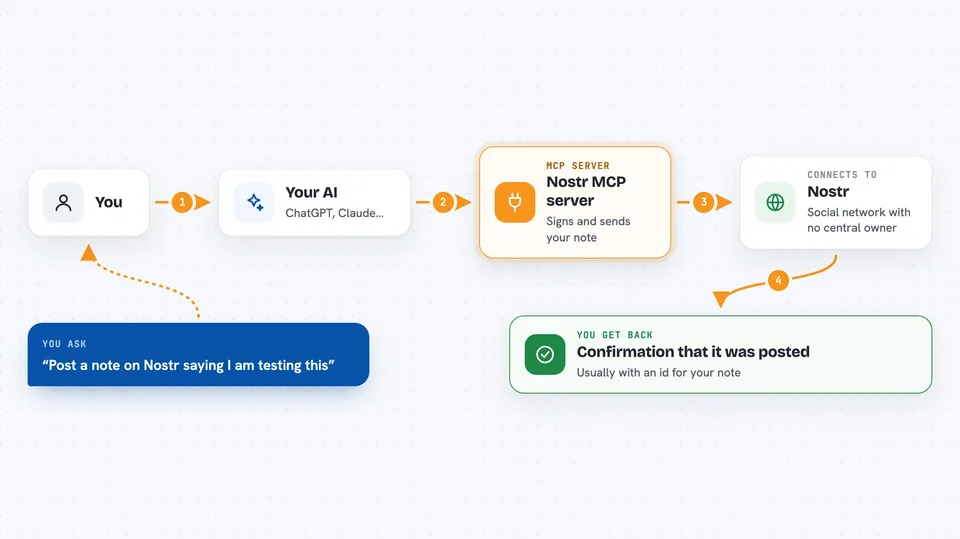
You type a request in your AI chat, something like asking it to post a short note. The AI passes that request to this helper program. The helper signs the note with your Nostr key and sends it out to the relays, which are the servers that carry Nostr posts. A moment later your note is live on Nostr, and the AI tells you it went through.
 Click to zoom
What you can do with it
- Post a short note to Nostr from your AI chat
- Publish a note you drafted together with the AI
- Send your post out through several relays at once
- Send a Lightning zap to a Nostr user (listed as work in progress)
Try asking your AI
- “Post a note on Nostr saying I am testing this new setup”
- “Write a short note about my morning coffee and publish it to Nostr”
- “Post this text to Nostr: hello from my AI assistant”
- “Send a zap of 1000 sats to user@domain.com on Nostr”
What it gives back to you
You get a short confirmation in the chat, usually telling you the note was posted and giving you an id for it. If something goes wrong, like a relay not responding, you get an error message instead. You will not see a full feed of Nostr posts here. This helper is mainly about sending things out.
Before you start
What you need
- A Nostr account with a private key (it starts with nsec)
- Node.js 18 or newer installed on your computer
- The list of relays you want to use (the setup file has examples you can keep)
Good to know
Anything you post goes out publicly on Nostr and cannot be quietly taken back, and the zap feature can spend real money.
Install it with your AI
Add Nostr MCP server to your AI, no technical skills needed
You don't install anything by hand. You copy one prompt, paste it into an AI that can work on your computer, and it checks, installs and connects the server for you, asking you when it needs something.
Sign in to get the install prompt
Members get a ready-made prompt that lets the Claude desktop app check Nostr MCP server, install it and connect it for them, step by step. You don't need any technical skills: you copy, paste and answer a few questions. Your connected AI can also find and install any of the 4,609 MCP servers here for you.
Who it's for
People who already post on Nostr and want to publish from their AI chat, plus anyone curious about trying Nostr without opening a separate app.


