
MCP server · Productivity
ADA Turbo Agency OS MCP server
Give your AI a whole creative agency of 26 specialist roles, plus a pixel office that shows them at work.
ADA Turbo turns your AI assistant into a small creative agency. It adds 26 ready-made specialist roles, from Brand Director to Data Analyst, that you can call on while you work. It is handy if you plan campaigns, write copy, or run marketing and want a second brain that thinks like a team.
What is an MCP server? The 30-second version
On its own, your AI can only chat with you. An MCP server is a small helper program that gives your AI a new skill or a connection to something else. This one connects your AI to the ADA Turbo agency system, so it can switch into a specialist role and use that role's knowledge when you ask. You set it up once, and after that your AI just knows how to act like a Brand Strategist or a Copywriter.
What this MCP server does
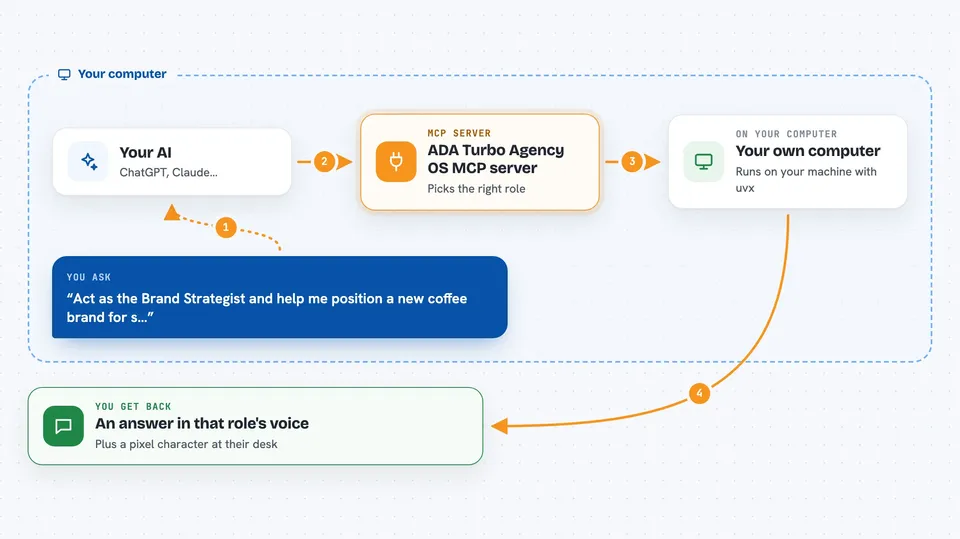
You ask your AI for help with something, like naming a product or planning a launch. Your AI uses this helper to pick the right specialist role from the 26 available. The helper then pulls in that role's knowledge and workflow templates and hands them back to your AI. Your AI writes the answer in that role's voice, and if you have the visualizer open, you can watch a little pixel character walk to their desk while it happens.
 Click to zoom
What you can do with it
- Ask a Brand Strategist to shape your positioning
- Get a Senior Copywriter to draft campaign lines
- Have a Growth Marketing Director plan a launch
- Ask an SEO and Content Strategist for a content outline
- Get an Account Director to structure a client brief
- Ask a Data Analyst to make sense of your numbers
- Watch a pixel office show which role is working
Try asking your AI
- “Act as the Brand Strategist and help me position a new coffee brand for students.”
- “Switch to the Senior Copywriter and write five taglines for a summer sneaker launch.”
- “Ask the Growth Marketing Director for a two-week launch plan on a small budget.”
- “Use the SEO and Content Strategist to outline a blog post about remote work.”
What it gives back to you
You get written answers in the voice of the role you asked for, like a strategy note, a set of taglines, or a plan. The helper also feeds your AI the right templates and knowledge so the answer stays on topic. If the pixel office is open in your browser, you see a character move to their desk while the role is active. Nothing is sent anywhere unless you turn on a live AI model yourself.
Before you start
What you need
- The uvx tool installed on your computer (a small helper that runs Python apps)
- An MCP-capable app like Claude Desktop, Cursor, Claude Code, or Antigravity
- Optional: an API key from Google, OpenAI, or Anthropic if you want live model answers in the browser
Good to know
If you add your own API keys in the browser, they are stored in your browser's local storage, so use a computer you trust.
Install it with your AI
Add ADA Turbo Agency OS MCP server to your AI, no technical skills needed
You don't install anything by hand. You copy one prompt, paste it into an AI that can work on your computer, and it checks, installs and connects the server for you, asking you when it needs something.
Sign in to get the install prompt
Members get a ready-made prompt that lets the Claude desktop app check ADA Turbo Agency OS MCP server, install it and connect it for them, step by step. You don't need any technical skills: you copy, paste and answer a few questions. Your connected AI can also find and install any of the 4,361 MCP servers here for you.
Who it's for
Marketers, brand and creative teams, and small agency folks who want AI help that thinks like a full team.





