
MCP server · Social media
Twitter MCP server (Twikit)
by adhikasp
Lets your AI search Twitter and read your home timeline, then sum it up for you.
This is a small helper that connects your AI assistant to Twitter. Once it is set up, you can ask your AI things like what people are saying about a topic, or what is new on your timeline, and it will go look for you. It is handy if you follow Twitter for work, research, or just want a quick summary without scrolling.
What is an MCP server? The 30-second version
On its own, your AI can only chat with you using what it already knows. An MCP server is a small helper program that gives your AI one new skill, in this case a connection to Twitter. You add this helper to your AI app, sign in with your Twitter details, and from then on your AI can search Twitter or read your timeline when you ask. Think of it as giving your assistant a phone that can open Twitter for you.
What this MCP server does
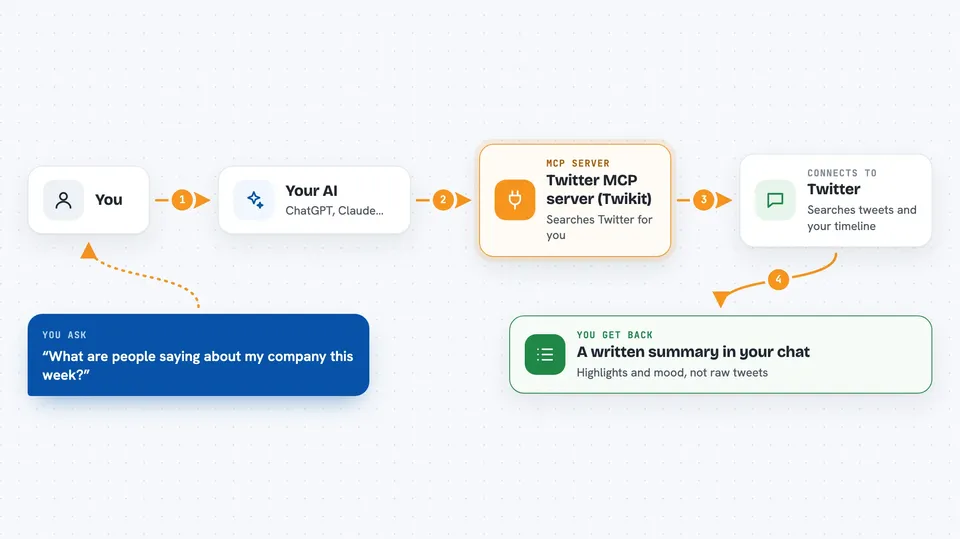
You type a request in plain words, like asking what people are saying about a certain account. Your AI passes that request to this helper program. The helper logs into Twitter with the account details you gave it and runs the search or pulls your timeline. It hands the tweets back to your AI, which reads them and writes a summary or answer for you in the chat. You never have to open Twitter yourself.
 Click to zoom
What you can do with it
- Search Twitter for tweets about a topic, a word, or a hashtag
- Search tweets sent to a specific account using to:accountname
- Read the latest tweets from your own home timeline
- Ask for a certain number of results, like the 20 newest tweets
- Sort results by latest tweets first
- Get a written summary of what people are saying, including the mood of the tweets
Try asking your AI
- “What are people saying about my company on Twitter this week?”
- “Search the 20 latest tweets sent to @SomeBrand and tell me the general mood”
- “What is happening on my Twitter timeline right now?”
- “Find recent tweets about the new iPhone and summarize the main complaints”
What it gives back to you
You get back a written answer in the chat, not a wall of raw tweets. Your AI reads the tweets it found and gives you a summary, a list of highlights, or an answer to your question. If you asked about mood or opinion, it will describe that in words, like mostly negative or mostly positive. The tweets themselves stay on Twitter; you just see the summary.
Before you start
What you need
- A Twitter account you can sign in with
- Your Twitter username, the email tied to the account, and your password
- An AI app that supports MCP servers, such as the Claude desktop app
- The uvx tool installed (a small program runner for Python tools)
Good to know
You are giving the helper your real Twitter username and password so it can sign in as you, and automated use of Twitter can get an account limited or locked, so use it gently.
Install it with your AI
Add Twitter MCP server (Twikit) to your AI, no technical skills needed
You don't install anything by hand. You copy one prompt, paste it into an AI that can work on your computer, and it checks, installs and connects the server for you, asking you when it needs something.
Sign in to get the install prompt
Members get a ready-made prompt that lets the Claude desktop app check Twitter MCP server (Twikit), install it and connect it for them, step by step. You don't need any technical skills: you copy, paste and answer a few questions. Your connected AI can also find and install any of the 4,361 MCP servers here for you.
Who it's for
People who follow Twitter for work or research, like social media watchers, marketers, customer support teams, and anyone who wants a quick summary instead of scrolling.


