
MCP server · Developer tools
FileScopeMCP
by admica
Your AI can rank your code files by importance, map dependencies, and answer questions about your codebase.
FileScopeMCP is a helper that scans your project's code and figures out which files matter most. It builds a map of how files depend on each other and keeps short summaries ready so your AI can answer questions about your code without reading every file. It is handy for developers who use an AI assistant like Claude Code or Cursor and want it to understand a real project.
What is an MCP server? The 30-second version
On its own, your AI can only chat with you using what it already knows. An MCP server is a small helper program that gives your AI a new skill or a connection to something else. This one connects your AI to your codebase, so it can look up files, dependencies, and symbols in your project. When you ask a question, your AI calls this helper, and the helper goes and finds the answer in your code.
What this MCP server does
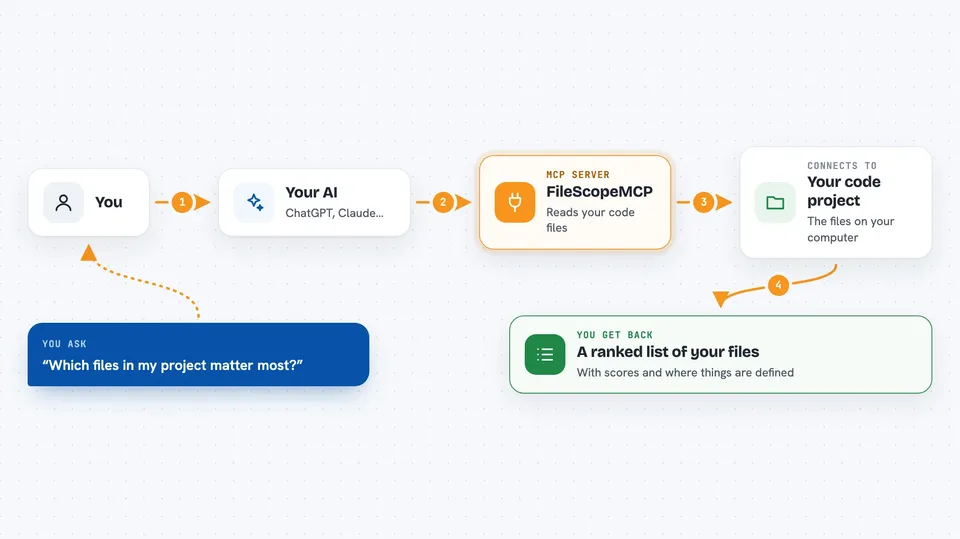
You ask your AI something about your project, like which files are most important. Your AI sends that question to FileScopeMCP. FileScopeMCP looks at your code, counts how many things depend on each file, and gives each one an importance score from 0 to 10. It also tracks imports in both directions, finds circular dependencies, and pulls out functions and classes. Then it hands the answer back to your AI, which shows it to you in the chat.
 Click to zoom
What you can do with it
- Find the most important files in your project
- See which files import or depend on a given file
- Look up where a function or class is defined
- Find who calls a function before you change it
- Spot circular dependency chains
- List files that changed since a certain time or commit
- Group files into clusters based on how tightly they are connected
Try asking your AI
- “What are the five most important files in this project?”
- “Where is the function called parseConfig defined?”
- “Which files depend on src/utils/helpers.ts?”
- “Are there any circular dependencies in this codebase?”
What it gives back to you
You get back plain answers in the chat: a ranked list of files with their scores, a file path with a line range, a list of callers, or a set of dependency chains. For a single file, you can get its summary, what it exports, what it depends on, and whether it is out of date. Everything shows up as text your AI writes for you, not as a file you have to open.
Before you start
What you need
- Node.js version 22 or newer and npm
- Build tools for native modules: on Linux, build-essential and python3; on macOS, Xcode command line tools; on Windows, Visual Studio Build Tools with C++
- An MCP client like Claude Code, Cursor, or another supported agent
Good to know
One tool, exclude_and_remove, can drop files from tracking, so be careful when you use it.
Install it with your AI
Add FileScopeMCP to your AI, no technical skills needed
You don't install anything by hand. You copy one prompt, paste it into an AI that can work on your computer, and it checks, installs and connects the server for you, asking you when it needs something.
Sign in to get the install prompt
Members get a ready-made prompt that lets the Claude desktop app check FileScopeMCP, install it and connect it for them, step by step. You don't need any technical skills: you copy, paste and answer a few questions. Your connected AI can also find and install any of the 4,361 MCP servers here for you.
Who it's for
Developers and engineers who use an AI coding assistant and want it to understand a real, multi-file project.





