
MCP server · Developer tools
Mason MCP server
Lets your AI read your project's history and notes so it stops repeating searches and keeps guidance up to date.
Mason is a helper that plugs into your coding assistant and gives it memory about your project. It builds a CLAUDE.md file from your git history and file samples, and keeps a map linking features and flows to the files behind them. It is handy if you work in a code repository and your AI keeps asking the same questions or following instructions that are out of date.
What is an MCP server? The 30-second version
On its own, your AI can only chat with you. An MCP server is a small helper program that gives your AI a new skill or a connection to something else. Mason is that helper here, and it connects your AI to your git repository and project files. So when you ask about a feature or a decision, the AI can look it up through Mason instead of guessing.
What this MCP server does
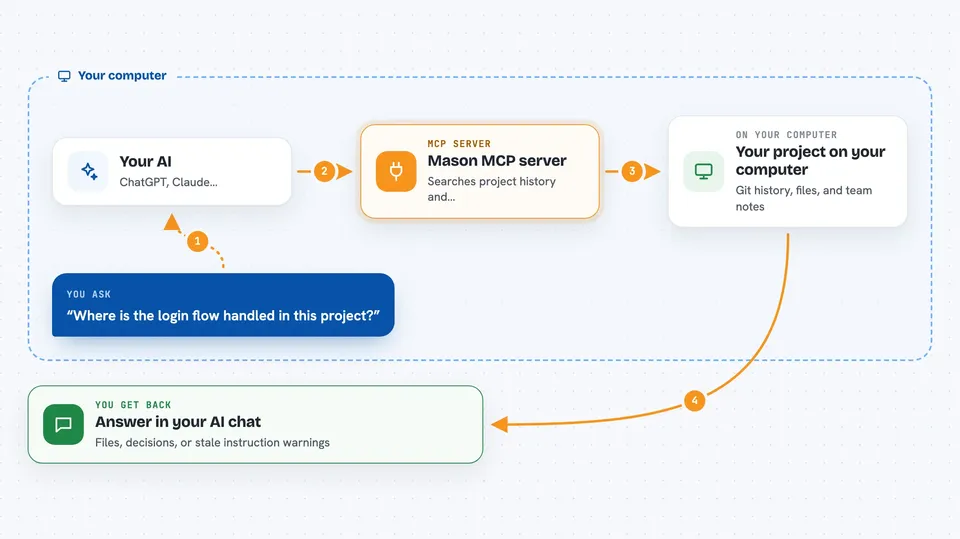
You ask your AI something about your project, like where a feature lives or why a choice was made. The AI passes that request to Mason. Mason looks through your git history, your project files, and any notes your team recorded, then sends back the relevant pieces. Your AI turns that into an answer for you, and it can also record new decisions so later tasks can find them. It also runs read-only checks that flag instructions in your README or agent files that no longer match the code.
 Click to zoom
What you can do with it
- Generate a CLAUDE.md file from your git history and file samples
- Keep a concept map that links features and flows to the files behind them
- Record the reason behind a decision so later tasks can retrieve it
- Flag instructions in README or agent files that no longer match the code
- Surface related tests and files that historically change together
- Audit a repository without setting anything up, using mason audit
- Review committed changes against a base branch, using mason review
Try asking your AI
- “Where is the login flow handled in this project?”
- “Why did we switch to this queue library? Check Mason for the recorded reason.”
- “Which files usually change together when I touch the billing module?”
- “Run a Mason audit on this repo and tell me what is out of date.”
What it gives back to you
You get answers in the chat, backed by what Mason found in your repository. That can be a list of files, a short summary of a recorded decision, or a set of findings about stale instructions. When Mason records something new, it confirms what it saved. The audit and review commands print their findings directly in your terminal.
Before you start
What you need
- Git installed on your computer
- A Git repository to run it in
- A supported host, such as Claude Code or Codex
- A terminal where you can run the mason command
Good to know
Mason reads your repository and can record decisions, so review what it saves and check your host's trust settings before letting it run.
Install it with your AI
Add Mason MCP server to your AI, no technical skills needed
You don't install anything by hand. You copy one prompt, paste it into an AI that can work on your computer, and it checks, installs and connects the server for you, asking you when it needs something.
Sign in to get the install prompt
Members get a ready-made prompt that lets the Claude desktop app check Mason MCP server, install it and connect it for them, step by step. You don't need any technical skills: you copy, paste and answer a few questions. Your connected AI can also find and install any of the 4,609 MCP servers here for you.
Who it's for
Developers and anyone who works inside a code repository with an AI coding assistant and wants it to stop repeating searches and follow up-to-date guidance.




